Wednesday, May 19, 2021

How to fix Super MB Star C3 “Error 23 H1.First Install.exe” Issue


mb-star-c3-error

Dear Cathy:

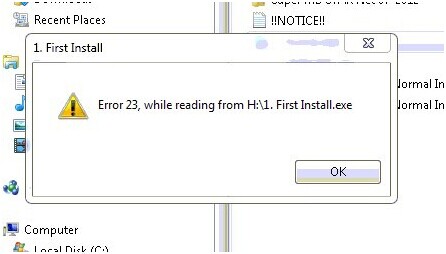
I recently got a Super MB Star C3 from OBD2TOOL for my Mercedes 2009. I got the Mb Star C3 device two days ago, tried installing it on the same day, but got an error message, reading “Error 23, while reading from H:\1.First Install.exe”, as shown below, during the installation.
mb-star-c3-error

At frist, I installed the Mercedes STAR C3 diagnostic tool on a Windows XP computer, then I tried on another computer with windows 7 system, but the windows kept popping out. Please help me fix it, thanks.

Jason

Dear Jason:

The error is probably caused by your system, which may not compatible with the tool. It is required that Super MB Star C3 should run in computer environment with professional Microsoft Window XP or Windows 7 system.

Or it is because the software is damaged. If there is a software, the device cannot work normally. If the software damaged is Xentry, you should send it back to us for repair; if it is other softwares, please download a replacement on https://my.vmware.com/web/vmware/info/slug/desktop_end_user_computing/vmware_workstation/8_0

Tuesday, May 18, 2021

How to use MB STAR SD C4 to activate Benz 211 unlock and lock beep


Recently some customers asked about MB SD C4 programming capability. Here obd2eshop engineers have made a guide on activate Benz 211 unlock and lock beep with MB SD C4 diagnostic tool for your reference.

Car Model:
Mercedes Benz W211

Tools you need:
MB SD C4 Diagnostic Tool
This is my experience of how to activate the unlock and lock beep on my Mercedes E55, with sd connect c4 mux. I found ask for help about this, and i would like to share my experience with a few Mercedes brothers. Hope this helps in deed.

Model:
Mercedes Benz E55 AMG (W211) ‘2008
mb star
Tools i used:
SD connect compact 4 diagnostic mux
Dell laptop D630

How-to-use-MB-STAR-SD-C4-to-activate-Benz-211-unlock-and-lock-beep-1

(here i highly recommend you esp. for new uses to buy plug-and-play diagnostic bundles- mux with laptop, for it could avoid lots of installation problems and can be used directly when get it. To save money, i used new sd c4 and second-hand laptop.)

The procedure of activation of the unlock and lock beep
Open the laptop and Xentry.

Connect the sd c4 mux with the car.
For connection diagram, i referred to mbstarshop and most of problem can be found and solved by their technicians.

For the laptop and c4 mux, i used wireless connection.

Open software Xentry.

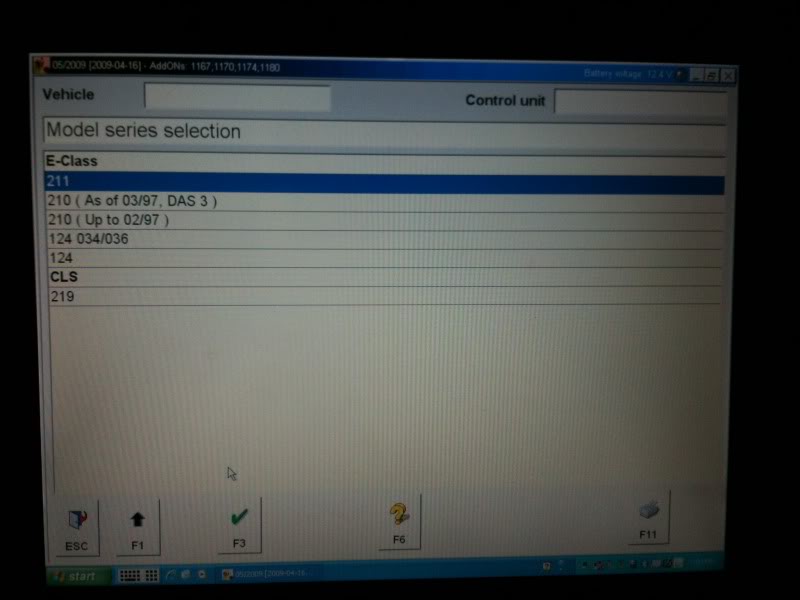
Model series selection: 211

How-to-use-MB-STAR-SD-C4-to-activate-Benz-211-unlock-and-lock-beep-2

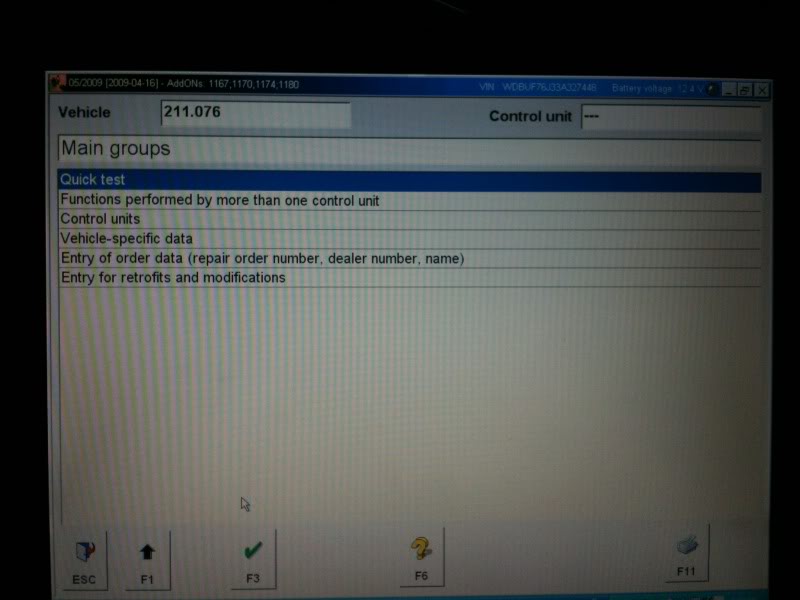
This is the main menu

How-to-use-MB-STAR-SD-C4-to-activate-Benz-211-unlock-and-lock-beep-3

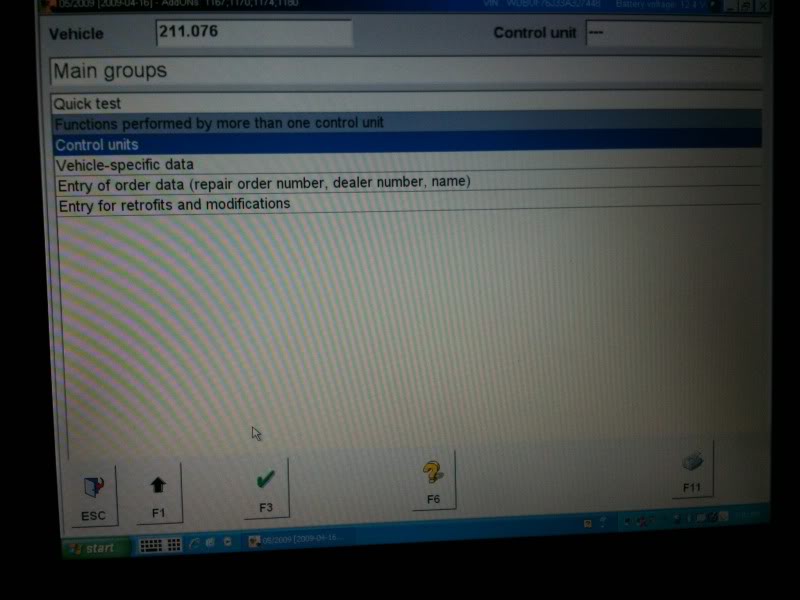
Select Control units
How-to-use-MB-STAR-SD-C4-to-activate-Benz-211-unlock-and-lock-beep-4

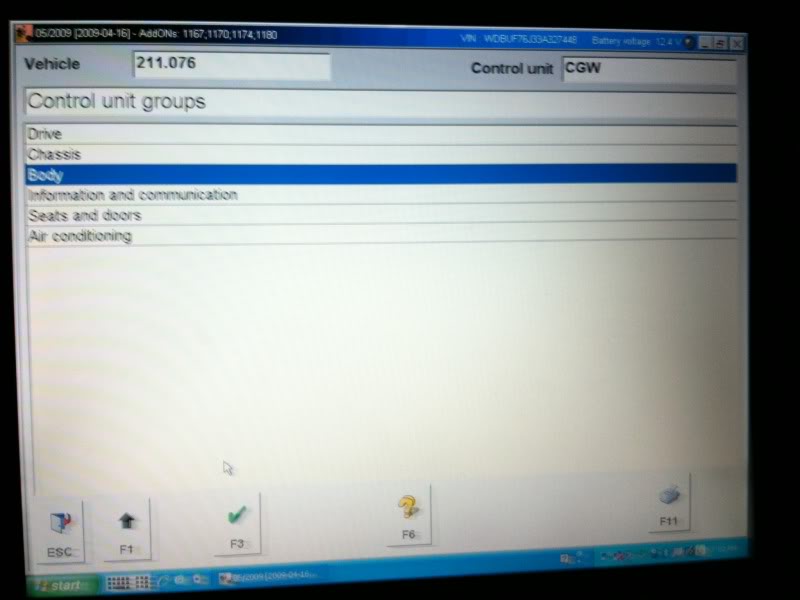
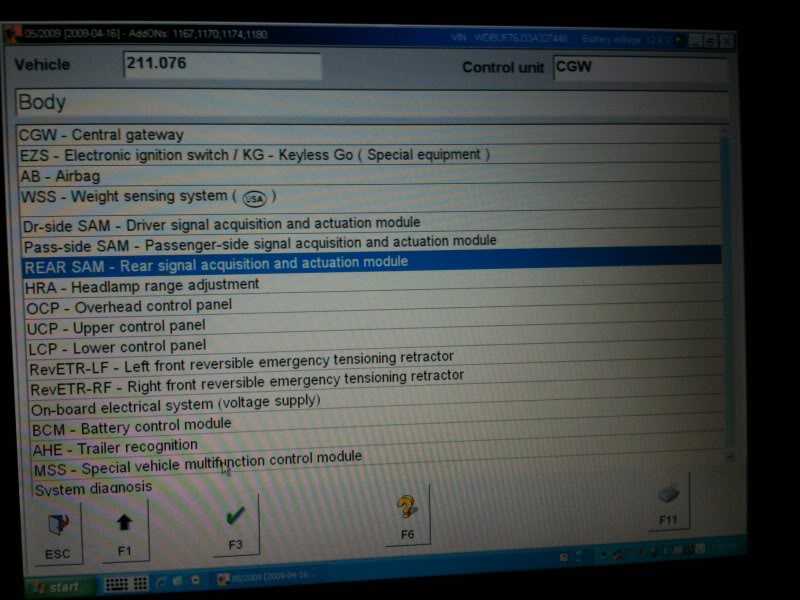
Then Body
How-to-use-MB-STAR-SD-C4-to-activate-Benz-211-unlock-and-lock-beep-5

Then rear SAM – rear signal acquisition and actuation module

How-to-use-MB-STAR-SD-C4-to-activate-Benz-211-unlock-and-lock-beep-6

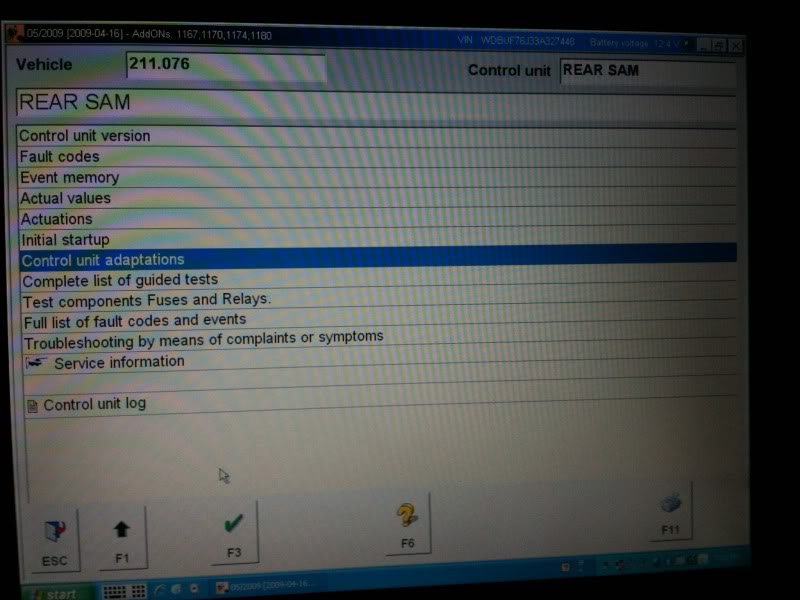
Then Control unit adaptations

How-to-use-MB-STAR-SD-C4-to-activate-Benz-211-unlock-and-lock-beep-7

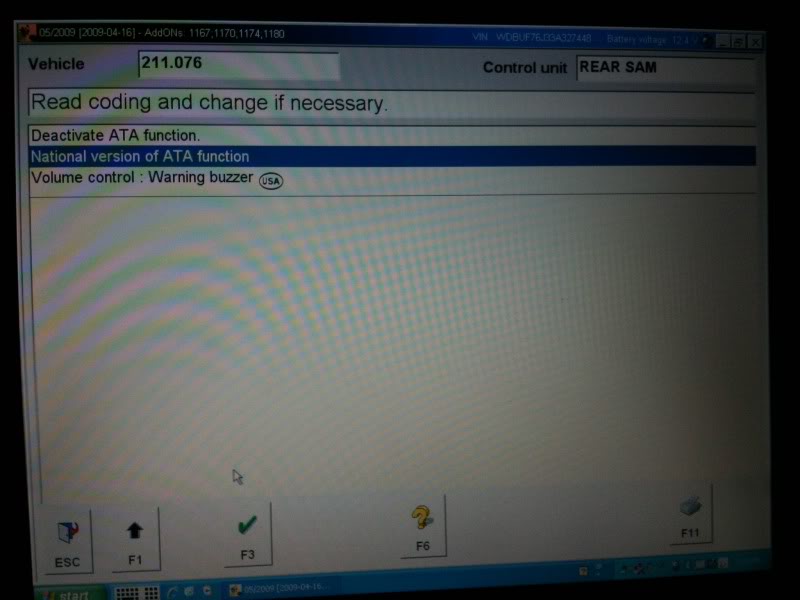
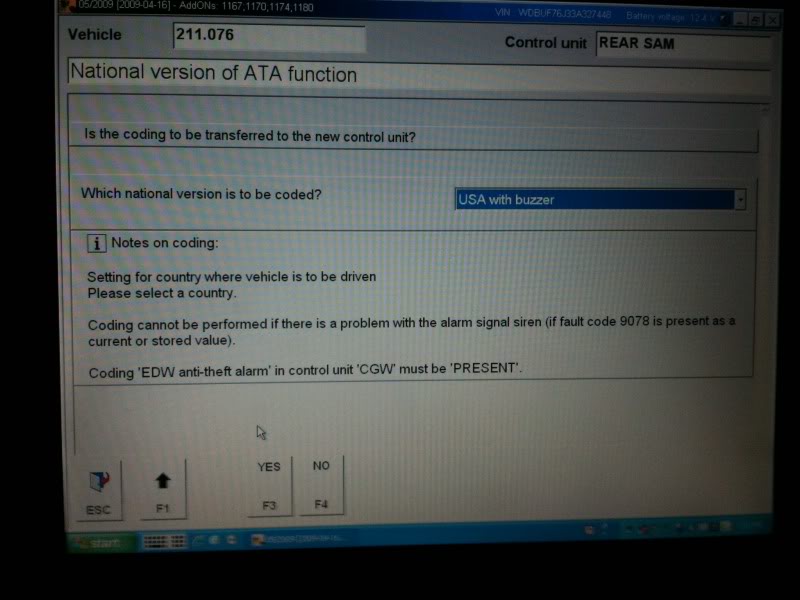
Then national version of ATA function

How-to-use-MB-STAR-SD-C4-to-activate-Benz-211-unlock-and-lock-beep-8

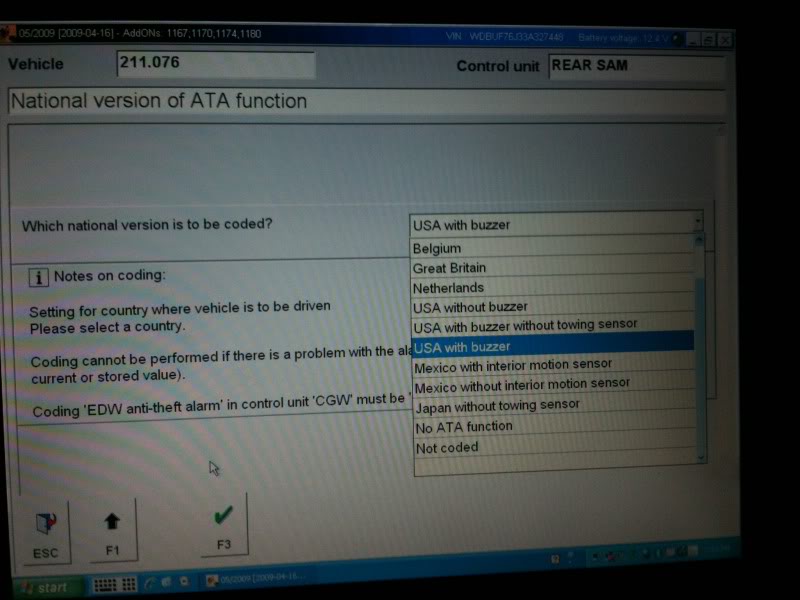
At this screen you will see a pull down menu with a list of different regions on it. The only ones you need to worry about are USA with buzzer and Netherlands. If you choose USA, I will give you three short quick beeps when you lock the car and one short when you unlock it. Netherlands will give you three longer beeps when you lock the car and one long when you unlock it. Personal preference on which one you like. Here i select USA with buzzer.Then hit F3

How-to-use-MB-STAR-SD-C4-to-activate-Benz-211-unlock-and-lock-beep-9

Then F3(YES)

How-to-use-MB-STAR-SD-C4-to-activate-Benz-211-unlock-and-lock-beep-10

Done!

Hope this helps

Monday, May 17, 2021

How to use MB Star C5 hard disk and how to update Star C5

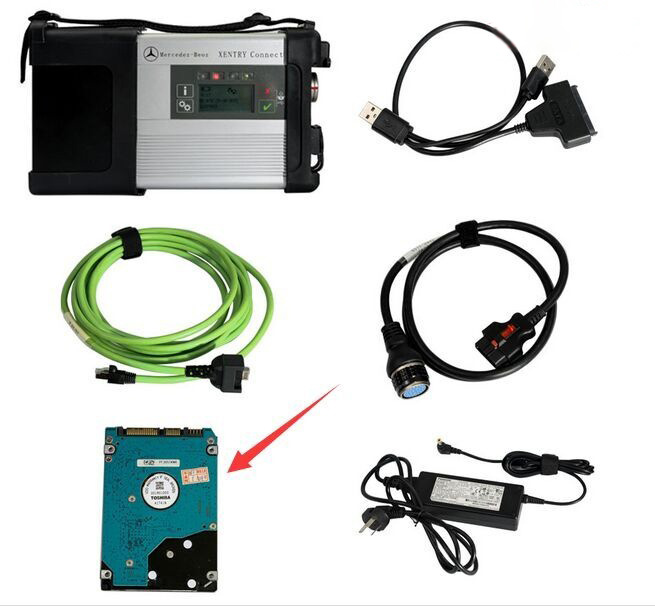
MB Star C5 moveable hard disk is used for containing Xentry DAS, please do not use it as a computer system hard disk.

Here two tips to follow.

Option 1. you use C5 disk on your own computer. Tip: advice you not rework it or dismantle it and plug it to the computer to modify the data.

Option 2. you buy the extra computer together with Star Diagnostic MB Star C5, then you are advised to prepare one blank hard disk for system installation because the computer you bought doesn’t come with hard disk.

How-to-use-MB-Star-C5-hard-disk-and-how-to-update-Star-C5-1

How to update DoIP Xentry Connect C5?

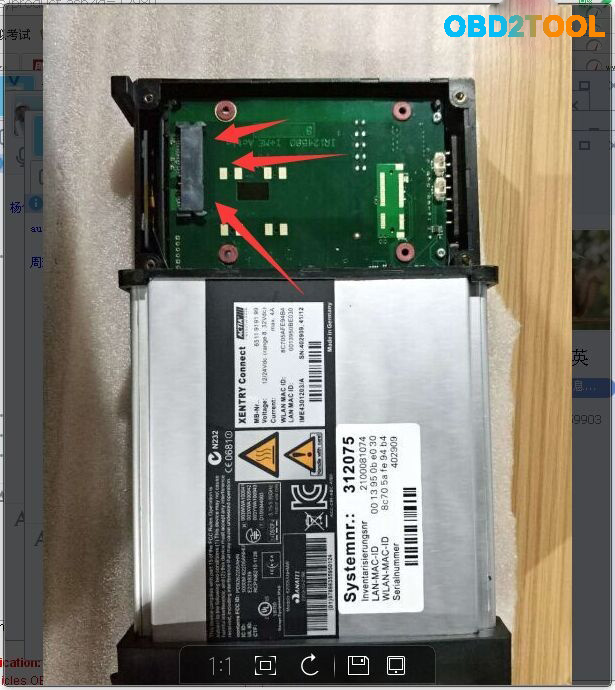
Usually you are required to send back the MB Star C5 hard disk for update unless the engineers can make out the updating software for download.

Attach one picture which shows the hard disk location in the C5 mux.

How-to-use-MB-Star-C5-hard-disk-and-how-to-update-Star-C5-2

Sunday, May 16, 2021

mb sd c4 xentry data can not save? how to solve?

The MB SD C4 i bought can not save the xentry data, each time i need to reactivate it and then paste the code again, it is too much time-costing.

i chat with chinacardiags.com online services, chat with seven, and she helped me to solve the problem.

Just share with you.

Firstly: find  the directory:  C:ProgramData/LicDir and then delete the other files except:

only keep the three files,

and  secondly activate the xentry by yourself with keygen or send to seller’s Email: sales@obd2tool.com to get activation code to activate it.

thirdly: go to  C:ProgramData/LicDir and find the data lic_key_2.dat, copy it and paste it, and then rename the file to  lic_key_2.x4711.

and then click it yes. and right click it and make it as read only.

Saturday, May 15, 2021

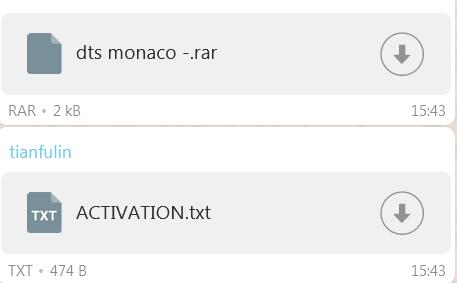
Tips on Sdconnect C4 WIS EPC activation

I have mb Sdconnect C4 to activate code for WIS, EPC, xentry and dts Monaco, and then contacted obd2tool.com engineer and they said ” You can send the activation id to calculate the password, or send it to teamviewer to activate the software for you remotely”, then they connected with teamviewer for Activation code for WIS and EPC, but for some reason hardware id changed (Lan Id is different. Probably because WiFi is on) and then Xentry doesn’t start.

wis-epc-activation

obd2tool.com engineer replied me:

Follow the steps below;

*   Delete the lic-key2.dat file under the C drive directory

(C:/Programdata/LicDir)

*   The activation code of xentry is still deactivated by the one given to you before, and then a new lic-key2.dat will be generated under the C drive directory (C:/Programdata/LicDir)
*   Copy a copy of lic-key2.dat, change the copy to a lic-key2.x4711 file, and then set the file attribute to read-only

Update!

Everything ok now. Xentry,Wis and Epc starts. Know i have to test the Sd connect C4 to a car.

Many thanks for their professional after-sale service.
loading..

Friday, May 14, 2021

MB SD C4 EWA Local Host Cannot be reached

Problem:

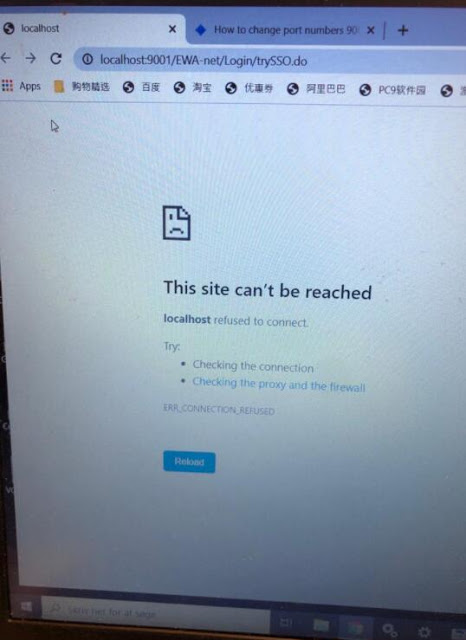
I tried to enter local host in MB SD Connect C4 EWA software program, it failed me and reported error “This site cannot be reached”
mb-sd-c4-ews-This-site-cannot-be-reached-1

Solution:
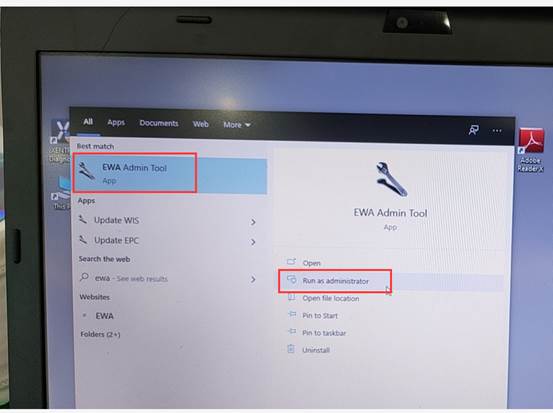
Press windows icon on the tool bar. Find EWA program
Right click to open EWA as administrator
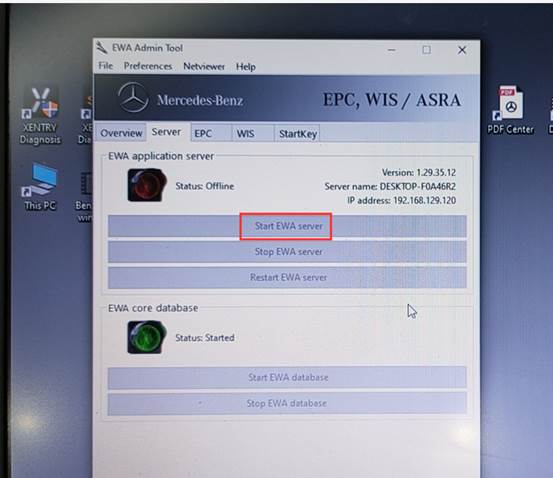
Then Started EWA server
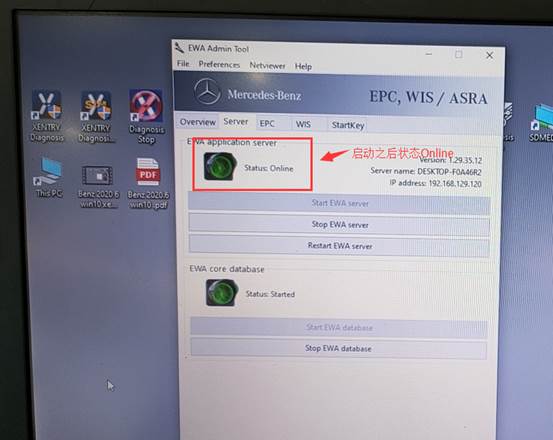
It will show online status if it is working.
mb-sd-c4-ews-This-site-cannot-be-reached-3
mb-sd-c4-ews-This-site-cannot-be-reached-4
mb-sd-c4-ews-This-site-cannot-be-reached-5

www.obd2tool.com
loading..

Tuesday, March 30, 2021

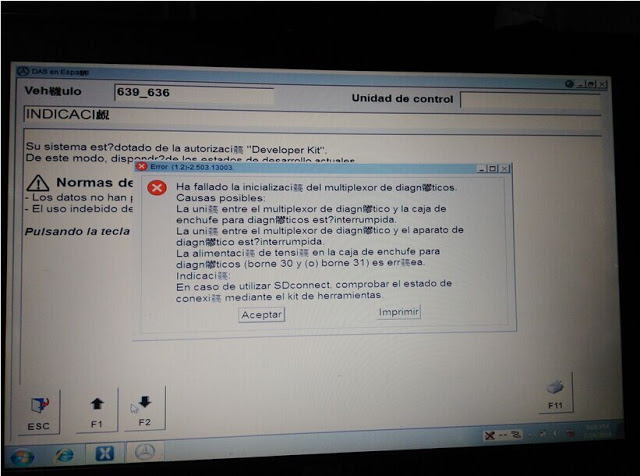
MB Star C3 Xentry Fault(1.2)-2.503.13003 Initialization failed


Files c32s.dll and CAL 872 fix can solve Xentry/DAS Fault(1.2)-2.503.13003 “Initialization of diagnosis multiplexer failed”, said users with Chinese MB STAR C3 diagnostic tool.

Multiplexer:
Chinese MB Star C3

Error message:
“Fault(1.2)-2.503.13003
Initialization of diagnosis multiplexer failed

Possible causes:
The link between the diagnosis multiplexer an the
diagnostic socket is interrupted
The link between the diagnosis multiplrxer an the
diagnostic unit is interrupted.
The voltage supply at the diagnostic socket (circuit30
and(or) circuit31)is fault.
Note:
When using SDconnect, check the connection status
using the Toolkit. ”

xentry-fault-1-2-2-503-13003-1
xentry-fault(1.2)-2.503.13003-2

Analysis from OBD2TOOL engineers:
“your STAR C3 mux is not connected in a proper condition. Check the connection first, with your car and laptop”

Disclaimer:
Solutions below are offered by users. TRY ON YOUR OWN RISK.

Solutions from ZCC
Software version: DAS 07/2011
Free download c32s.dll & CAL 872 fix (872 fix is copyrighted)

https://mega.nz/#!pkli3YIL!B6v0QFmLxFjb30N_VyoxNPizAnA_bkwqKRY8b1QvVJE

Finally I solved this problem.
It was really a complex combination of faulty hardware and software. I had a problem with that annoying c32s.dll file. I replaced it with the original 01/2011 one plus I used CAL 872 fix version 2 for DAS 07/2011 onwards. Only the c32s.dll solved the problem.
Solutions from fadiboujaoude
Software version: Das Xentry 01 2012
Free download oldc3.rar:

https://mega.nz/#!481xWILD!ZdYpw60KKfa5MkbmVnuUAFXQW5EFQNQf0TEVdcAt6hg

Solved my problem with the following tips…

download and set the das32R2(032012)
2. get the c32s.dll of das xentry 01 2012 and replace the existing one in F:/programme/Das/Bin
3.replace the HHTWin.ini located in c:\Windows :
(Copy And paste the lines below And exit and save HHTWin.ini File)
[STARTUP]
DX=515
DY=510
X=110
Y=0
BACK=21
SLAVE=PARTD2
DEBOUT=1
DEBLVL=6
SPC=02
SPCN=02
SPCP=02
SPCD=02
SPCV=02
[STARCONF]
BMPPATH=C:\USERDATA\Docs\HHT\
MAXFILES=200
DEBOUT=1
DEBLVL=6
[Debug]
HHTWIN.exe-modpath=F:\PROGRA~1\HHT\PKW\
HHTWIN.exe-szIniFile=C:\WINNT\HHTWIN.ini
HHTWIN.exe-lpszCmdLine=
HHTWIN.exe-Parameter=Inifile
HHTWIN.exe-szParamsPath=C:\userdata\CSD\Writefil\HHTWIN_Params.ini
HHTWIN.exe-CmdParams=
HHTWINX.DLL-modpath=F:\PROGRA~1\HHT\PKW\
HHTWINX.DLL-szIniFile=C:\WINNT\HHTWIN.ini
4.search on this forum for the file oldc3 … extract it .. then run it..
5. Done
this is the only way i got my DAS to read my multiplexer

Wish this help!

(PS: sorry for that i didn’t mention all the authors which i read their threads and posts but this because i read a lot and i did many and many tries to finally have the solution)