Showing posts with label MB Star Compact 4. Show all posts

Saturday, July 24, 2021

Mercedes SD Connect C4. Switching Wi-Fi channels if not stable wireless connection


mb sd c4 plus dell630

Switching Wi-Fi channels if not stable wireless connection between the multiplexer SD Connect C4 and laptop. For Road24h mode.

Wireless connection Wi-Fi has 14 channels. Depending on the country, the number of permitted channels may be reduced. So for example Ukraine and Russia are used 13 channels. For some WiFi adapters are available on 11 channels only. Often, in the presence of a lot of number WiFi networks, all channels are involved. Moreover, each channel can operate multiple devices at the same time, it creates instability of equipment operation. In particular, in the case of multiplexer SD Connect, when congestion currently used channel or if there is other interference, you may experience slow operation or an intermittent open WiFi connections. In this case, it is advisable to change the channel number. This can be make in the settings of the WiFi adapter of the laptop. To do this, go to the folder “network connections”, right-click on “wireless connection”/ properties / configure / advanced. In the left column, find the line “Channel Ad Hoc 802.1 b/g” in the right column/window will appear to enter (select) a channel number. See screenshot:

Change channel number to any another one, different of the default, and confirm all Windows with “OK”. Changes do not always immediately take effect, it is desirable to restart the laptop. If after download the laptop WiFi connection to the multiplexer is not established automatically, restarting the multiplexer. Not the fact that the selected channel will be less congested than the previous one, in this case, the procedure must be repeated. There are programs-scanners, allowing to estimate the workload of Wi-Fi channels, but usually experimentally possible to find a relatively free channel.

Friday, July 23, 2021

How to Install SD Connect C4 multiplexer batteries


Mercedes SD Connect C4. Install the batteries.

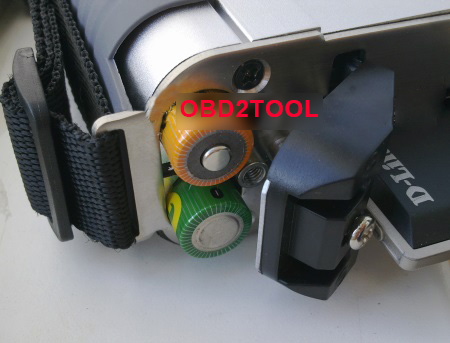
When installing batteries follow the correct polarity according to the image:

SDConnect-C4-Install-the-batteries

sdconnect-batteies
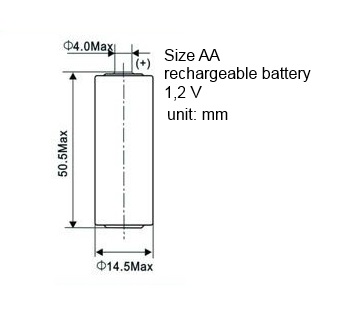
It is recommended to operate the multiplexer SD Connect C4 with established internal batteries. Size AA Ni-Cd 1.2 V. the recommended capacity of 2400 — 2800 mA/h.

The need for internal batteries is caused by:

1. firstly that the multiplexer SD Connect which was fully independent of the computer, running the Linux operating system, “gross” power-off that occurs when unpulling the diagnostic cable from the vehicle and then loading up the device when you reconnect to the car it is not advisable, and in some cases, may lead to breakage of the multiplexer
2.  second, in the absence of internal batteries, at the time of engine start in a vehicle voltage of the vehicle, and hence in the power supply circuit of the multiplexer appearsudden voltage power supply that can cause loss of connection between the multiplexer and PC, and in some cases, may lead to breakage of the multiplexer

The presence in the SD Connect battery allows you to keep it in working condition as if disconnected from the vehicle at the time of the sagging of the supply voltage and eliminates the need to re-download the next time you connect to the diagnostic connector.

In mode, the power only from internal battery (disconnected from the diagnostic connector), it is possible to switch the multiplexer into “sleep mode”, which is not possible with power from the car. A complete shutdown of the device is not provided. It possible by  taking out the batteries or changing the power diagram (see video).

Without changes in power diagram, long-term, without the use, storage multiplexer, batteries should be removed, as in sleep mode, the standby quiescent current is 10-60 mA with periodic jumps up to 190 mA. With the recommended battery capacity is 2400 mA/h, and provided that they are 100% pre-charge ensure retention sleep mode in only 3 to 7 days. Further, the voltage of the battery falls below critical, which negatively affects their service life.

Before removing the batteries, switch the multiplexer in STANDBY/SHUT DOWN. At the time of connection to the vehicle connector, the instrument automatically exits sleep mode and begins charging the internal batteries.

Capacity of used batteries in multiplexer Mercedes Star Diagnostic SDConnect C4 must be at least 2000 mAh.

The message on the display “insert the battery” or “check battery” may indicate a capacity loss of one or more batteries or a bad contact in the circuit of the batteries. The increase in the total internal resistance of the battery module by more than 1 Ohm is causing the message about not working properly or the lack of batteries.

Sunday, May 16, 2021

mb sd c4 xentry data can not save? how to solve?

The MB SD C4 i bought can not save the xentry data, each time i need to reactivate it and then paste the code again, it is too much time-costing.

i chat with chinacardiags.com online services, chat with seven, and she helped me to solve the problem.

Just share with you.

Firstly: find  the directory:  C:ProgramData/LicDir and then delete the other files except:

only keep the three files,

and  secondly activate the xentry by yourself with keygen or send to seller’s Email: sales@obd2tool.com to get activation code to activate it.

thirdly: go to  C:ProgramData/LicDir and find the data lic_key_2.dat, copy it and paste it, and then rename the file to  lic_key_2.x4711.

and then click it yes. and right click it and make it as read only.