Showing posts with label DTS Monaco. Show all posts

Sunday, April 24, 2022

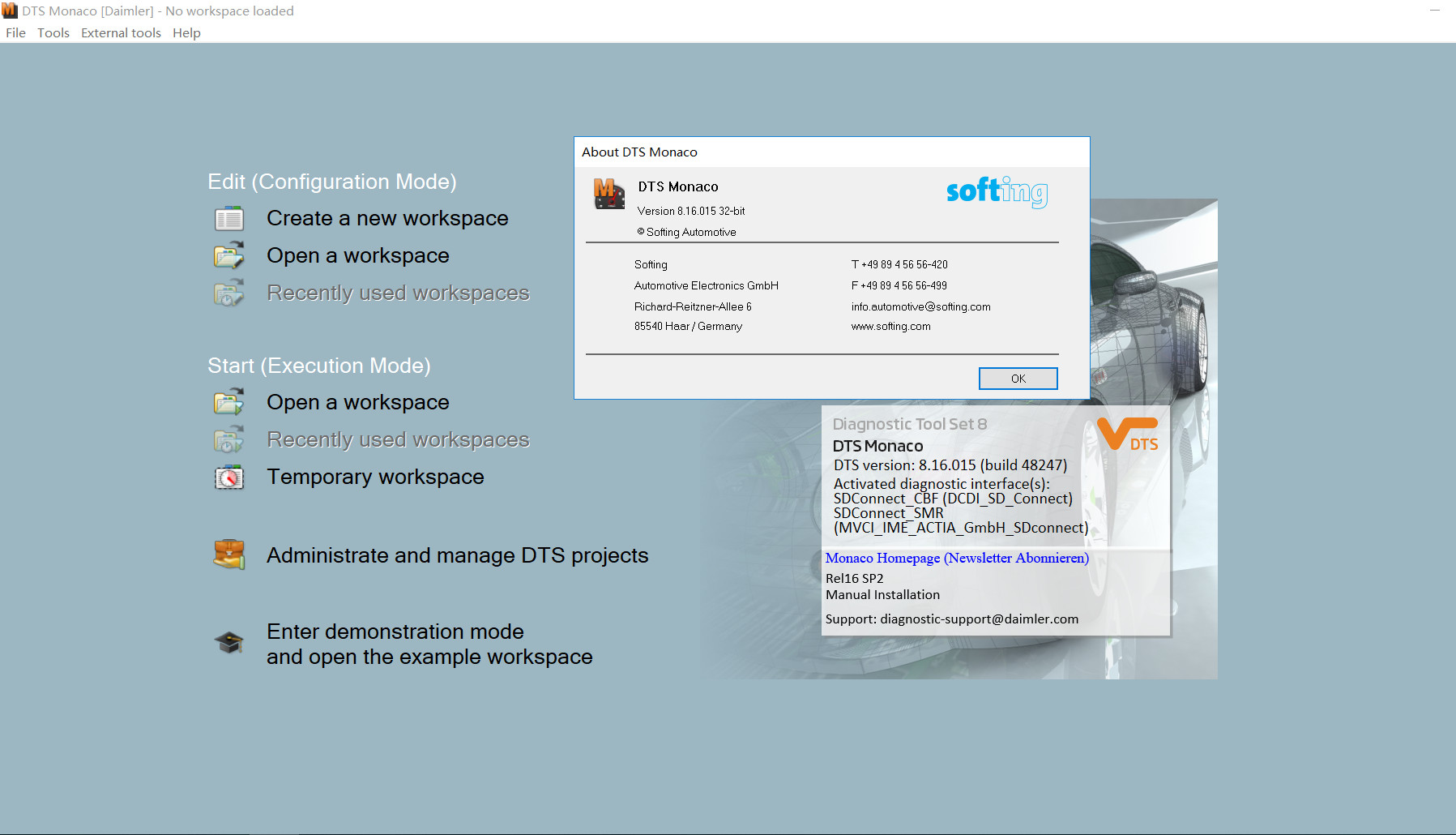
What’s new in DTS Monaco 9.02

 What’s new in DTS Monaco 9.02?

Diagnostic Tool Set (Softing DTS 9) has new functionalities enable even faster and more cost-efficient diagnostic development.

The highlights of the new 9.02 generation include, in particular, remote diagnostic support in the engineering network (remote diagnostics) and the display and recording of Ethernet communication (DoIP, Diagnostics over Internet Protocol). New functions in the area of OTX support, based on the latest standard, enable a perceptible increase in the speed of work thanks to automation and the ability to precisely solve individual problems with self-generated user interfaces. The integration of function-oriented diagnostics with the Smart Diagnostic Engine (Softing SDE) has now already made the leap to the next generation of “diagnostic systems”.
DTS-Monaco-9.02-1

Remote Diagnostics in the Engineering Network

the engineer can connect up remotely, carry out his/her own tests and correct any problems directly (remote software update) so that the actual tests in hand can be continued. This can save a lot of time and money, especially in globally operating teams, as travel can be avoided and expensive test resources shared.

Does DTS 9.02 work on W206?
ZenZefi certificates are needed.

Does DTS 9.02 work on W223?
For w223 it needs ZenZefi certificate.
This project files works partially not all ecus are able to be coded in w223 and w206 cars.
The zenzefi certificates are around 10 certificates as of now.
Xentry diagnostic still doesn’t work if you are having that 10 zenzefi certificates also still it doesn’t work.
You need for every single ecu separate certificates for Diagnostic and separate for coding. And there are 6 different Types of certificates. After sales Basic, Aftersaleaenhanced, Development, Development Enhanced, Production and Suppliers.

Do I need to remote DTS Monaco 8.13/8.16 if install 9.02?

No, you can have both DTS 8 and 9 on the same laptop.

Does DTS Monaco 9.02 work without activation/certificate?

No, without working zenzfei it’s actually less useful than DTS8.
and works on SMR only but not CBF.
Full DTS have support for cbf. The i9.02 is incomplete version.

DTS 8.16 works perfectly with all chassis. Online and Offline.

8.16 works with 223 and 297, it has been working for a ling time, but you need online account.

You need to register and get account to use 9.02! Kline, can and doip protocols are supported. Not like the bad and first test dts from softing wich is viral on internet. Better use 8.16.

If you want to know more about Benz star diagnostic, please visit our website https://www.obd2tool.com

Wednesday, February 16, 2022

Mercedes-Benz VGSNAG2 (7G-Tronic) TCU Flashing by DTS Monaco


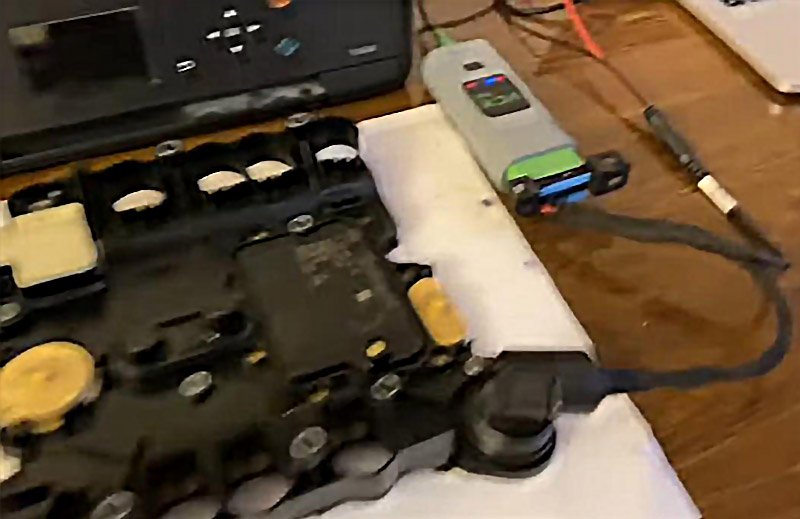
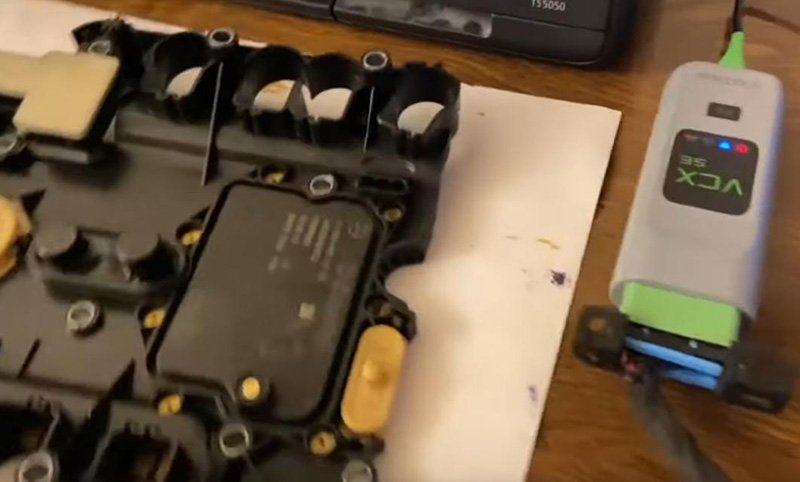
Today we’re going to flash a VGS/NAG2 board inside Benz W221 gearbox by VXDIAG VCX SE and DTS Monaco.

Here we connect it to PC by VXDIAG VCX SE. (A good alternative that has a built-in DOIP: MB SD C4 Plus/Super MB Pro M6)
Besides, don’t forget gearbox 7-G renew cable and 12V power supply.

Mercedes-Benz-VGSNAG2-(7G-Tronic)-TCU-Flashing-by-DTS-Monaco-1
Mercedes-Benz-VGSNAG2-(7G-Tronic)-TCU-Flashing-by-DTS-Monaco-2

We run DTS Monaco, because DAS will ask for a password(have to calculate the password when the board turns to ECU mode through DAS).
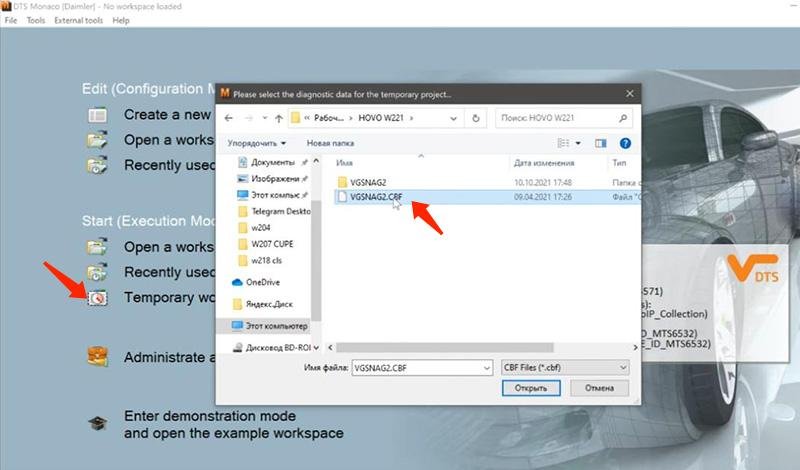
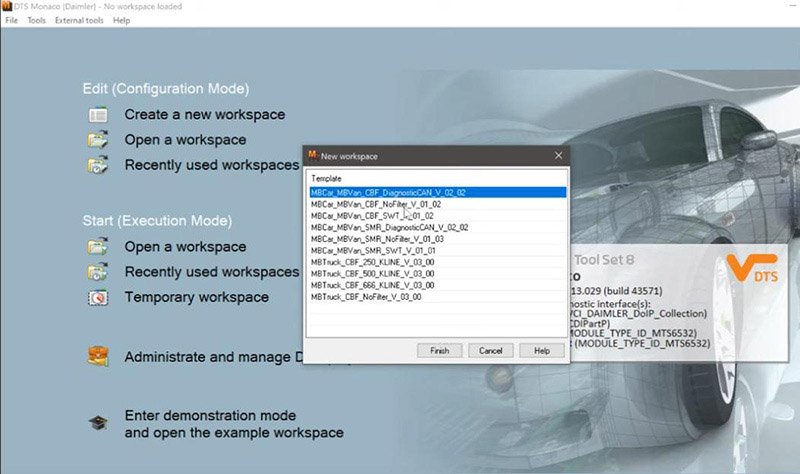
On Temporary workspace, open up CBF file.
Rectangle Font Screenshot Automotive tire Operating system

Mercedes-Benz-VGSNAG2-(7G-Tronic)-TCU-Flashing-by-DTS-Monaco-3
Mercedes-Benz-VGSNAG2-(7G-Tronic)-TCU-Flashing-by-DTS-Monaco-4

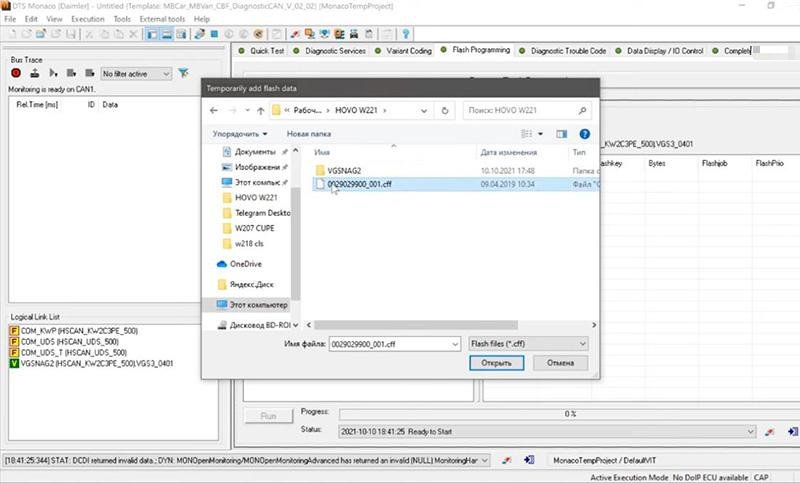
Now we’re going to unlock the board on Flash Programming.
Select CFF file.

Mercedes-Benz-VGSNAG2-(7G-Tronic)-TCU-Flashing-by-DTS-Monaco-5

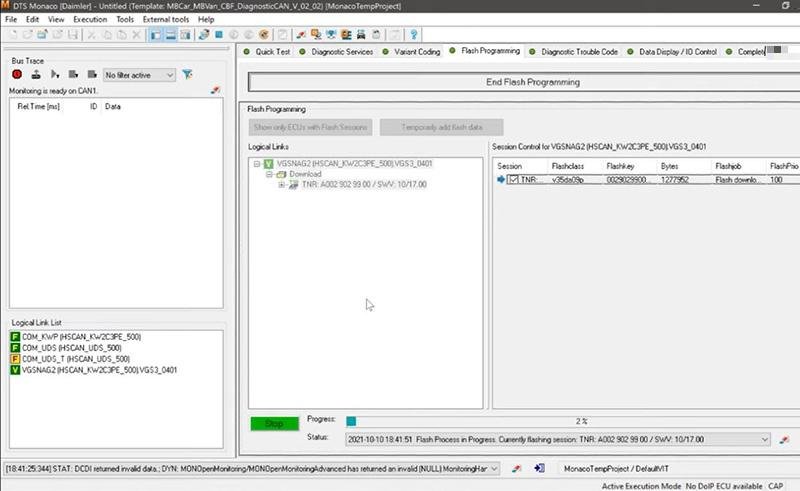
Check software we need for the car, click on “Prepare Flash Programming” and “Run”.
This step takes about 10-15 minutes.

Mercedes-Benz-VGSNAG2-(7G-Tronic)-TCU-Flashing-by-DTS-Monaco-6

After it’s completed, click on “End Flash Programming”.
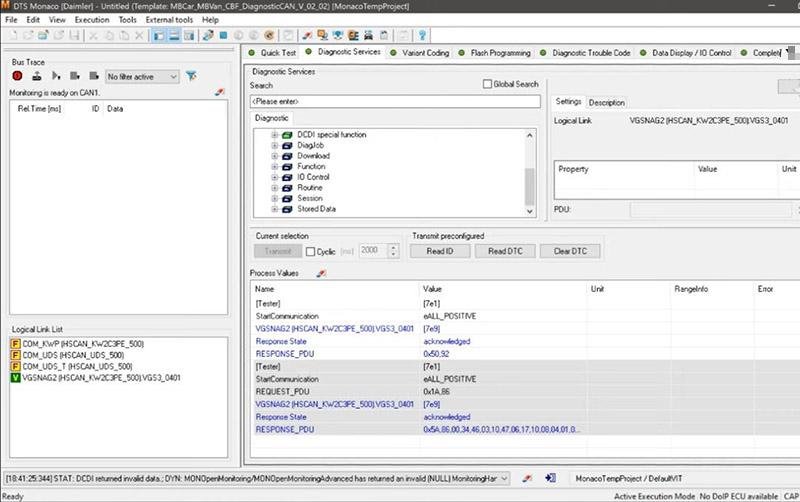
Go to “Diagnostic Services” to check firmware.

Mercedes-Benz-VGSNAG2-(7G-Tronic)-TCU-Flashing-by-DTS-Monaco-7

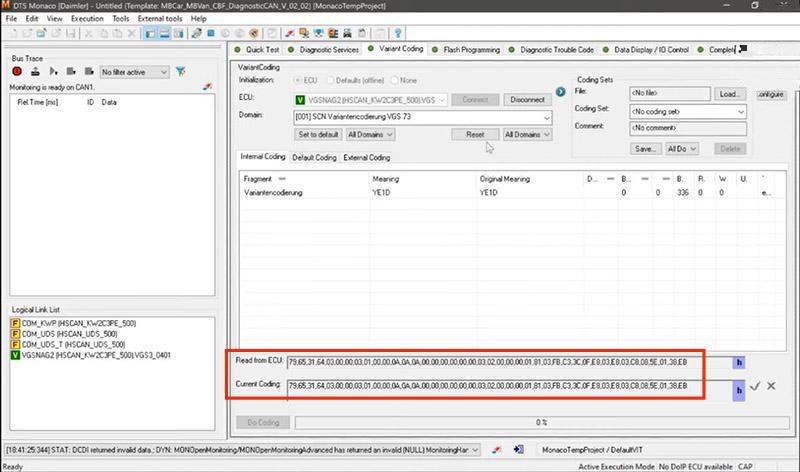
Now go to “Variant Coding” to encode the board.
Connect ECU and select domain.
Here we’ve already written the coding.

Mercedes-Benz-VGSNAG2-(7G-Tronic)-TCU-Flashing-by-DTS-Monaco-8

Disconnect ECU and exit.

Done!

So, as you can see, we’ve flashed Benz W221 gearbox through DTS Monaco without any block or password required.

Thursday, February 10, 2022

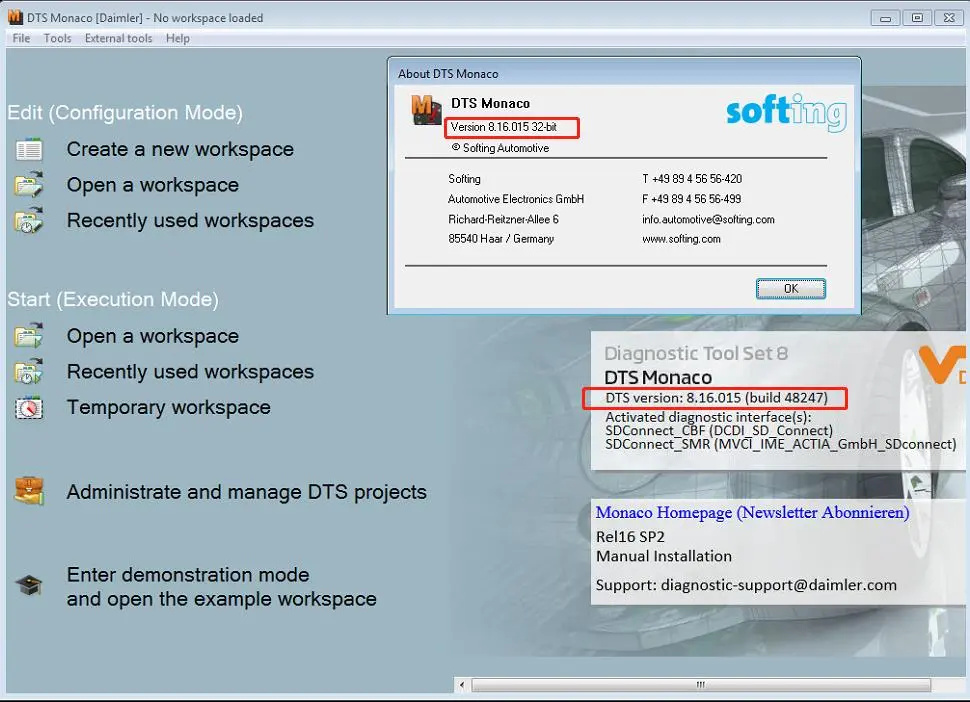
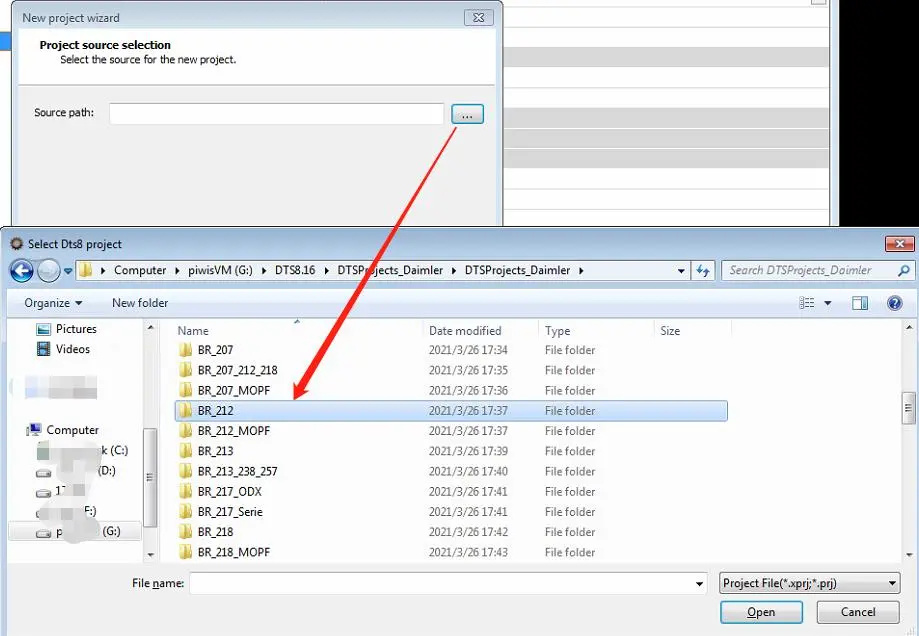
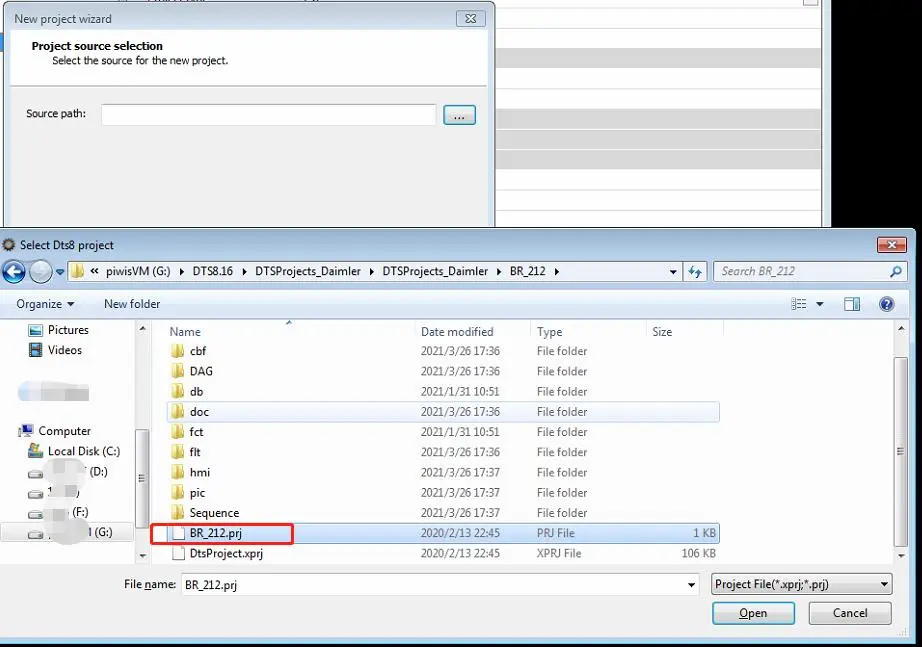
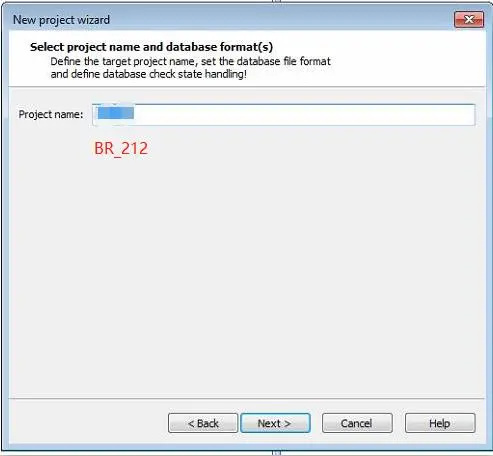
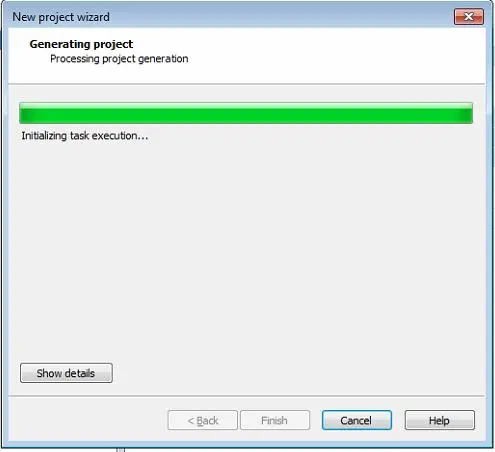
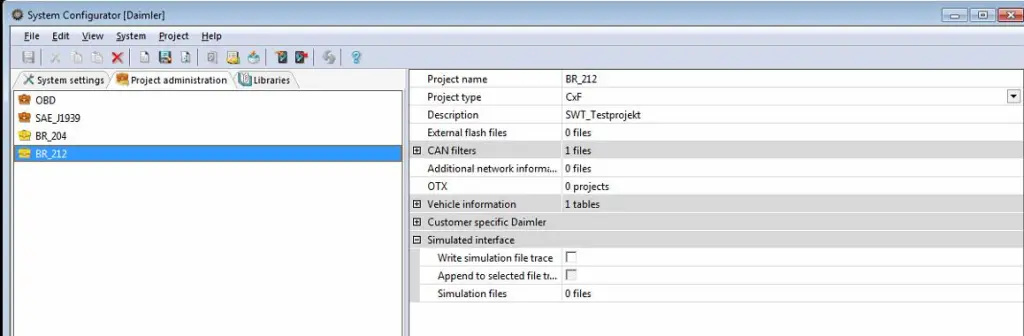
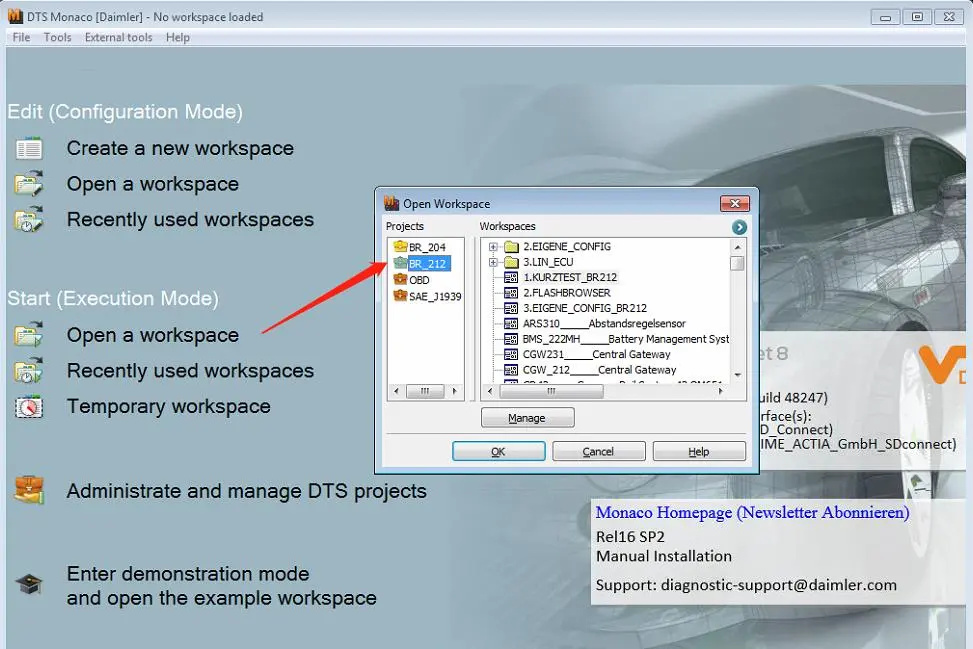
How to add vehicle project database in DTS Monaco 8.16

How to add vehicle project database in DTS Monaco 8.16

use C4 or Xentry VCI/C6 connect
DTS Monaco 8.16

How-to-add-vehicle-project-database-in-DTS-Monaco-8.16-1

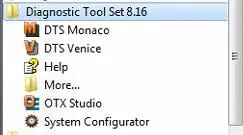
Diagnostic Tool Set 8.16-System Configurator

DTS Monaco

How-to-add-vehicle-project-database-in-DTS-Monaco-8.16-2
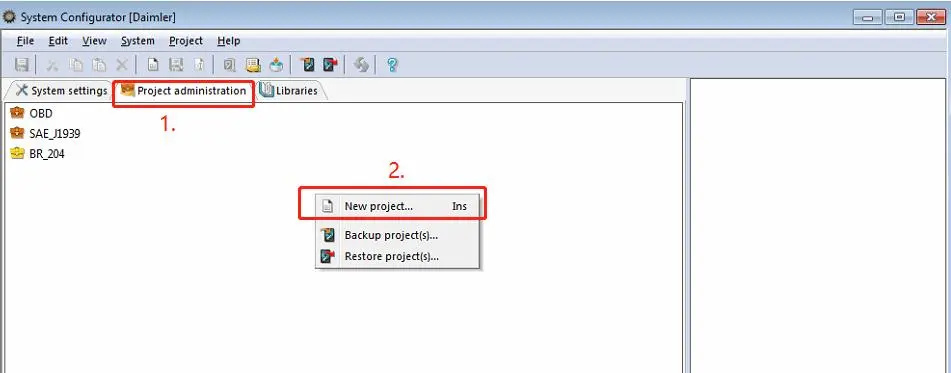
How-to-add-vehicle-project-database-in-DTS-Monaco-8.16-3
How-to-add-vehicle-project-database-in-DTS-Monaco-8.16-4
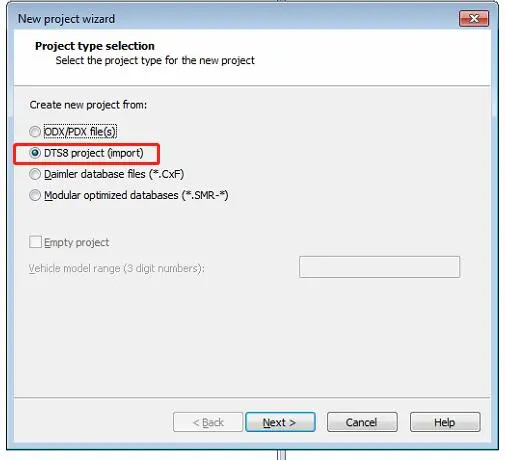
How-to-add-vehicle-project-database-in-DTS-Monaco-8.16-5
How-to-add-vehicle-project-database-in-DTS-Monaco-8.16-6
How-to-add-vehicle-project-database-in-DTS-Monaco-8.16-7 How-to-add-vehicle-project-database-in-DTS-Monaco-8.16-8 How-to-add-vehicle-project-database-in-DTS-Monaco-8.16-9
How-to-add-vehicle-project-database-in-DTS-Monaco-8.16-10


Tuesday, February 8, 2022

Benz W222 Seat Belt Warning Disabled by DTS Monaco

Sometimes,you only drive a short distance with low speed,then you don’t need to fasten your seat belt.So here is a guide on how to use DTS Monaco to disable seat belt warning for Mercedes Benz W213,W205,W222,W217,W253,W257 etc.

Procedures:

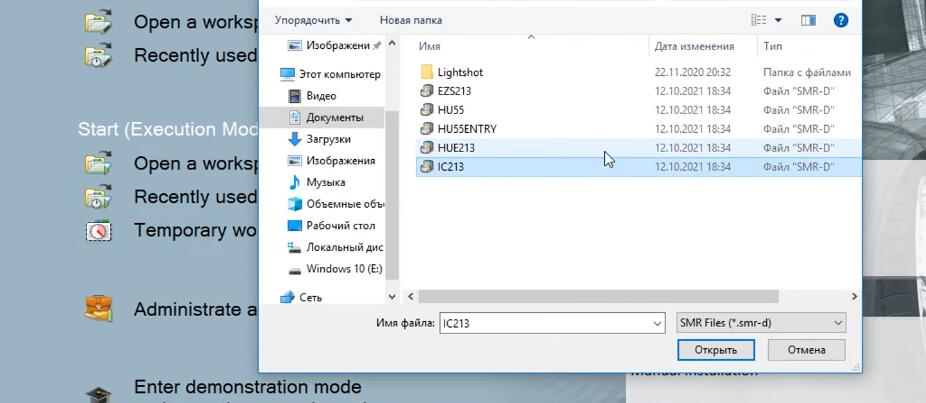
Run DTS Monaco software on your PC,then click “Temporary workspace”

And select “IC213” (IC213 for W213,W205,W217,W222,W238,W257,W463…)

Benz-W222-Seat-Belt-Warning-Disabled-by-DTS-Monaco-1

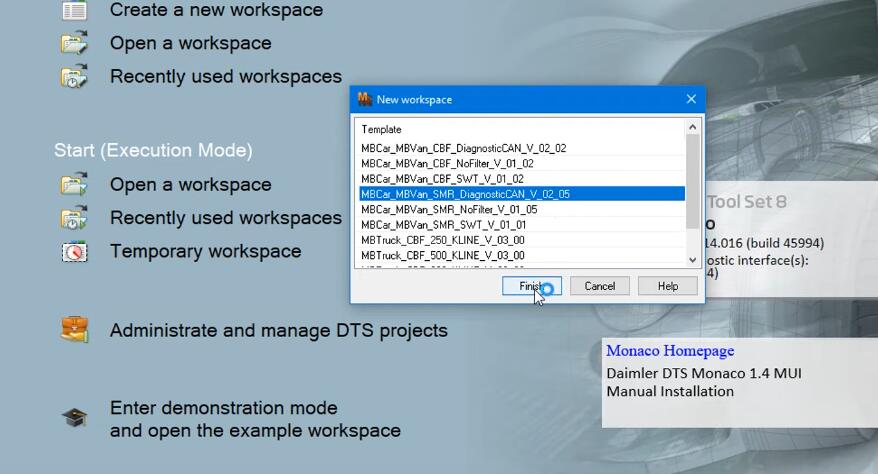
Select “MBCar_MBVan_SMR_DiagnosticCAN_V_02_05”,then click “Finish”

Benz-W222-Seat-Belt-Warning-Disabled-by-DTS-Monaco-2

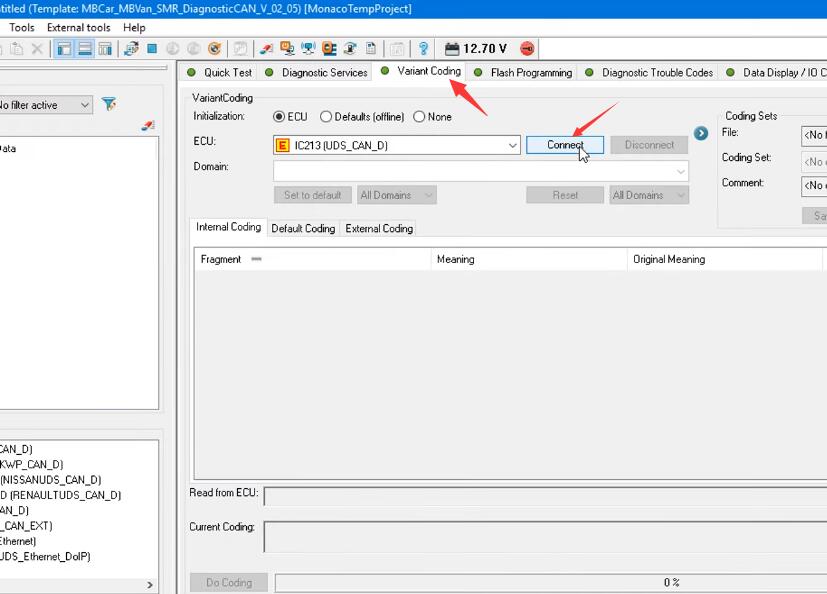
Select “Variant Coding”,then click “Connect”

Benz-W222-Seat-Belt-Warning-Disabled-by-DTS-Monaco-3

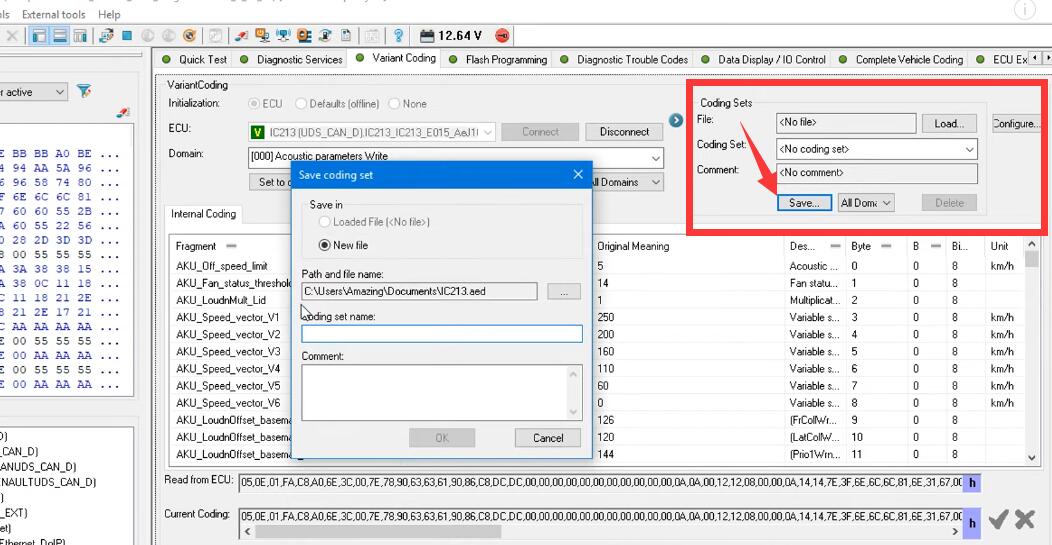
Before you starting coding,recommend you make a backup for original file

Benz-W222-Seat-Belt-Warning-Disabled-by-DTS-Monaco-4

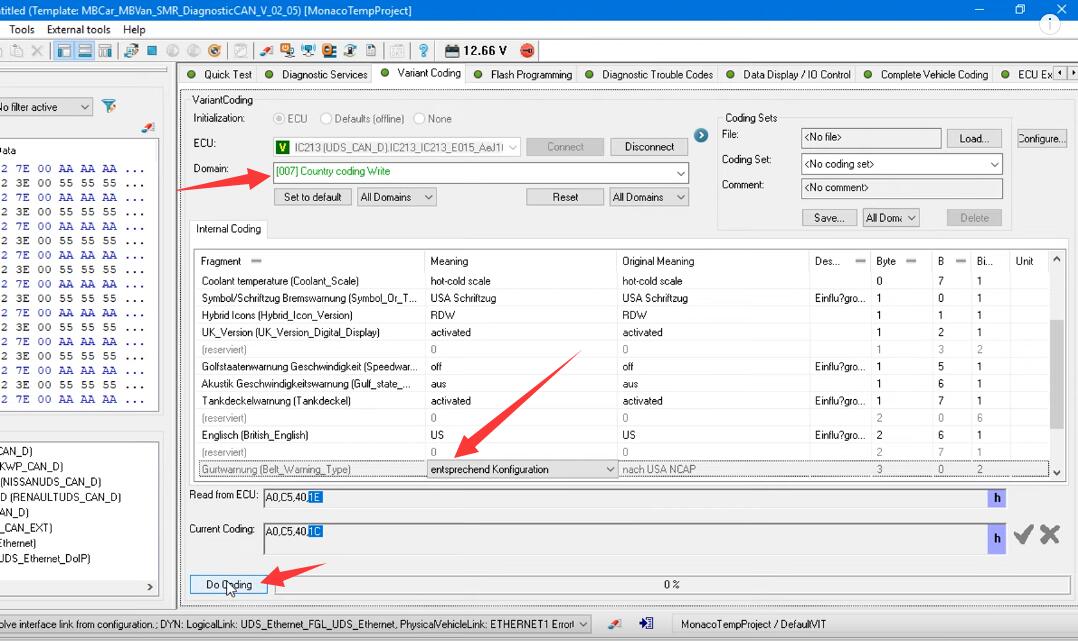
Select “007 Country coding Write”

Change “Belt_Warning_Type” value to “entsprechend Konfiguration”

Click “Do Coding”

Benz-W222-Seat-Belt-Warning-Disabled-by-DTS-Monaco-5

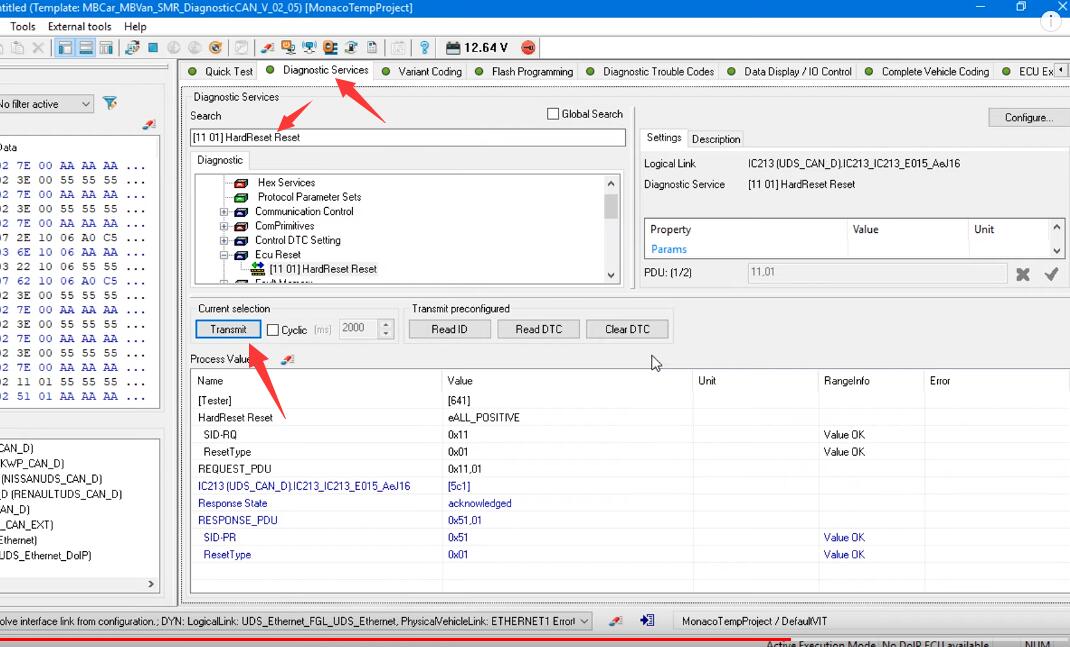
Click “Diagnostic Services”,select “[11 01] HardReset Reset”

And then click “Transmit”

Benz-W222-Seat-Belt-Warning-Disabled-by-DTS-Monaco-6

Now all things done for seat belt warning disabled.

More repair case for Benz,please refer to:Mercedes Benz Trouble Repair.

Sunday, February 6, 2022

Benz DTS Monaco Software Free Download


What is DTS Monaco?

DTS Monaco software is the official software used by Daimler-Benz development engineers.It is universal engineering test terminal for the diagnosis and control function of the vehicle controller, The name Monaco is derived from the modular analyzer used in vehicle traffic.DTS Monaco covers all the tasks in the field of engineering, testing and production test preparation.
DTS Monaco enables the comprehensive testing of diagnostic communication, diagnostic data and diagnostic sequences in the areas of engineering, testing and preparation of manufacturing tests. It can be adapted flexibly both for a whole range of different test tasks and for different user groups.

Benz-DTS-Monaco-Software-Free-Download-1

DTS Monaco Functions List:
Testing communication
Analyzing data on the bus
Testing ODX data against ECU
Reading/clearing error memory
Identifying variants
Programming flash memory
Displaying measurement values
Testing actuators
Parameterizing ECUs
Variant coding
Running ECU routines
Testing OBD functions
Creating/executing test sequences
Identifying built-in ECUs

Flexibly Adaptable
DTS Monaco is part of the Diagnostic Tool Set product family and stands for Modular Analyzer for Vehicle Communication. A clearly laid out start page enables simple and fast access to the functions required most frequently. The actual workspace is divided into two: one area with a fixed layout and one with layouts that you can toggle between. A status display below shows communication server messages. The various functions are realized using special, configurable interface elements. These “HMI Controls” can be arranged freely in the layouts in configuration mode and comprehensively configured.

Fast Results
For typical use scenarios predefined tem-plates including an universal database for the OBD selfdiagnosis as well as various protocol templates (WWH-OBD, J1939-73 among others) are supplied. In Demonstration mode, all functions can be tested, even without an interface and a license, using a detailed example including simulation. Furthermore, the tool has a completely integrated OTX runtime for running complex test sequences in accordance with ISO 13209. An authoring tool for creating such OTX sequences can be started directly from DTS Monaco.
Benefits
Reduced costs and familiarization time as DTS Monaco covers the functionality of several tools, previously separate: OBD scan tool, data and bus monitor etc.
Fast results thanks to preconfigured templates
Top quality thanks to early detection and remedy of communication problems and function errors
Highly effective thanks to flexible adaptability to various tasks
Communication data and test results can be fully documented

Early Detection of Problems
In execution mode, a configured workspace can be “started”. In doing so individual functions can be started automatically and communication can be established in advance if so required. Selfgenerated test sequences enable both simple and very complex function tests. This makes it possible to detect, and remedy, communication problems and function errors at an early stage. Communication data and test results can be documented in entirety in the process.

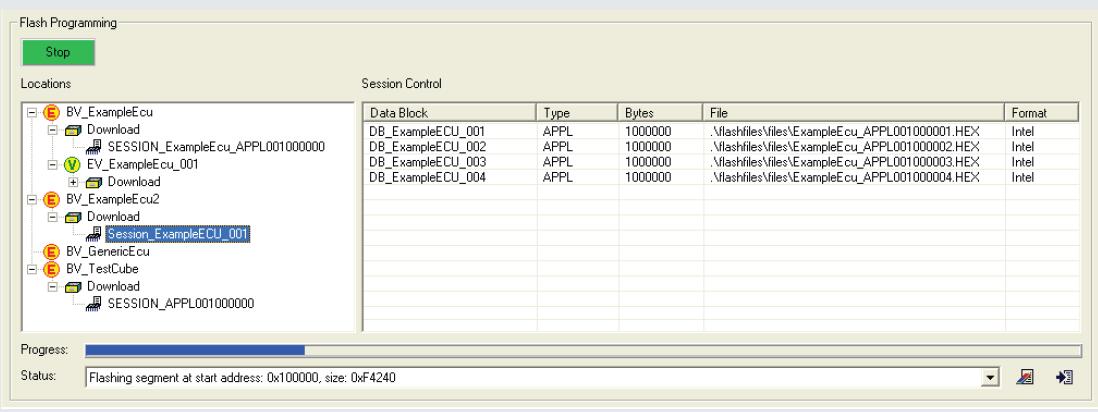
DTS FLASH
DTS Flash is an easy-to-use tool based on the ODX standard for flash programming of ECUs. It is possible to program one or more flash sessions of an ECU. As a prerequisite you need ODX data: ODX-D incl. an OEM specific flash job and ODX-F, which contains either the flash programming data or a reference (possibly late-bound) to it. You can reference the data formats HEX, MOT, BIN, S3 and S19.

Benz-DTS-Monaco-Software-Free-Download-2

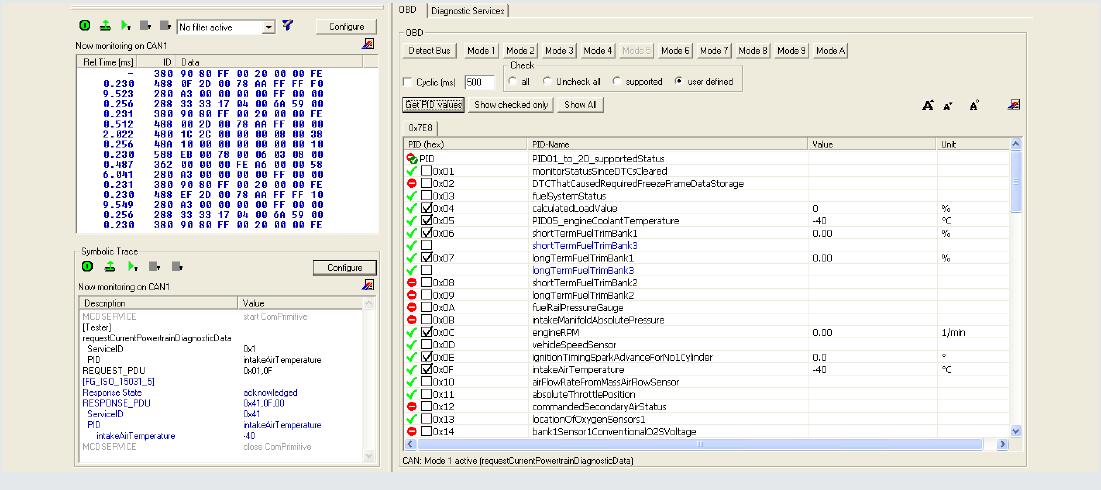
DTS OBD
DTS OBD is a PC-based tool for validating and releasing the self-diagnosis of individual ECUs or an entire vehicle in vehicle engineering. It covers the entire scope of onboard diagnostics and combines the functionalities of an OBD scan tool with those of a data and bus monitor in a single tool. You can detect the type of the connected bus either automatically or select it manually. For the current available OBD modes there are various analysis functions. Measured values are updated either manually or cyclically and can be logged for the purposes of documentation or external analysis (e.g. Excel spreadsheets). Parameters can be modified via symbolic names and sent to the relevant ECU for response analysis. All communication can be analyzed down to the very last detail and if necessary be recorded both at bus level (hexadecimal raw data) and at the application layer (in symbolic representation). When used on a notebook during a test drive, the font can be enlarged in several stages on the screen.

Benz-DTS-Monaco-Software-Free-Download-3

DTS Monaco Free Download:

DTS_V8_03_012_Daimler

https://mega.nz/#!p9ZDGKwS!VTn9fB80Z9-YKpV8aj9PkRXR3KinAT6RFiW13GGdOHI

DTS 8.08.021 Download:

https://mega.nz/#!RZ1AyYZS!Y_f4IPAzuYjZ7oK0vcqguO_ooo5apJ6KONCXunyXI10

DTS8.08path.txt

https://mega.nz/#!wVEhiQZQ!hK_klz4cYmnJoUuVGj8io2L9_PEbXu1l8rBGV02rTtw

Benz DTS 8.16 100% work version here:
https://www.obd2tool.com/goods-2890-MB-SD-Compact-4-Update-to-Latest-version.html

Friday, February 4, 2022

How to Install Mercedes Benz DTS Monaco 8.16 Software

This instruction show you the guide on how to install Mercedes Benz DTS Monaco Software.

Preparations:

Benz DTS Monaco Software Free Download
V2021.12 MB SD Connect C4/C5 Super Engineering Software with DTSmonaco V8.16.015 And Vediamo V5.01.01
https://www.obd2tool.com/goods-2890-MB-SD-Compact-4-Update-to-Latest-version.html

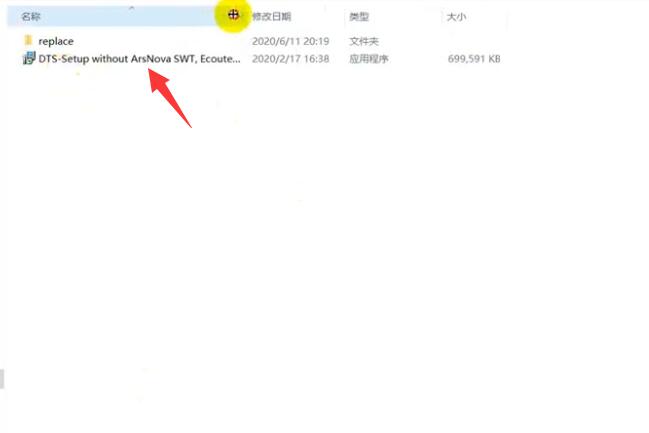
After finish downloading and extract you will get below files
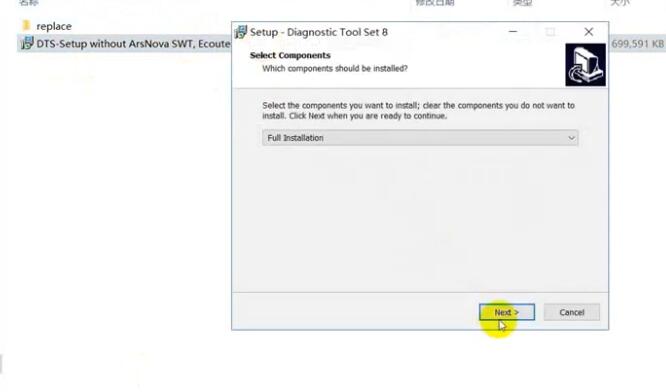
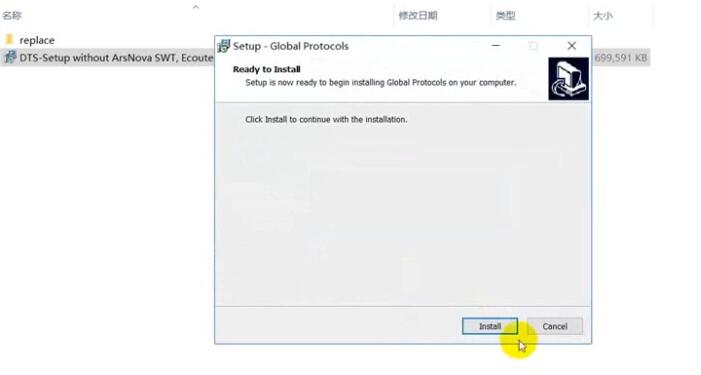
Double click DTS-Setup to start installation

How-to-Install-Mercedes-Benz-DTS-Monaco-Software-1

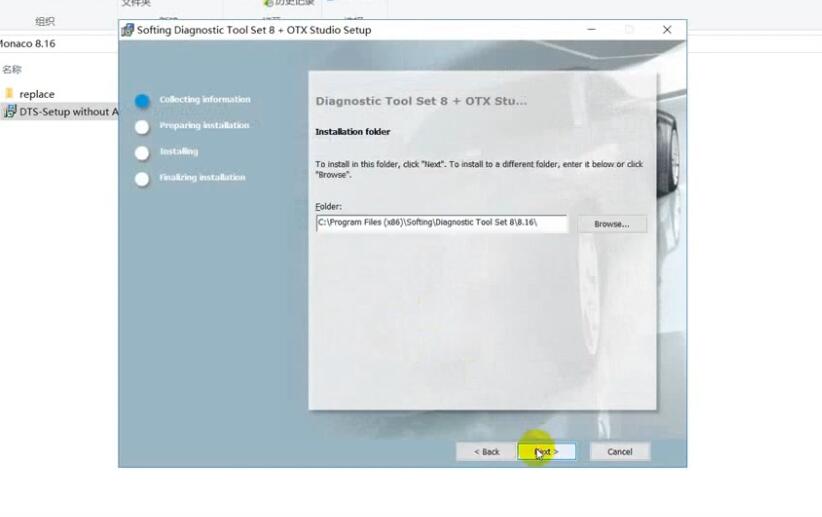
Then just click default option to continue

How-to-Install-Mercedes-Benz-DTS-Monaco-Software-2
How-to-Install-Mercedes-Benz-DTS-Monaco-Software-3

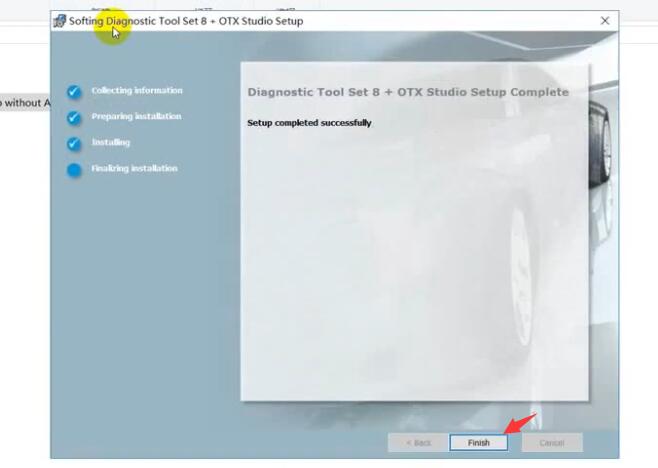
Click Finish

How-to-Install-Mercedes-Benz-DTS-Monaco-Software-4
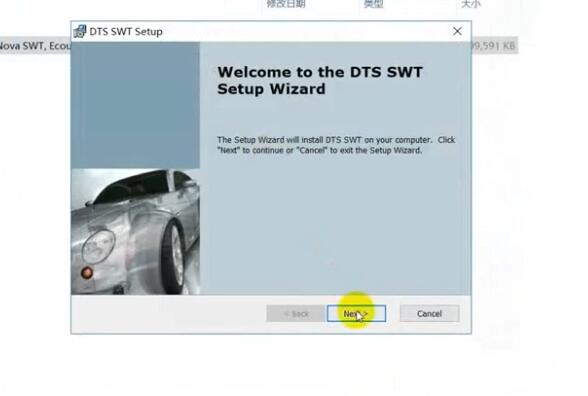
How-to-Install-Mercedes-Benz-DTS-Monaco-Software-5
How-to-Install-Mercedes-Benz-DTS-Monaco-Software-6

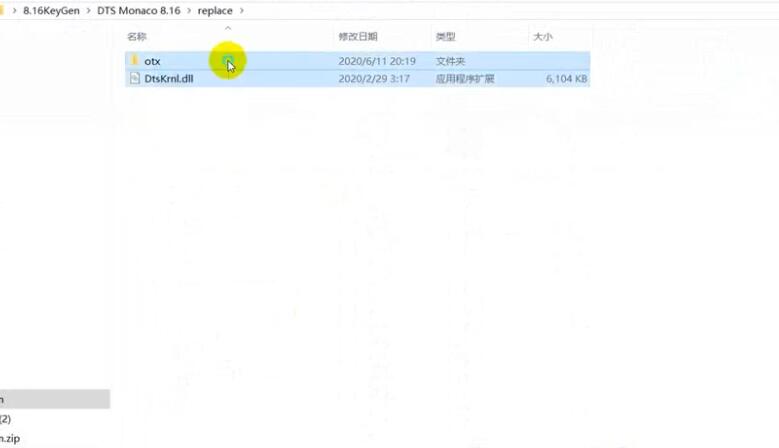
Copy files in the repalce folder to DTS Monaco installation folder replace
C:\Program Files(x86)\Softing\Diagnostic Tool Set 8\8.16\bin

How-to-Install-Mercedes-Benz-DTS-Monaco-Software-7

Then run “DTS Monaco” icon on desktop,it will show you the HWID and ask you to activate
Please sent me your HWID to me(carautorepair01@gmail.com),we will sent you a activate file and license file
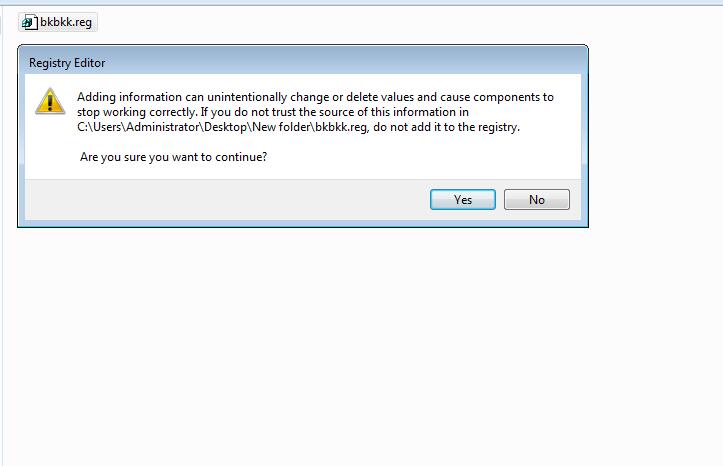
When you get the xxx.reg file,double click it to register it to your pc,click yes to add it the registry

How-to-Install-Mercedes-Benz-DTS-Monaco-Software-8

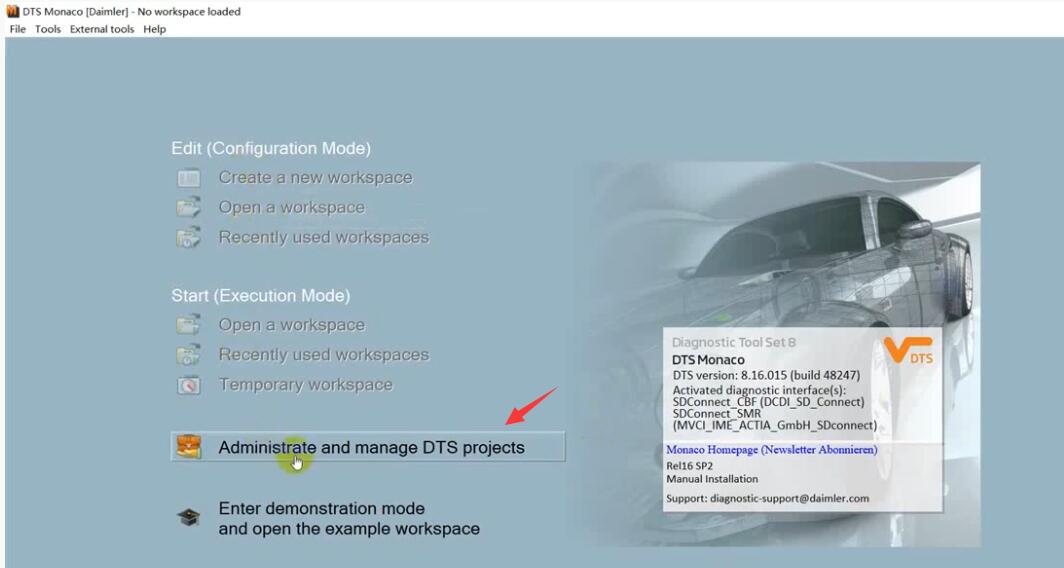
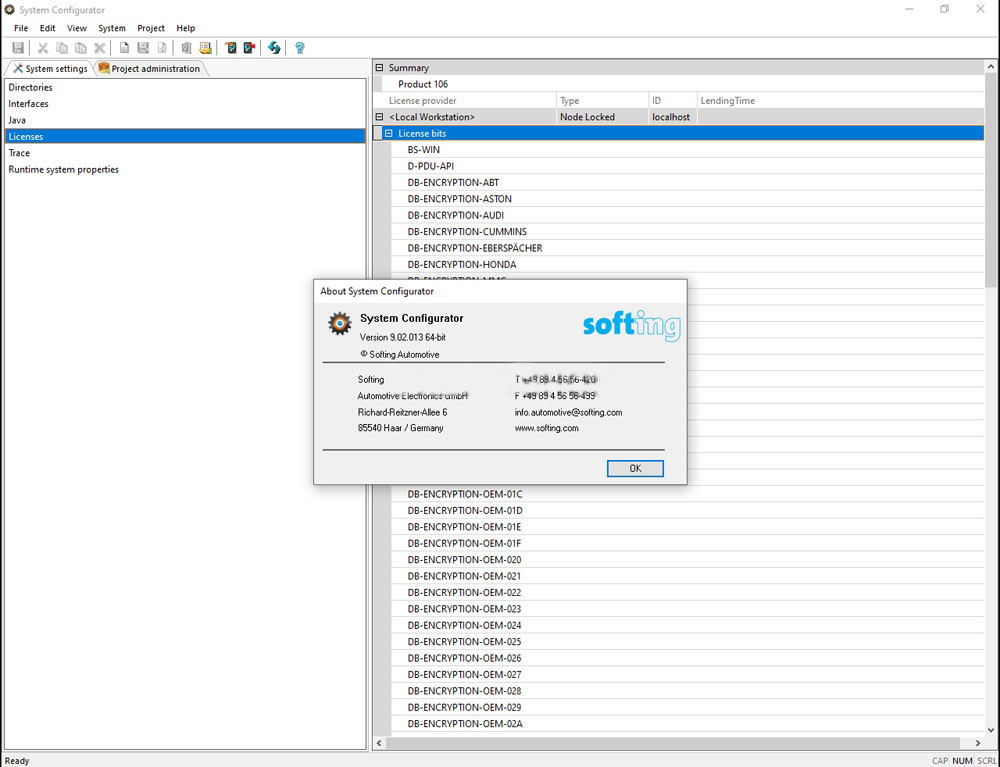
Run DTS Monaco and select “Administrate and manage DTS projects’

How-to-Install-Mercedes-Benz-DTS-Monaco-Software-9

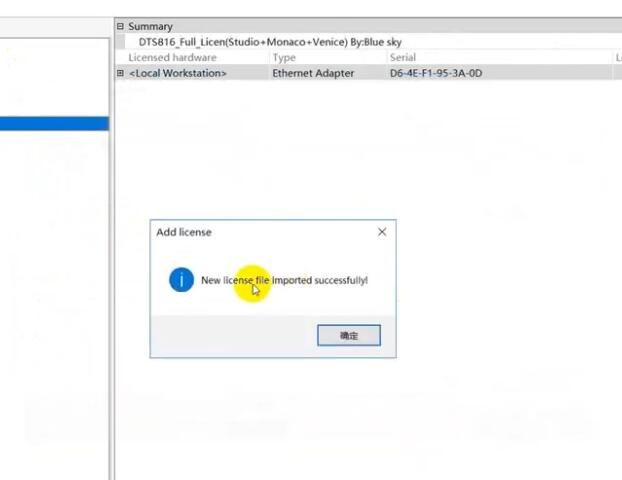
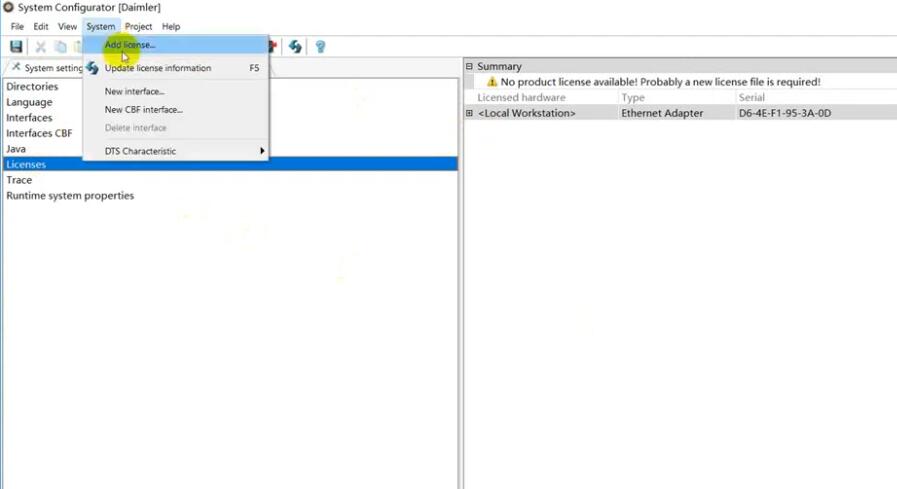
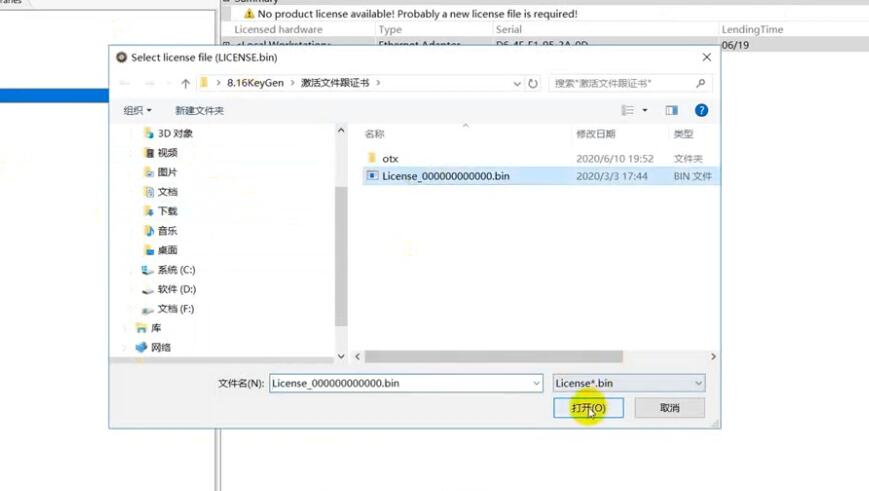
Select “System”–>”Add license”

How-to-Install-Mercedes-Benz-DTS-Monaco-Software-10

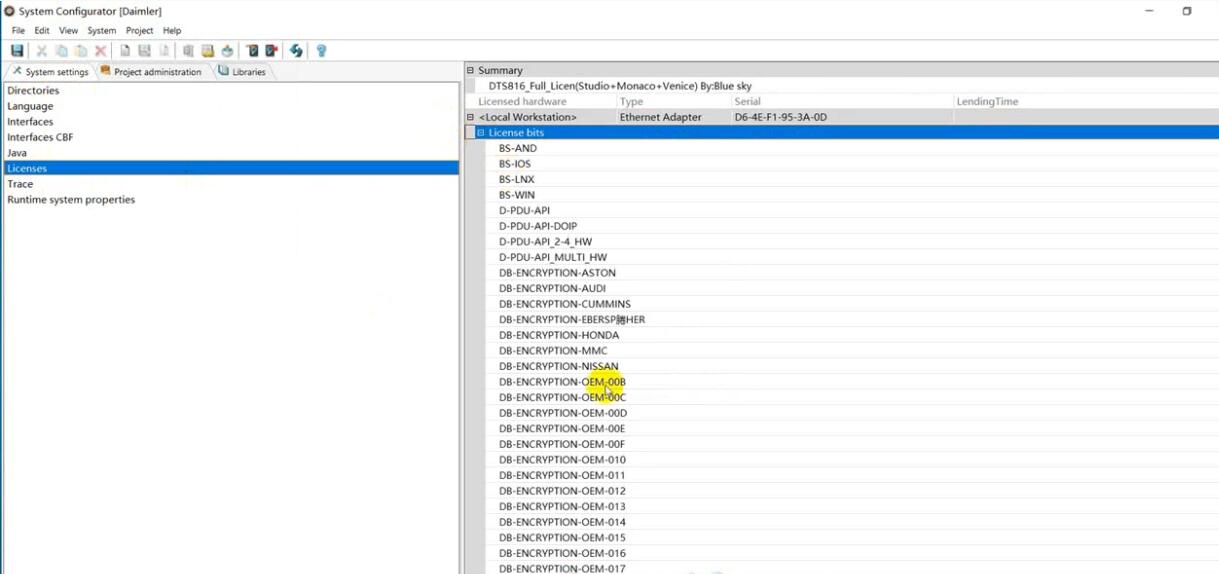
Load the License_0000000000000.bin file i sent you before

How-to-Install-Mercedes-Benz-DTS-Monaco-Software-11

Now your DTS Monaco have activated successfully!

How-to-Install-Mercedes-Benz-DTS-Monaco-Software-12
How-to-Install-Mercedes-Benz-DTS-Monaco-Software-13

DTS Monaco 8.03.12 Software Install on Win 7:
When installing DTS Monaco to communicates and works with SDconnect4 all user installed SD Connect C4 Toolkit version 2.1.3. And no one tried to force the work SDconnect Toolkit version 2.1.4.2, which is installed together with the installation of Setup_Addon_DAG. And I did it.
Checked only on the system without DAS/Xentry.
DTS Monaco 8.03.12.
Windows 7 x64.
Follow the next steps:
1. Install Monaco
2. Install Setup_Addon_DAG
3. Go to С:\ProgramData\I+ME ACTIA\Toolkit\
4. Open and edit ini
Code:
ShowInTray=2
NetworkIcon=2
DeviceIcon=1
ConnectionState=1
1. Save file and reboot Windows
2. Connect SDconnect MUXvia cable
3. Start System Configurator
4. Go to Licensesand you will see your MUX as DCDIPartW with your serial number. After editing in Interfaces 5. type of MUX will change to MVCI_IME_ACTIA_GmbH_SDconnect
6. Go to Interfaces
Code:
eCOM_SMR
Interface name – > SDconnect_SMR
Bus system interface – > D-PDU API
D-PDU API version – > I+ME ACTIA GmbHXS_D_PDU_API_FOR_DTS_8_03_12
Module type – > MVCI_IME_ACTIA_GmbH_SDconnect
Cable – > CABLE_OBDII_SDCONNECT
Physical links: CAN1, CAN4, CAN8
1. Click Saveand close System Configurator
2. Now you can connect to the car or single ECU
I successfully connected to ZGW221 w/o car
DTS Monaco always sends a notification that it is impossible to contact the EIS221 to read the mileage, voltage, etc. (because w/o car)

DTS Monaco 8.14 Installation:
1.Copy bin folder to C: \ Program Files (x86) \ Softing \ Diagnostic Tool Set 8 \ 8.14 \ and replace the original file.
2.Run Monaco.exe a dialog box appears, press Ctrl + V to copy hardware ID to me.

Friday, September 3, 2021

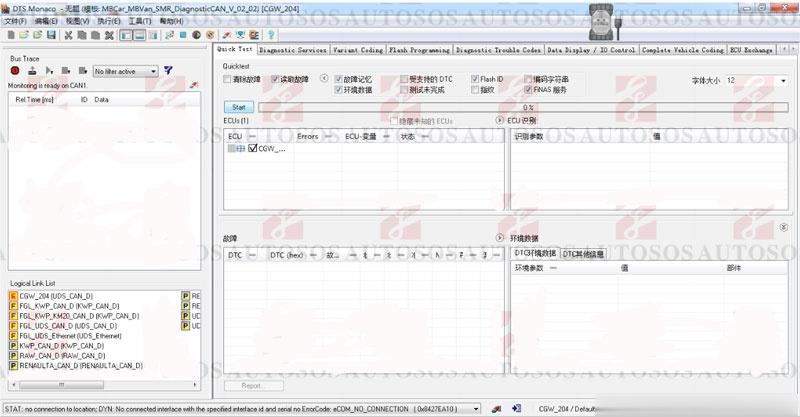
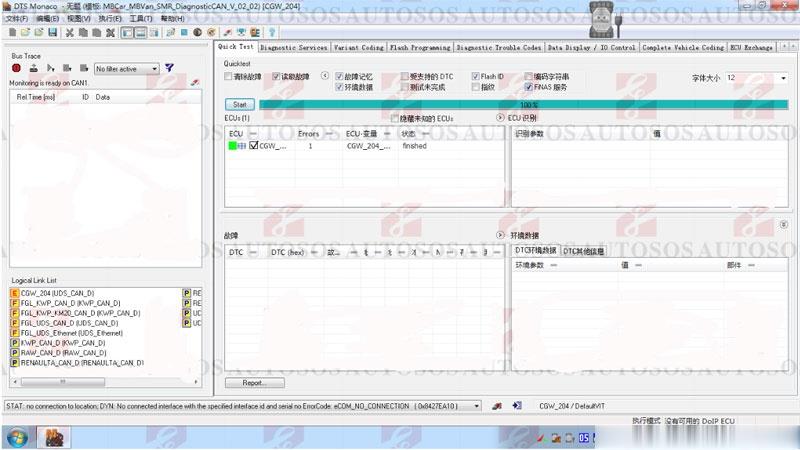
How to Add SMR-d to Benz C6 DoIP VCI DTS Monaco


Here’s the instruction to add SMR-d and Configure DTS Monaco engineering software for OEM Benz C6 DoIP VCI.

Software HDD should be purchased alone (comes with keygen and DTS Monaco software).

Add DTS Monaco SMR-d operation:

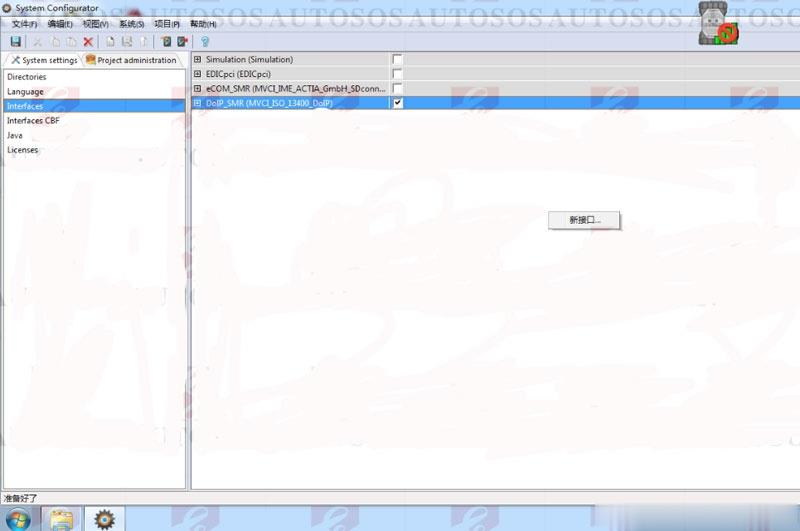
Open DTS System Configurator on desktop, select Interfaces, right click to open new interface

How-to-Add-SMR-d-to-Benz-C6-DoIP-VCI-DTS-Monaco-1 (2)

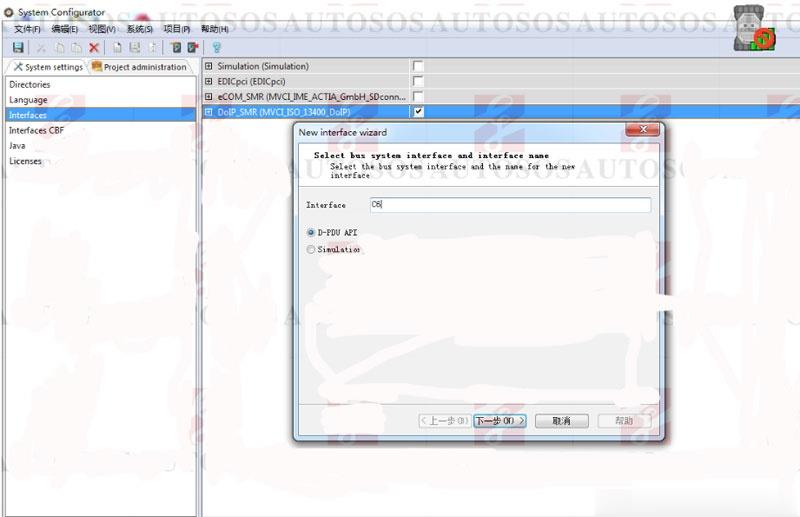
Manually enter Interface “C6“, press Next

How-to-Add-SMR-d-to-Benz-C6-DoIP-VCI-DTS-Monaco-2 (2)

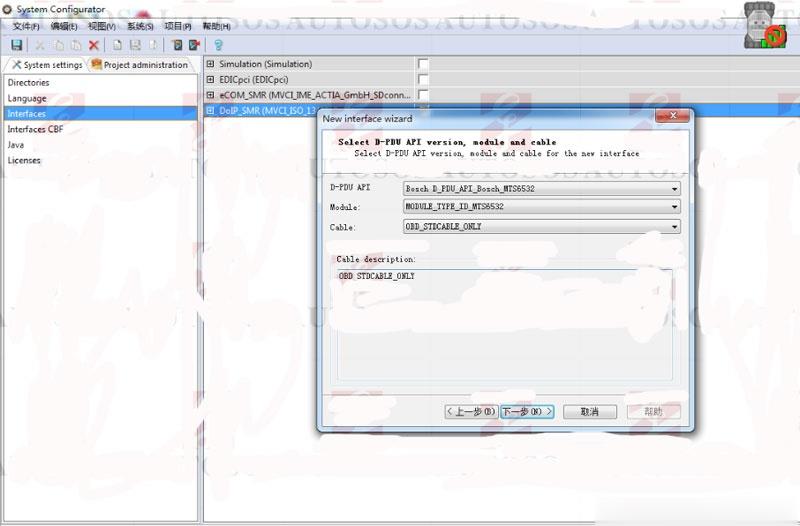
Configure Benz C6 VCI as picture below
D-PDU API: Bosch_D-PDU_APO_Bosch_MTS6532
Module: MODULE_TYPE-ID_MTS6532
Cable:OBD_STICABLE_ONLY

How-to-Add-SMR-d-to-Benz-C6-DoIP-VCI-DTS-Monaco-3 (2)

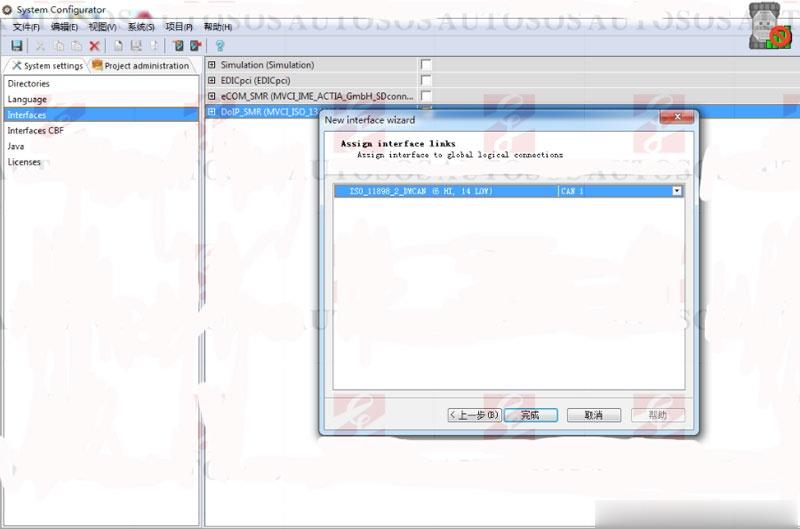
Select CAN I interface link

How-to-Add-SMR-d-to-Benz-C6-DoIP-VCI-DTS-Monaco-4 (2)

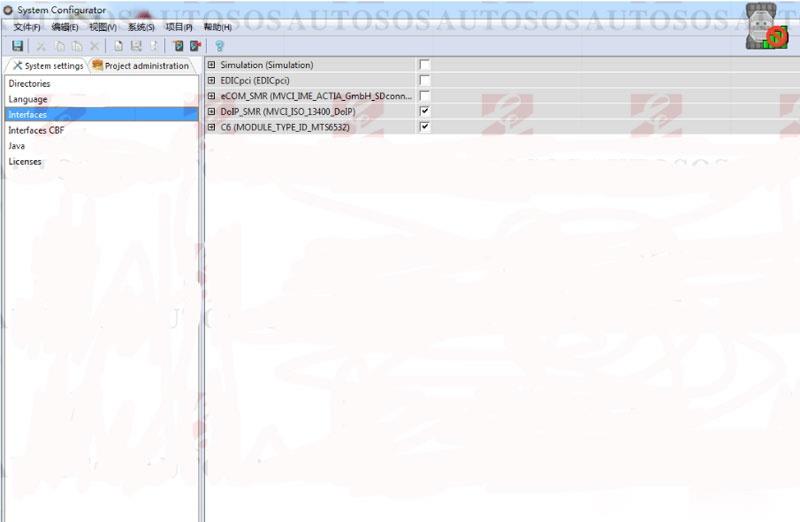
Enable Benz C6 DoIP as picture below

How-to-Add-SMR-d-to-Benz-C6-DoIP-VCI-DTS-Monaco-5 (2)

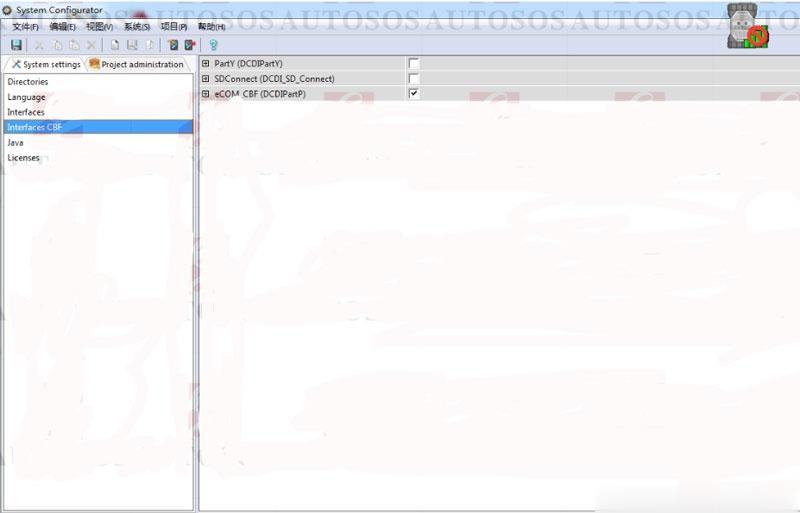
Choose eCOM CBF (DCDIPartP)

How-to-Add-SMR-d-to-Benz-C6-DoIP-VCI-DTS-Monaco-6 (2)

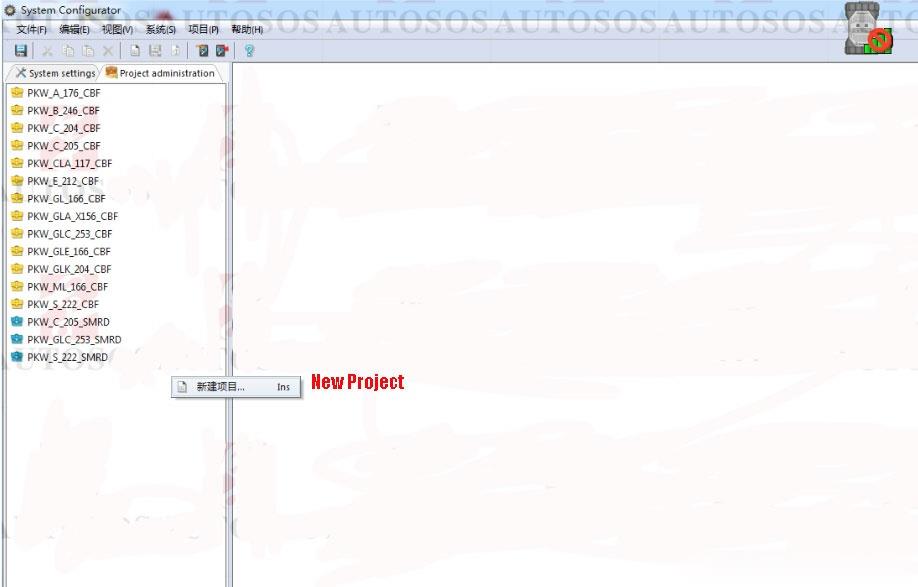
Select Project administrator, create new project

How-to-Add-SMR-d-to-Benz-C6-DoIP-VCI-DTS-Monaco-7 (2)

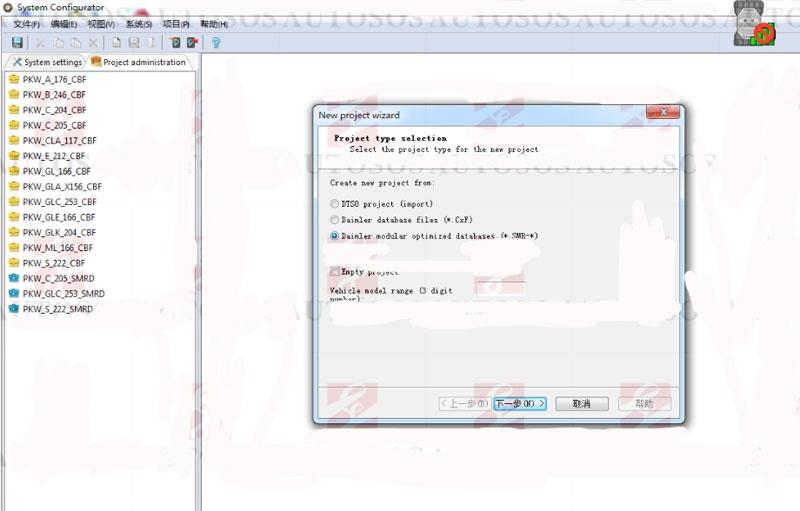
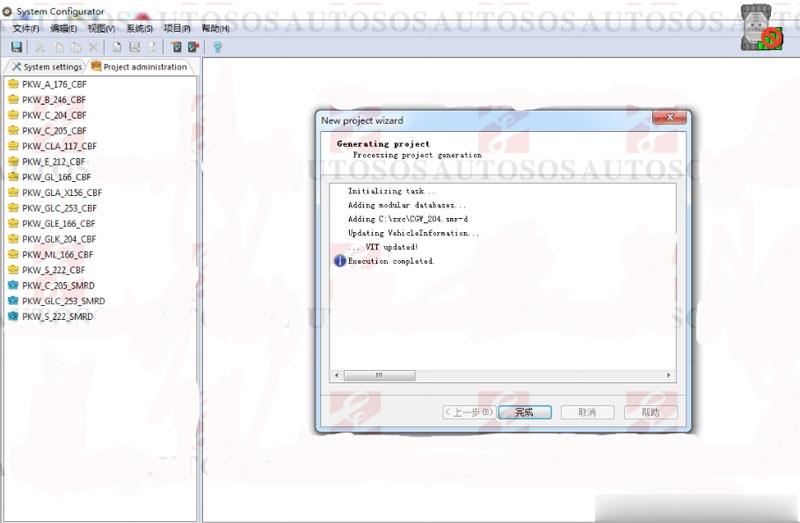
Select modular optimized database  (*.SMR-*)

How-to-Add-SMR-d-to-Benz-C6-DoIP-VCI-DTS-Monaco-8 (2)

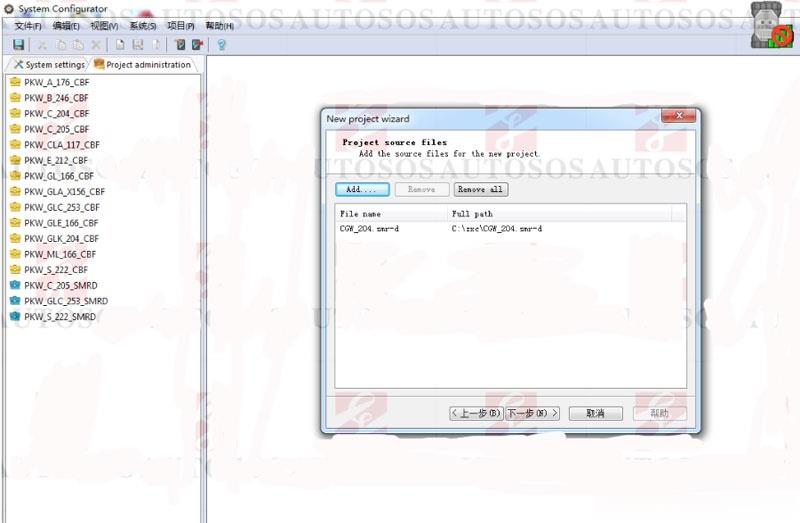
Add CGW_204.smr-d

How-to-Add-SMR-d-to-Benz-C6-DoIP-VCI-DTS-Monaco-9 (2)

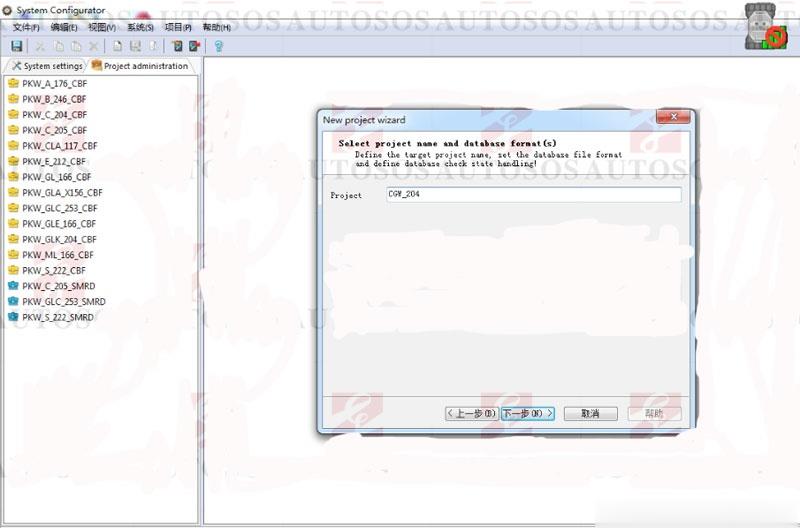
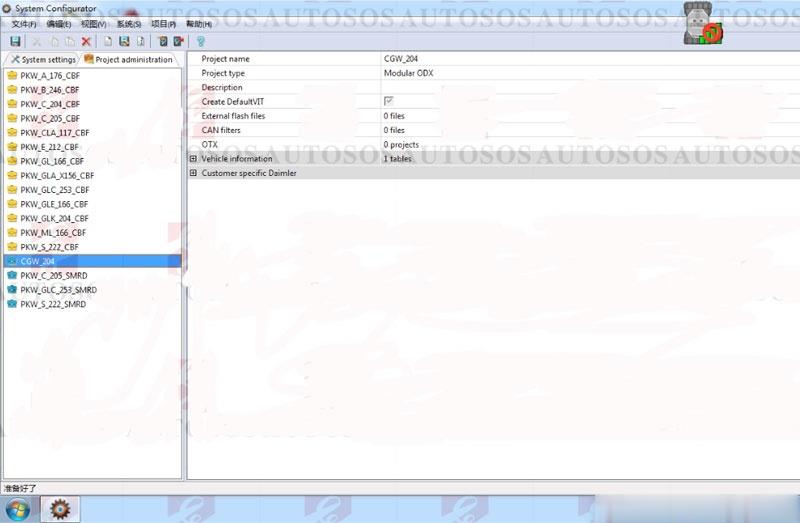
Project: CGW_204

How-to-Add-SMR-d-to-Benz-C6-DoIP-VCI-DTS-Monaco-10 (2)

Add CGW_204.smr-d success

How-to-Add-SMR-d-to-Benz-C6-DoIP-VCI-DTS-Monaco-11 (2)
How-to-Add-SMR-d-to-Benz-C6-DoIP-VCI-DTS-Monaco-12 (2)

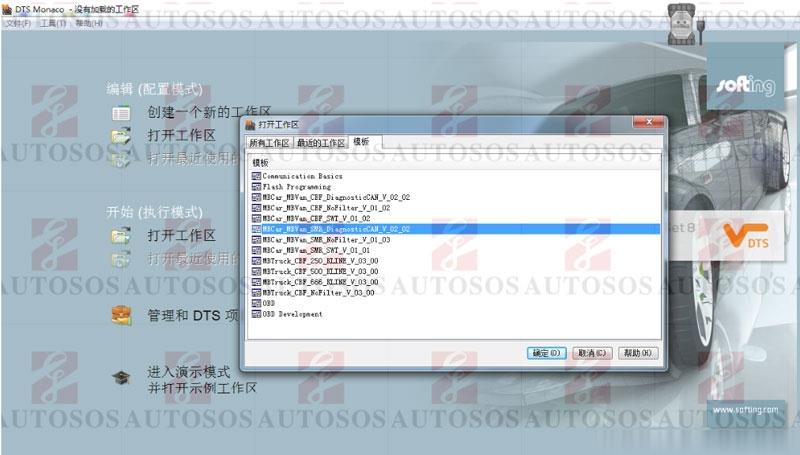
Enter DTS Monaco software

How-to-Add-SMR-d-to-Benz-C6-DoIP-VCI-DTS-Monaco-13 (2)

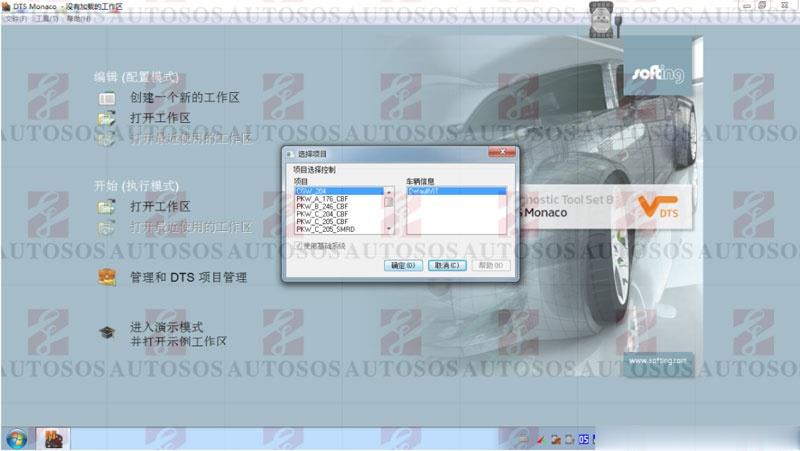
select CGW_204 project

How-to-Add-SMR-d-to-Benz-C6-DoIP-VCI-DTS-Monaco-14 (2)

login project

How-to-Add-SMR-d-to-Benz-C6-DoIP-VCI-DTS-Monaco-15 (2)
How-to-Add-SMR-d-to-Benz-C6-DoIP-VCI-DTS-Monaco-16 (2)

Now can you flash modules with the DTS Monaco software.
Done.