Showing posts with label Mercedes Benz Star diagnosis C3. Show all posts

Saturday, April 23, 2022

Mb Star C3 “simdas.exe needs to close” and WIS error Solution

Some customer had the “simdas.exe needs to close” and WIS error when running Mb Star C3 pro red multiplexer Dell format DAS.
Mb-Star-C3-simdas.exe-needs-to-close-and-WIS-error-Solution-1

Problem 1:
I had the these errors when i run MB Star diagnosis DAS:
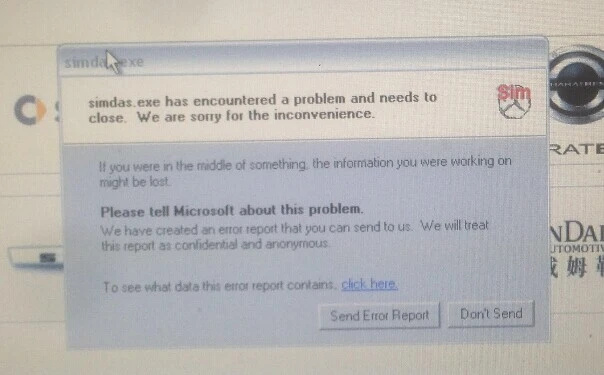
1) simdas.exe has encountered a problem and needs to close. We are sorry for the inconvenience.

Mb-Star-C3-simdas.exe-needs-to-close-and-WIS-error-Solution-2
Mb-Star-C3-simdas.exe-needs-to-close-and-WIS-error-Solution-3

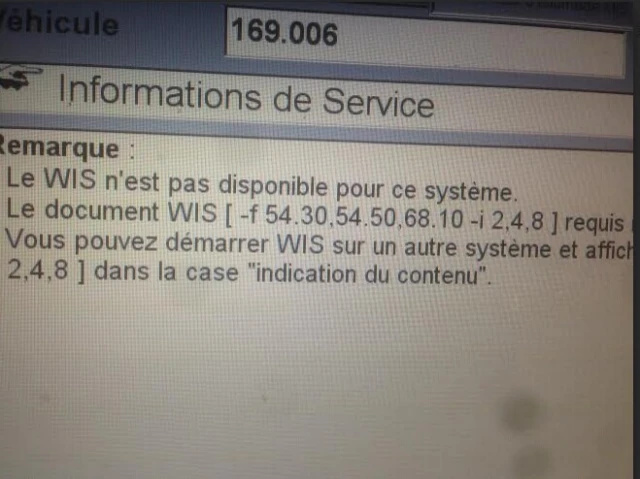
2)The WIS is not available for this system

Mb-Star-C3-simdas.exe-needs-to-close-and-WIS-error-Solution-4

Cause:
Improper operation

Solution:
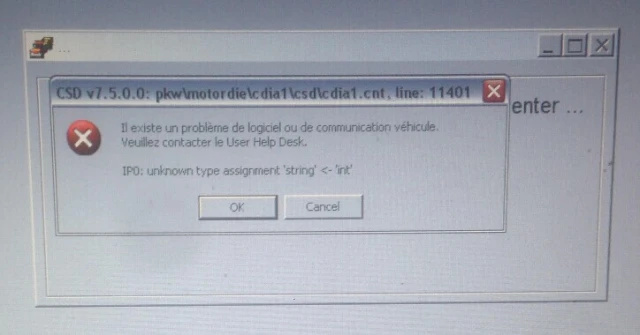
1. simdas.exe error: You should enter DAS but not SIM software to troubleshot Mercedes
2. WIS error:
You entered WIS from DAS directly. It was incorrect. You should start WIS from desktop.

A Mercedes Benz W212 2010 with VIN 2120891A208054 owners had the problem when diagnose his model with original MB Star C3 scanner.

Problem 2:
He has got the Benz star c3 (with original Star diagnosis DAS/Xentry SSD) multiplexer to diagnose and program his model. But the software pops up an error message “ZGW is not answer”. He then contact Autonumen technician if it is Ok to buy the latest DAS/Xentry for MB Star C3 to work on this model.

Solution:
Sorry, for MB newer model, your W212 included, you should go for MB SD Connect C4 diagnostic system with newer software version. MB star C3, even original one is too old to diagnose these newer MB cars.

Monday, July 26, 2021

Star C3 cannot work on recent W205 solution

 User puzzles:

I have installed Xentry 3.2021 in Star C3 multiplexer. It works well so far. Now, I need to make diagnosis on w205 year 12/2014 but It can not communicate with the car. C3 don’t work in all recent cars in xentry but in DAS is ok.

Experienced users’ suggestion:

C3 has many limitation regarding latest vehicles in Xentry.
It can’t diagnose it e.g w205, w212, w222, w906, smart 453 etc.

its glory is already passed unless you deal only with vehicles in DAS.
you have to change to SD Connect C4.
C4’s support also officially has been stop since 12-2015.

It is no different even you change folder.
it is different protocol with recent vehicles.

For your w205 (nice car) you can use one of this :
1.sd connect c4
2.xentry sd connect c5

Both good at all new models,W222, W221, W212, W203, 211,W 204,W207, W212, GL166, B 246, CLS 218, SLK172 and Smart405, 451, 452, 454

Besides the Star diagnosis software c3 and c4 own, sdconnect c4/c5 added three more software: SD Media, Xentry and Smart TAN Code.
SD Media: Video and PDF lessons;
Xentry: New software released by Company after 04/2009 by diagnosis new cars. Xentry software for diagnosing W 204,W207 and W212 which C3 and C4 does not support;
Smart TAN Code: Opened special function in DAS program with Smart cars 405/ 451/452/ 454.Besides, it also opened more special functions, such as engineer mode, remove limitations,etc, which Star C3 and Star C4 do not have.

I have successfully communicated wit my w205 AMG using a SD C4 connect all controllers accessed.

Wednesday, May 19, 2021

How to fix Super MB Star C3 “Error 23 H1.First Install.exe” Issue


mb-star-c3-error

Dear Cathy:

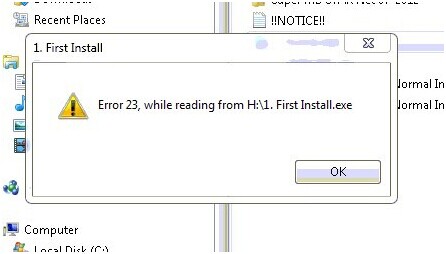
I recently got a Super MB Star C3 from OBD2TOOL for my Mercedes 2009. I got the Mb Star C3 device two days ago, tried installing it on the same day, but got an error message, reading “Error 23, while reading from H:\1.First Install.exe”, as shown below, during the installation.

mb-star-c3-error

At frist, I installed the Mercedes STAR C3 diagnostic tool on a Windows XP computer, then I tried on another computer with windows 7 system, but the windows kept popping out. Please help me fix it, thanks.

Jason

Dear Jason:

The error is probably caused by your system, which may not compatible with the tool. It is required that Super MB Star C3 should run in computer environment with professional Microsoft Window XP or Windows 7 system.

Or it is because the software is damaged. If there is a software, the device cannot work normally. If the software damaged is Xentry, you should send it back to us for repair; if it is other softwares, please download a replacement on https://my.vmware.com/web/vmware/info/slug/desktop_end_user_computing/vmware_workstation/8_0

Tuesday, March 30, 2021

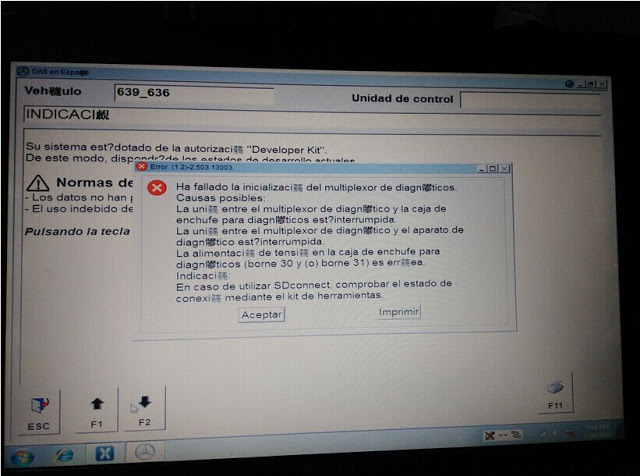
MB Star C3 Xentry Fault(1.2)-2.503.13003 Initialization failed


Files c32s.dll and CAL 872 fix can solve Xentry/DAS Fault(1.2)-2.503.13003 “Initialization of diagnosis multiplexer failed”, said users with Chinese MB STAR C3 diagnostic tool.

Multiplexer:
Chinese MB Star C3

Error message:
“Fault(1.2)-2.503.13003
Initialization of diagnosis multiplexer failed

Possible causes:
The link between the diagnosis multiplexer an the
diagnostic socket is interrupted
The link between the diagnosis multiplrxer an the
diagnostic unit is interrupted.
The voltage supply at the diagnostic socket (circuit30
and(or) circuit31)is fault.
Note:
When using SDconnect, check the connection status
using the Toolkit. ”

xentry-fault-1-2-2-503-13003-1
xentry-fault(1.2)-2.503.13003-2

Analysis from OBD2TOOL engineers:
“your STAR C3 mux is not connected in a proper condition. Check the connection first, with your car and laptop”

Disclaimer:
Solutions below are offered by users. TRY ON YOUR OWN RISK.

Solutions from ZCC
Software version: DAS 07/2011
Free download c32s.dll & CAL 872 fix (872 fix is copyrighted)

https://mega.nz/#!pkli3YIL!B6v0QFmLxFjb30N_VyoxNPizAnA_bkwqKRY8b1QvVJE

Finally I solved this problem.
It was really a complex combination of faulty hardware and software. I had a problem with that annoying c32s.dll file. I replaced it with the original 01/2011 one plus I used CAL 872 fix version 2 for DAS 07/2011 onwards. Only the c32s.dll solved the problem.
Solutions from fadiboujaoude
Software version: Das Xentry 01 2012
Free download oldc3.rar:

https://mega.nz/#!481xWILD!ZdYpw60KKfa5MkbmVnuUAFXQW5EFQNQf0TEVdcAt6hg

Solved my problem with the following tips…

download and set the das32R2(032012)
2. get the c32s.dll of das xentry 01 2012 and replace the existing one in F:/programme/Das/Bin
3.replace the HHTWin.ini located in c:\Windows :
(Copy And paste the lines below And exit and save HHTWin.ini File)
[STARTUP]
DX=515
DY=510
X=110
Y=0
BACK=21
SLAVE=PARTD2
DEBOUT=1
DEBLVL=6
SPC=02
SPCN=02
SPCP=02
SPCD=02
SPCV=02
[STARCONF]
BMPPATH=C:\USERDATA\Docs\HHT\
MAXFILES=200
DEBOUT=1
DEBLVL=6
[Debug]
HHTWIN.exe-modpath=F:\PROGRA~1\HHT\PKW\
HHTWIN.exe-szIniFile=C:\WINNT\HHTWIN.ini
HHTWIN.exe-lpszCmdLine=
HHTWIN.exe-Parameter=Inifile
HHTWIN.exe-szParamsPath=C:\userdata\CSD\Writefil\HHTWIN_Params.ini
HHTWIN.exe-CmdParams=
HHTWINX.DLL-modpath=F:\PROGRA~1\HHT\PKW\
HHTWINX.DLL-szIniFile=C:\WINNT\HHTWIN.ini
4.search on this forum for the file oldc3 … extract it .. then run it..
5. Done
this is the only way i got my DAS to read my multiplexer

Wish this help!

(PS: sorry for that i didn’t mention all the authors which i read their threads and posts but this because i read a lot and i did many and many tries to finally have the solution)

Friday, September 7, 2018

My experience with MB star C3

am going to keep posting my updates about doing an AAM and SRS module swap in my 01 ML 430 Sport using the Chinese clone Benz star c3 diagnosis tool.
I received my C3 yesterday and the Dell D620 a day earlier to use for the C3. Replacing the hard disk with the one supplied with the C3 was a snap. After watching a few videos on YouTube on how to set up the Xentry and Das programs I had them up and running. But then it took me another 3-4 hours of playing and researching online to figure out how to set up the RS232 port to see the Stardiagnos.
At 10:30 last night, and very exhausted it came to life. As I had figured the AAM and SRS modules were completely non responsive and could not be talked with via the tool.
This morning I ordered a new AAM from obd.com and with free shipping and $370 it is on its way to my shop. I picked up a SRS module from a wrecked ML in a local junk yard that I hope will work.
I plan on attacking the SRS system this weekend and the AAM next week. I have been working through the Xentry emulator to learn how to properly set up and program these parts today at my desk and think I have it down pretty well. It is pretty simple once you figure out the navigation and menu structure in the DAS system.
So stay tuned and offer a prayer for me that I do not brick any of the components in my truck.

Chinese MB STAR scanners


I thought I would start a new thread on the Chinese Mb Star C3 systems, since there doesn’t seem talk on this subject thus far.
Since you’re reading this thread then I’m guessing you were like me and are searching for information on these Chinese MB STAR systems.
I’m sure you’ve found several web sites selling these things, prices ranging all over from $380 up to over $800 but unfortunately I there isn’t a damn thing about anyone actually purchasing one of these and verifying the sellers claim on whether they really work or if they really don’t require the original IBM ThinkPad to work properly.
Well, here ya go folks!
So after months of searching and doing research with not much luck I finally took the risk and bought one of the Chinese MB STAR C3 systems.
I was very hesitant in buying one of these Chinese devices. The total price with shipping turned out to be $450. There were several places on the internet with prices ranging all over. I only found one place that was a little less expensive than $450 total, I think maybe $430 but that guy was not very prompt in returning my emails. I finally ordered mine from obd2tool.com. Michael Luo was the sales rep who immediately responded to my inquiry on the device and he immediately responded to all my emails and questions within a day at worst. He was very friendly and patient with me and his English surprisingly good.
The one they sell was claimed to work on most any laptop, not just the IBM ThinkPad was required to run the software. Which is what these systems were originally intended for.
It took me about three weeks to finally receive the device VIA DHL after I sent the payment. Mine took a little longer to receive because I placed the order right before Chinese new year, but Michael warned me that shipping will take an extra week because most of China was off for a week for Chinese new year.
When I finally received the unit I was very surprised on how heavy they box was. I guess this is why it was $50 just for the shipping.
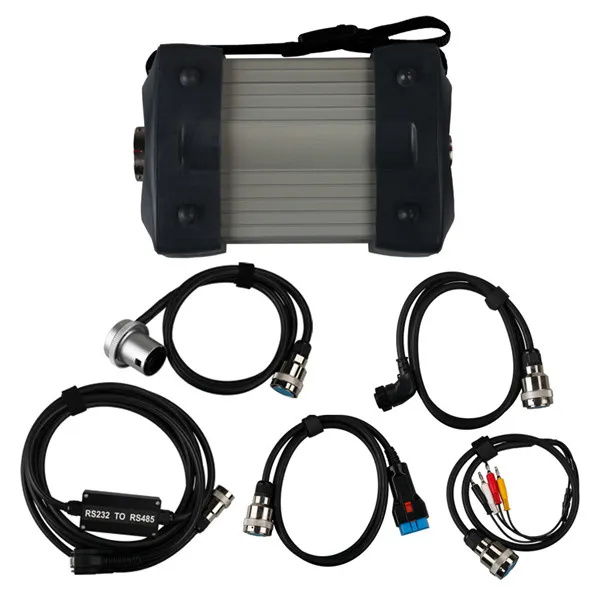
When I opened the box I was very surprised and very impressed in the quality and the amount of contents. The multiplexer unit itself is a very heavy duty all aluminum enclosure with tough rubber end caps and real nice polished aluminum connector ends. It even came with the stickers to make it look like an original MB STAR system.
It came with several cables to make it work with most any car including the 32 pin round connector for those Euro models. All I really needed was the 16 pin cable that plugs into the CAN slot.
I was very impressed with the quality of all the cables. They all felt and looked very heavy duty and had heavy duty solid aluminum connectors. None of it looked cheap at all.
The kit came with a Samsung External USB 80 gig hard dive which had the MB STAR software loaded on it. Also included to my surprise was a PCMCI to serial card with driver software. I’m assuming that the STAR system will not run from a USB to serial box and since I told Michael which system I had, he knew that I did not have a serial port on my laptop so he included this for free.
All in all I was very impressed with what I received as far as quality and everything that was included for the $450.
Now on to the operation of the unit:
After doing a little research I learned that the software might not work on Windows 7.
I didn’t even bother trying since a buddy of mine gave me an old tablet with a serial port built in and already had XP loaded on it. So I just decided to use that since it was a touch screen and would probably be a little easier to use than my bulky 17” screen laptop.
I forgot to mention, you will need at least 1 gig of RAM to run this program, it will not even load with anything less than a gig. Luckily I had an extra 512 board lying around the office… Shhhh…lol
This is what I did first before I even started messing with the software:
Since this thing is already kind of bulky I really didn’t want to run it with an external hard drive attached so I figured out a way to include this image on my internal hard drive.
Since this image was about 63gig I needed a larger hard drive for my tablet. Luckily I had access to a 180gig laptop SATA drive from work since we sometimes through them out after we do testing on them. (Oh shut up, we through these things out! lol) I connected both drives to my desktop PC and went to work. You probably figured out by now that I did this all at work since who actually has a desktop at home anymore? I hope my boss doesn’t read this…lol The first thing I did was use Acronis and cloned the old tablet drive to the new 180gig drive so that I now had a large enough drive to add the STAR image to it. Next I used Partition Magic to add a logical partition of about 80gigs to the drive. Next I used a free program called Drive Image XML. I first made a backup image of the 80gig drive that came with the unit. I saved this to my secondary hard drive on my desktop PC (My own personal 1 Terabyte drive) just in case I needed the original image in the future. I then used the Drive Image software to restore the backed up image to the new 80gig logical partition I created on the new 180gig drive. When I first tried to put the new hard drive in the tablet it would not boot. It turned out that I needed to delete the drive letter from the main partition where my original XP image was. I recommend you do this by Automotive Scan Tool before you install it back in the laptop since I had to take the drive back out, hook it up to my other PC again and delete it from there, then re-install the drive into the tablet.
BAM! This worked! I now have a hard drive with my original bootable image of XP with a separate logical drive letter with the image of the 80gig drive that came with the kit all on one hard dive so it’s easily assessable from the my computer I-con.
Now on to the software that came with this:
The image that came on the external hard drive, which is now on my internal drive is actually an image of an IBM ThinkPad that runs in a program called VMware. I was not familiar with this software but just went with it. There are some simple start up instructions included in a couple of power point slides. I followed those instructions but couldn’t get it to run. I was getting an error, which I apologies but I can’t remember exactly what it was, something about a compatibility issue. This made me very nervous that the software wasn’t going to run on my tablet. So I did a search for this error on the net and sure enough my good ole friends at Google had a web site with the answer for me. The site I found had my exact error message and simply said to delete some configuration file in the VMware folder. I’m guessing this is some kind of setup file that came loaded on the hard drive that was not correct for my tablet. So I first made a backup of this file, just in case, then deleted this file from the logical drive like it said to. I restarted the VMware program and Vola, it worked!
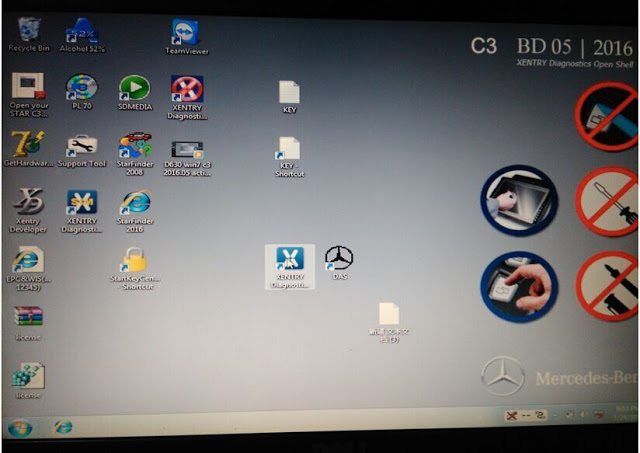
I now had VMware running with image of from an IBM ThinkPad that was preloaded with a several different programs on its desktop that I have never heard of. One of these programs was Xentry another was DAS as well as a few others. I included a snap shot of the screen so you can see all what it came with.
I first clicked on the Xentry I-con, but it would not load. I then tried the DAS I-con and waited. This is the frustrating part, this software runs VERY slow and took nearly 8-10 minutes to completely load. Maybe my computer is just very slow or maybe I need more memory, I don’t know but eventually it was up and running.
Hooking it up to the car:
Once the software finally loaded I connected the 16 pin cable to my CAN port under my dash, and the serial connector to my tablet PC then turned on the ignition of the car. I followed the menus and chose the type of car, etc. Unfortunately it would not auto detect my car. I don’t know if this was just my car or if it’s a bug in the software/hardware. My car had a lot of electrical and computer issues that the mechanic told me about, which is why I decided to buy this thing since I already spent $5k for him to fix most of the problems. So it could have just been a problem with my car not allowing it to auto detect, I couldn’t tell you.
This really wasn’t a big deal. The software simply took me through a few questions to manually select my exact vehicle model.
After a couple of minutes I was finally connected to the cars computer systems. The main menu had a few different choices, but I found the “Start quick scan” was the best option. Unfortunately there is nothing quick about this. The whole scan took a good 10-15 minutes to complete. I started having low voltage problems from the car since I had to have the ignition on and the door open during this whole process. This actually cased more false codes and problems so I recommend that you start the car and let it idle during this whole process. You could probably hook up a battery charger, I didn’t try that but will next time since the engine started getting kind of hot idling there for a good 40 or so minutes while I was doing all this.
Once it was finally done it came up with a long list everything in the car. At the end of each line it had a status of either an “f” or an “i” or and “E” or a check mark.
I was not familiar with software at all, so I played around with it a bit and tried hitting the green checkmark button on the ones that had an ‘f” this did in fact bring up another screen that allowed you to view the fault codes and erase them if you wanted to.
There is also an option on the main screen to erase all codes. It doesn’t tell you that it’s all codes but I’m pretty sure it is. Unfortunately it only clears most of them and you may still have to go into each one manually and clear them or check them to see if they’re current or just stored.
After playing with this software a little more I found that there are actually some trouble shooting steps assigned to each fault codes. I’m sure this makes it much easier for a Mercedes tech. If you select the fault code then hit the green checkmark this should take you to the trouble shooter. I think you may have to hit the magnify glass button at some point, I can’t really remember.
There is going to be a learning curve here and you’ll soon find out that if you back to far out of certain screens you have to re-scan or after you leave the main screen you loose the option of clearing all the codes without a re-scan. It can be a little frustrating at first, but after a while of playing with the software and after several beers while waiting it started to come into play.
So I starting checking out some of my reoccurring fault codes, but wasn’t sure what was real or just logged from an old occurrence so I deleted all the codes, then did a re-read again. A couple of the codes kept coming back as “f” but I expected this. I’m having an SRS problem that I’m trying to trouble shoot. When I finally got into the SRS code that kept reoccurring I learned that the software is in real time. Meaning that you can actually see the screen change if you fix the fault or re-cause it. Very cool!
So this is about as far as I got with the DAS software.
Right now I have 4 codes relating to my SRS system that I’m trying to clear up so I can get rid of the pesky SRS light and finally get the SRS system fixed.
The DAS software gave me a component number and a code which I am now trying to trouble shoot. This is where the other software comes into play. Keep reading…
The StarFinder software:
This software is ultra cool!! Again there was a bit of a learning curve but it didn’t take me too long to figure it out enough to find what I was looking for.
With this software I was able to type in the fault code that the DAS gave me and it popped up a schematic with the circuit of the part. You can then click on the diagnostic button to find out what it is and how to test it. Here is the really cool part!… When you click on the Star Finder button it brings up a list of all the fault codes or you can do a search and type yours in. Once you click on your fault code it brings up a series of actual pictures of the car of where the device is located and how to get to it. That was just too cool!! The star finder software makes it worth the money alone! Although, I guess it wouldn’t do you any good unless you had the error code from the DAS system. Lol So the two programs complement each other very well.
I think the other programs have something to do with warranty information and data entry by the tech while he’s working on the car. Which really makes me think this is an actual image of a complete hard drive from a service shop that seems to be cracked. Hey, at least it works!
So in conclusion the Chinese system I ordered for $450 was a great deal and works great! The car I used it on was a 2006 SL500. I also tried it on a 2001 SLK320 and had success with that as well. The VMware image thing was kind of odd but seemed to work just fine. My only complaint was that it was very slow. The system might run faster and better on an actual IBM ThinkPad but for what I’m doing, this setup works just fine. Just have a 6 pack of beer handy because you’re going to be doing a lot of waiting on the system to boot and load.
I hope this helps anyone who is thinking about buying one of Mercedes Star Diagnostic. I got mine for a total of $450 shipping included from obd2tool.com. I have done a lot of research and I highly recommend buying from these guys. I think it’s worth the extra $10-$20 over the cheaper site that I found. I promise I am in NO way affiliated with these guys what so ever. I am just a truly satisfied customer.
I recommend you emailing them first and telling them what computer you plan on using it on and what operating system and whether you have a serial port or not, etc. I’m not sure if it works on windows 7 or not. Also make sure you have at least a gig of RAM on the system you’re planning on running it on. It will not load with anything less.
Here are some screen shots from the software. I apologies but I didn’t get any photos of the unit or cables but you’ll just have to trust me when I say that everything looked even better than the photos they advertise on their site. Everything looked like really heavy duty good stuff. Nothing looked cheap at all!
Thursday, October 26, 2017

Star C3 Part D & New MB W222, W217, W205 etc (Discuss)

A good thread with posts: Part-D MUX (a.k.a Star C3) and W222/W205...
 
c3-1
 
Hey dears

perhaps some of you have some insights on this: While we all know that the new model series like W222, W217, W205 etc have on board ethernet routed to the OBD socket, and the Benz diagnostic tool SDConnect is Ethernet/DOIP capable, the diagnosis still seem to be fully possible via D-CAN (pins 6,14 on the OBD socket). For instance, third party tools like BOSCH KTS and the BOSCH CDR (that we use for pulling crash data) do not communicate over Ethernet, they connect to several modules (well some 70% of what is in the car due to 3rd party limitations) via CAN, and they do it allright.

So what is the real reason for Part-D mux not communicating with these model series, could this be just a planned "programmed obsolescence" so the old units get retired faster than they really should?

Perhaps it would be possible to edit vehicle definitions so the old communication platform would still serve for these cars?

I have several Part D muxes, some original, some clones, and some of them work really, really reliably. Learning that purchase of a cloned MB Star C4 that would be as reliable as this is next to impossible, i am thinking about possible workarounds. Since it does not look like actual communication architecture limitation. Anyone?

 RE: Part-D MUX (a.k.a Benz star c3) and W222/W205...
There is nothing planned it is simply technology development. In time when was used PartD there was no ethernet/DoIP in the cars so was not needed have this technology in diagnostic device. Then came new technology and was build new communication hardware. For new technology is needed new technology that′s all. It is the same like car from year 2000 and car from 2015.

RE: Part-D MUX (a.k.a Star C3) and W222/W205...
The only thing is, that Part D is not supported in newer Xentry and Vediamo or dts monaco software.
This part would work also with the cars for CAN Bus only.

RE: Part-D MUX (a.k.a Star C3) and W222/W205...
  (10-05-2017 12:45 AM)laco210 Wrote:
    There is nothing planned it is simply technology development. In time when was used PartD there was no ethernet/DoIP in the cars so was not needed have this technology in diagnostic device. Then came new technology and was build new communication hardware. For new technology is needed new technology that′s all. It is the same like car from year 2000 and car from 2015.


Well that would be true if the newer vehicles would run ONLY in the DoIP mode/lacking CanBUS. But actually they DO have ordinary can BUS and even the documentation (WIS) states, that the diagnostics still take place using the D-CAN!

But guess what. We never know until we test ourselves.

I did a little experiment. I have installed a VOLVO DICE (capable of being a J2534 pass thru) drivers and configured that in Xentry (using the provided ptd_select program). Result - fully running diagnostics on a CAN (YES IT IS A PASS THRU CAN because DICE can't do DoIP) on a 2016 S-Class.

I will test more interfaces and report. If that turns to be sufficiently reliable, i will stick to it and forget about other interfaces.

RE: Part-D MUX (a.k.a Star C3) and W222/W205...
Most of our SDconnect tools are not DoIP capable but can still do W222 and similar MB models. That is for the diagnostics tasks. They cannot do Telematics updates or similar that run through the IP port.

The issue with C3/PartD and these new cars is not CAN but support for UDS protocol.

RE: Part-D MUX (a.k.a Star C3) and W222/W205...
(10-05-2017 08:42 PM)DBmhh Wrote:
Most of our SDconnect tools are not DoIP capable but can still do W222 and similar MB models. That is for the diagnostics tasks. They cannot do Telematics updates or similar that run through the IP port.
The issue with C3/PartD and these new cars is not CAN but support for UDS protocol.

That would make sense and perfectly explains why i am getting full diagnostics using Volvo interface in J2534 mode that has CAN but also supports UDS (in fact, isn't it rather a feature of the driver than the box itself?)

Anyway, quite happy with what i;ve found and if anyone's interested i will give info on what tools, versions, setup etc was used to make this work.

RE: Part-D MUX (a.k.a Star C3) and W222/W205...
(10-05-2017 08:42 PM)DBmhh Wrote:
The issue with C3/PartD and these new cars is not CAN but support for UDS protocol.

Bud, D3 supports UDS protocol. For example Sprinter 3 up to 2014 model year. Delphi CRD2 is UDS.
(10-04-2017 11:02 PM)mikepl Wrote:
Hey dears
So what is the real reason for Part-D mux not communicating with these model series, could this be just a planned "programmed obsolescence" so the old units get retired faster than they really should?

The only reason is that MB discontinued its support.

RE: Part-D MUX (a.k.a Star C3) and W222/W205...
(10-08-2017 08:59 AM)efka Wrote:
Bud, D3 supports UDS protocol. For example Sprinter 3 up to 2014 model year. Delphi CRD2 is UDS.

"Supports UDS" or "only UDS"? Why does C3 not talk to a 2014 Sprinter CDI control unit when it does talk with the rest of the car?

How did you check C3 supporting UDS and really talking to the control unit with the UDS protocol? The control unit most likely accepts both when the 2014 only accepts UDS.

RE: Part-D MUX (a.k.a Star C3) and W222/W205...
The only difference PartD has no DoIP.
All other ECU protocols are supported.

Saturday, October 7, 2017

MB Star Diagnostic Tool series

MB STAR Diagnostic Tool series are the Mercedes-Benz approved dealer diagnostic systems for troubleshooting and programming.

MB Star diagnostic hardware:

MB STAR series now includes: WIFI MB SD Connect Compact 4 system, Super MB STAR C3 diagnostic system, MB Star C3 multiplexers (best quality, best price and C3 pro with 7 cables) and MB STAR Compact 4 system.
http://forobd2tool.com/wp-content/uploads/2017/07/1/18-1.jpg
All Star diagnostic system will do  Mercedes Benz 1989~up to now Car, Bus, Trucks, Sprint, Smart  (expect SP45-C best price MB STAR C3)

MB Star C4 is the newer Star system for newer models and support Mercedes with UDS protocol. SD Connect supports offline/online programming and Vediamo engineering software as well. Super MB STAR is the only Star tool that can be updated online.

Star diagnosis software:
All MB STAR Diagnostic systems come with multi-language basic software applications.

1.D-A-S / Xentry: the automatically Diagnosis Assistance System, Concise interface and straightforward operation with IB M high-quality computer can realize the quick and accurate code reading and the whole car system testing

2.W-I-S net: Workshop Information System Supply the whole view of the wiring diagram in a car, component location diagram and maintenance method. What you do is to enter the chassis number, and then you will get the manufacture data, engine configuration and the car model -all in detail.

3.EPC.net: Electronic Parts Catalog

4.ST Finder: Part location finder

5.STARUTILITIES: the movement management system and self-test

6.SDMEDIA

7.PL69
http://forobd2tool.com/wp-content/uploads/2017/07/1/18-2.jpg
http://forobd2tool.com/wp-content/uploads/2017/07/1/18-3.jpg

Super Mb Star C3 comes with more software programs, including Smart Tan Code, Developer model and Benz Disassembly system etc comparing with other Star systems.

There are basic 3 formats Star diagnosis software HDD: IBM T30 HDD, Dell D630 HDD, and moveable external HDD. Internal HDD runs faster and stable then external HDD. While external HDD can be easily replaced and has no computer limitation (any laptop has COM-PORT)

Review MB STAR C3 XENTRYDAS Windows 10

Like many others I had a long, long struggle getting my Mercedes Star Diagnostic XENTRY-DAS setup working and thought I would share some of the learning to the forum.

There are many non-factory setups available with prices generally ~$600 for a C3 Star Multiplexer, cables, Dell 630 (built-in RS232 port), already loaded HDD. I didn’t want to spend that much and shopped on-line acquiring an external USB HDD with 05-2015 software and VMWare loaded. I acquired the Mux from NaHai Tech. Apparently these Multiplexers are Actia derivatives with the same serial number (6511100299), Part D4. I got the RS232 and OBD cables separately from other vendors as well.

I am using a Dell Inspiron 15 laptop with Windows 10.

VMWaredoes nicely run the XENTRY/DAS software on the virtual desktop through the external USB HDD. A variety of keygens are on-line, or through the forums here to get the necessary keys for WIS/EPC/Xentry. (Just having WIS is a blessing!)
Optimistically I connected it all up to the car (2004 W220.170, S430) but did not get the green “Connected” icon in the desk band. Rats. However the SDConnect Toolkit showed the Mux as “Part D” but “no connection”. So at least the computer sees the Mux.

I had read all the caveats on the forums about RS232 cable type, setting COM Port 2, setting low serial bit rate, fake RS232-RS485 modules on the serial cable, and that engine diagnostic tool C3 Part D is unsupported post 09/2014.
I started troubleshooting with the USB RS232 cable and tried one with FTDI and one without. To be certain they were communicating through VMWare I connected each to the serial input of an old IBM w/ serial port and used serial bus comm software to send/receive data from each computer. So I know either cable will work (if sometimes temperamentally). My version of VMWare Workstation (10.0) requires a “Removable Device” (which can be a thumb drive if you want to import data, or the DVD drive, or USB cable) be selected from a “VM” menu drop down. Its imperative that VMWare recognize that you want to disconnect from the host and put a check-mark by the device listing after the dialog comes up asking permission. Likewise when if you switch to the host (ie Win 10 in my case) the device (i.e. USB serial cable) won’t be available unless you disconnect VMWare’s use of it.
So the problem must be in the Mux itself or a cabling issue beyond the serial cable. After much screwing around and getting nowhere I finally contacted the vendor through their website contact portal. They were quite responsive and helpful. The HDD came with TeamViewer and so one night in the wee hours I setup the system and after several hours (arg!) the Chinese tech operated Teamviewer and evidently changed some Config settings. The green comm light came on the deskband!! Eureka. Short lived. When I restarted VMWare nothing worked again. NaHai said it must be a software problem, to purchase a plug-in HDD from them. With so much time invested I decided to get another C3 Mux and RS232 cable, from Obd2tool.com this time, the problem must be with one or the other. Shipping was quite fast actually and in a week or so I had the new setup ready. While waiting I investigated the Mux internals for bad solder joints and mapped the pinouts of the serial cable. I’ve worked with RS232 and RS485 in the past and this wiring is non-standard, to my head scratching.

With the new Benz diagnostic tool C3 Mux and new RS232 (but theirs comes with a converter box RS232-RS485, and it has internals) I connected it with my VMWare setup and it works! I can operate Xentry and diagnose the problems with my car – and there are several.

I tried the original Mux too and it works fine as well.
Patience pays. The supplier’s directions for setup and operation of this complex system is lacking. And it is, as everyone has commented many times, a very complex set of electronics and software!!! But anyone with an older Benz and limited budget (i.e. why not buy a new Benz if the budget isn’t limited!) will treasure the XENTRY/DAS‘s abilities and save a lot more money in the long run.

Tuesday, September 26, 2017

MB STAR C3 Xentry Error (1.3)-3.515.2019 (Solved)

18-2
Troubled with Xentry Error (1.3)-3.515.2019 for a few days. Tried lots of ways from Obd2tool.com but didn’t work. Then finally talked to the people work for mbstashop via Facebook. Work OK!! Send my case to them and write this review for mbstarshop to express my gratitude.

Tools used:
Mb Star C3 multiplexer with Xentry
Dell D630 Laptop
Mercedes-Benz C220 W203
Xentry Error (1.3)-3.515.2019 background information:
connect the vehicle with multiplexer and start my Dell D630. When the multiplexer is not connected to the computer, This task list is displayed
18-1
Then connect my computer to the Mercedes Benz Diagnostic Scanner c3, the task list will change now.
18-2
start the program Xentry.
18-3
choose the vehicle brand Merzedes and vehicle model: C220 W203
18-4
18-5
start the car’s ignition and then open the Diagnostic Program
18-5
18-7
the vehicle is not even recognized by the XENTRY
18-8
manually select the vehicle
18-9
choose a short test from the vehicle
18-10
vehicle data are determined and lessen
18-11
Not all ECUs can be found there. The controllers found but can not be processed. Also when I select the ECU itself without a short test, I get this error (1.3)-3.515.2019
18-12
In short, Once the vehicle is plugged in and I try to read out the fault memory, I get this error message number (1.3) -3.515.2019. I cannot find all ECUs.

Easy but useful solutions:
just modify the date and time of your computer
make sure that is the current date and time
Done!!
(Many thanks to mbstarshop technicians)

Wednesday, September 20, 2017

Some solution to solve MB Star C3 problem

One of obd2tool.com customer had the “simdas.exe needs to close” and WIS error when running Mb Star C3 pro red multiplexer 2015.12V Dell format DAS.
Problem 1:
I had the these errors when i run MB Star diagnosis DAS:
1) simdas.exe has encountered a problem and needs to close. We are sorry for the inconvenience.
MB-star-c3-sim-error-1
MB-star-c3-sim-error-2
2)The WIS is not available for this system
MB-star-c3-sim-error-3
Cause:
Improper operation
Solution:
1. simdas.exe error: You should enter DAS but not SIM software to troubleshot Mercedes
2. WIS error:
You entered WIS from DAS directly. It was incorrect. You should start WIS from desktop.
A Mercedes Benz W212 2010 with VIN 2120891A208054 owners had the problem when diagnose his model with original MB Star C3 scanner. So he consulted obd2tool.com technician.
Problem 2:
He has got the original Benz star c3 (with original 2013.09V Star diagnosis DAS/Xentry SSD) multiplexer to diagnose and program his model. But the software pops up an error message “ZGW is not answer”. He then contact obd365 technician if it is Ok to buy the latest 2015.12V DAS/Xentry for MB Star C3 to work on this model.
Solution:
Sorry, for MB newer model, your W212 included, you should go for MB SD Connect C4 diagnostic system with newer software version. MB star C3, even original one is too old to diagnose these newer MB STAR Diagnostic Tools.