Monday, May 17, 2021

How to use MB Star C5 hard disk and how to update Star C5

MB Star C5 moveable hard disk is used for containing Xentry DAS, please do not use it as a computer system hard disk.

Here two tips to follow.

Option 1. you use C5 disk on your own computer. Tip: advice you not rework it or dismantle it and plug it to the computer to modify the data.

Option 2. you buy the extra computer together with Star Diagnostic MB Star C5, then you are advised to prepare one blank hard disk for system installation because the computer you bought doesn’t come with hard disk.

How-to-use-MB-Star-C5-hard-disk-and-how-to-update-Star-C5-1

How to update DoIP Xentry Connect C5?

Usually you are required to send back the MB Star C5 hard disk for update unless the engineers can make out the updating software for download.

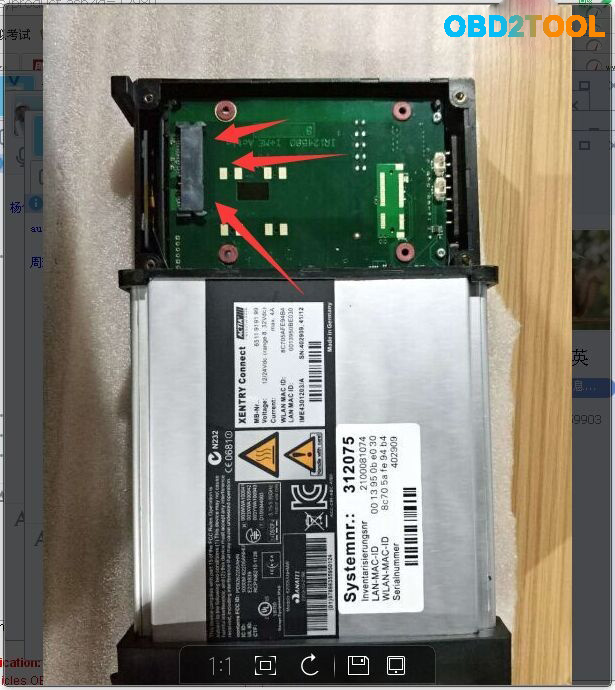
Attach one picture which shows the hard disk location in the C5 mux.

How-to-use-MB-Star-C5-hard-disk-and-how-to-update-Star-C5-2

Sunday, May 16, 2021

mb sd c4 xentry data can not save? how to solve?

The MB SD C4 i bought can not save the xentry data, each time i need to reactivate it and then paste the code again, it is too much time-costing.

i chat with chinacardiags.com online services, chat with seven, and she helped me to solve the problem.

Just share with you.

Firstly: find  the directory:  C:ProgramData/LicDir and then delete the other files except:

only keep the three files,

and  secondly activate the xentry by yourself with keygen or send to seller’s Email: sales@obd2tool.com to get activation code to activate it.

thirdly: go to  C:ProgramData/LicDir and find the data lic_key_2.dat, copy it and paste it, and then rename the file to  lic_key_2.x4711.

and then click it yes. and right click it and make it as read only.

Saturday, May 15, 2021

Tips on Sdconnect C4 WIS EPC activation

I have mb Sdconnect C4 to activate code for WIS, EPC, xentry and dts Monaco, and then contacted obd2tool.com engineer and they said ” You can send the activation id to calculate the password, or send it to teamviewer to activate the software for you remotely”, then they connected with teamviewer for Activation code for WIS and EPC, but for some reason hardware id changed (Lan Id is different. Probably because WiFi is on) and then Xentry doesn’t start.

wis-epc-activation

obd2tool.com engineer replied me:

Follow the steps below;

*   Delete the lic-key2.dat file under the C drive directory

(C:/Programdata/LicDir)

*   The activation code of xentry is still deactivated by the one given to you before, and then a new lic-key2.dat will be generated under the C drive directory (C:/Programdata/LicDir)
*   Copy a copy of lic-key2.dat, change the copy to a lic-key2.x4711 file, and then set the file attribute to read-only

Update!

Everything ok now. Xentry,Wis and Epc starts. Know i have to test the Sd connect C4 to a car.

Many thanks for their professional after-sale service.
loading..

Friday, May 14, 2021

MB SD C4 EWA Local Host Cannot be reached

Problem:

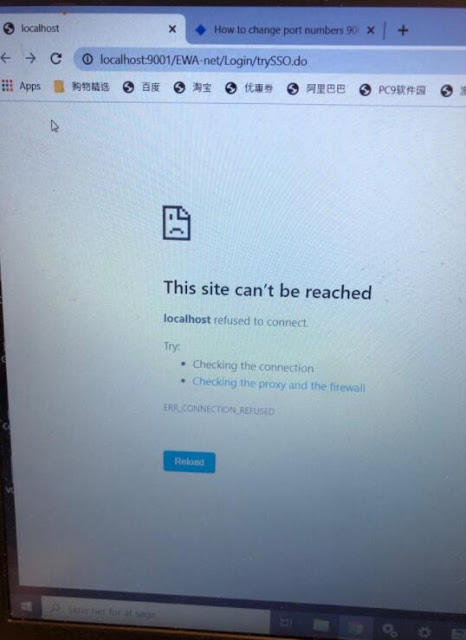
I tried to enter local host in MB SD Connect C4 EWA software program, it failed me and reported error “This site cannot be reached”
mb-sd-c4-ews-This-site-cannot-be-reached-1

Solution:
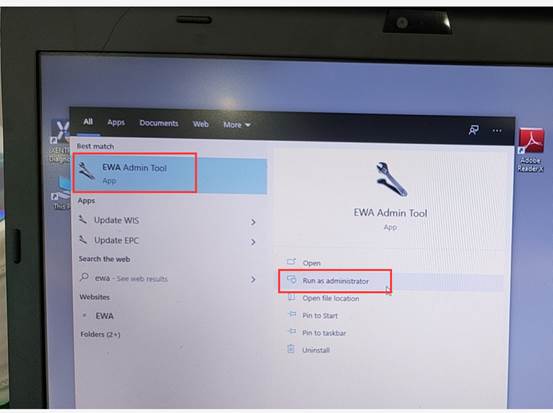
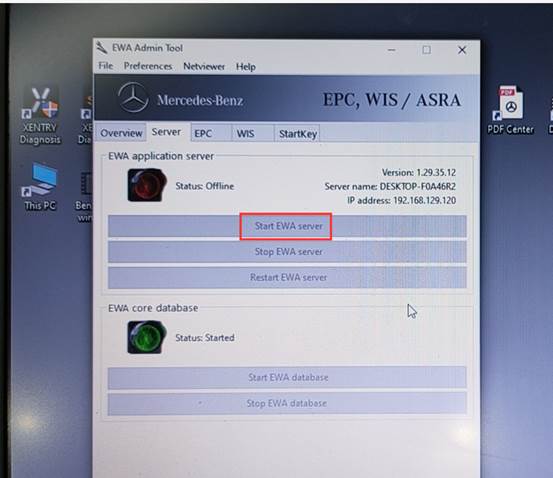
Press windows icon on the tool bar. Find EWA program
Right click to open EWA as administrator
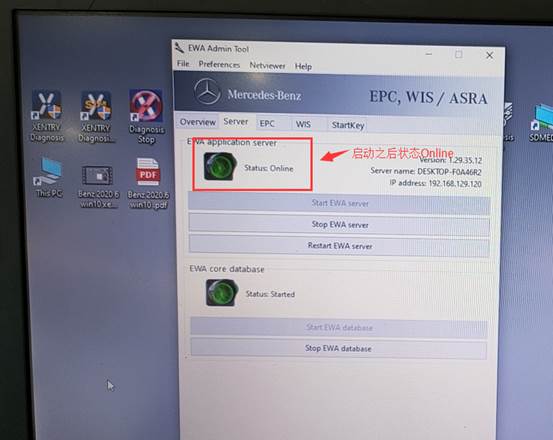
Then Started EWA server
It will show online status if it is working.
mb-sd-c4-ews-This-site-cannot-be-reached-3
mb-sd-c4-ews-This-site-cannot-be-reached-4
mb-sd-c4-ews-This-site-cannot-be-reached-5

www.obd2tool.com
loading..

Tuesday, March 30, 2021

MB Star C3 Xentry Fault(1.2)-2.503.13003 Initialization failed


Files c32s.dll and CAL 872 fix can solve Xentry/DAS Fault(1.2)-2.503.13003 “Initialization of diagnosis multiplexer failed”, said users with Chinese MB STAR C3 diagnostic tool.

Multiplexer:
Chinese MB Star C3

Error message:
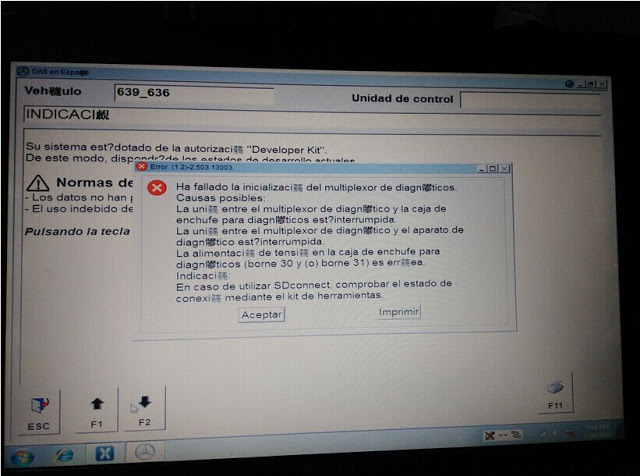
“Fault(1.2)-2.503.13003
Initialization of diagnosis multiplexer failed

Possible causes:
The link between the diagnosis multiplexer an the
diagnostic socket is interrupted
The link between the diagnosis multiplrxer an the
diagnostic unit is interrupted.
The voltage supply at the diagnostic socket (circuit30
and(or) circuit31)is fault.
Note:
When using SDconnect, check the connection status
using the Toolkit. ”

xentry-fault-1-2-2-503-13003-1
xentry-fault(1.2)-2.503.13003-2

Analysis from OBD2TOOL engineers:
“your STAR C3 mux is not connected in a proper condition. Check the connection first, with your car and laptop”

Disclaimer:
Solutions below are offered by users. TRY ON YOUR OWN RISK.

Solutions from ZCC
Software version: DAS 07/2011
Free download c32s.dll & CAL 872 fix (872 fix is copyrighted)

https://mega.nz/#!pkli3YIL!B6v0QFmLxFjb30N_VyoxNPizAnA_bkwqKRY8b1QvVJE

Finally I solved this problem.
It was really a complex combination of faulty hardware and software. I had a problem with that annoying c32s.dll file. I replaced it with the original 01/2011 one plus I used CAL 872 fix version 2 for DAS 07/2011 onwards. Only the c32s.dll solved the problem.
Solutions from fadiboujaoude
Software version: Das Xentry 01 2012
Free download oldc3.rar:

https://mega.nz/#!481xWILD!ZdYpw60KKfa5MkbmVnuUAFXQW5EFQNQf0TEVdcAt6hg

Solved my problem with the following tips…

download and set the das32R2(032012)
2. get the c32s.dll of das xentry 01 2012 and replace the existing one in F:/programme/Das/Bin
3.replace the HHTWin.ini located in c:\Windows :
(Copy And paste the lines below And exit and save HHTWin.ini File)
[STARTUP]
DX=515
DY=510
X=110
Y=0
BACK=21
SLAVE=PARTD2
DEBOUT=1
DEBLVL=6
SPC=02
SPCN=02
SPCP=02
SPCD=02
SPCV=02
[STARCONF]
BMPPATH=C:\USERDATA\Docs\HHT\
MAXFILES=200
DEBOUT=1
DEBLVL=6
[Debug]
HHTWIN.exe-modpath=F:\PROGRA~1\HHT\PKW\
HHTWIN.exe-szIniFile=C:\WINNT\HHTWIN.ini
HHTWIN.exe-lpszCmdLine=
HHTWIN.exe-Parameter=Inifile
HHTWIN.exe-szParamsPath=C:\userdata\CSD\Writefil\HHTWIN_Params.ini
HHTWIN.exe-CmdParams=
HHTWINX.DLL-modpath=F:\PROGRA~1\HHT\PKW\
HHTWINX.DLL-szIniFile=C:\WINNT\HHTWIN.ini
4.search on this forum for the file oldc3 … extract it .. then run it..
5. Done
this is the only way i got my DAS to read my multiplexer

Wish this help!

(PS: sorry for that i didn’t mention all the authors which i read their threads and posts but this because i read a lot and i did many and many tries to finally have the solution)

Wednesday, March 3, 2021

MB SD Connect C4 Software Problems and Solutions

V2021.3 software works with MB SD Connect Compact 4 for the latest Mercedes Benz cars and trucks, incl. new car of B 246, CLS 218, SLK172, etc. Have collected some common errors received from customer recently, and offer the corresponding solutions here.

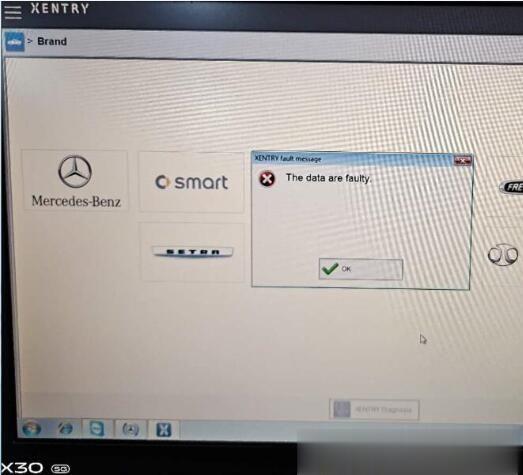
Error 1: When you run 2020.03 Xentry software with MB SD C4, the following error will be reported “The data are faulty” and cannot do any function.

MB-SD-Connect-C4-Software-Problems-and-Solutions-1 (2)

Solution offered by obd2tool.com engineer:
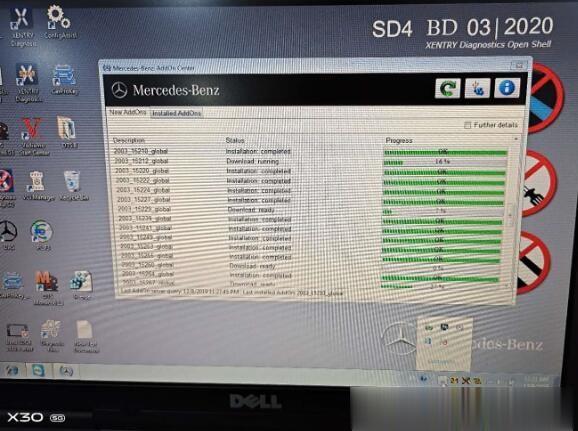
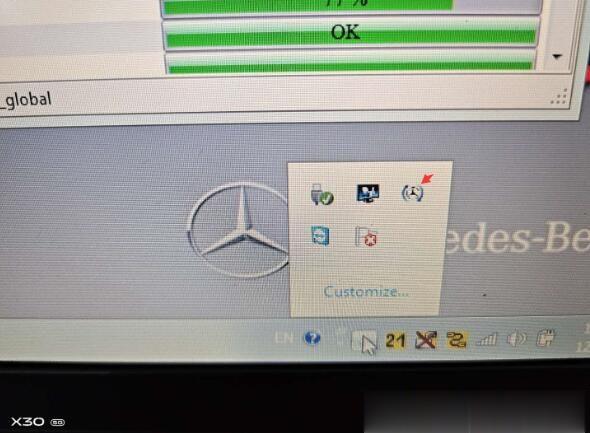
Caused the error reason: Click the upgrade icon as shown in the figure below.

MB-SD-Connect-C4-Software-Problems-and-Solutions-2 (2)
MB-SD-Connect-C4-Software-Problems-and-Solutions-3 (2)

The solution:
1. Please don’t click the upgrade icon, otherwise it will update.
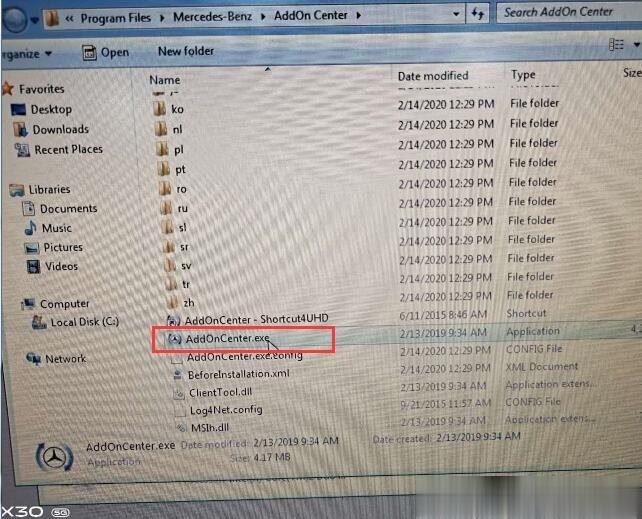
2. Change the file name “AddOnCenter.exe” to “AddOnCenter.ex_”, then it will not update automatically. After modifying, restart the computer.

MB-SD-Connect-C4-Software-Problems-and-Solutions-4 (2)
MB-SD-Connect-C4-Software-Problems-and-Solutions-5 (2)

3.Free download the following link to fix.
Xentrypatch202003: https://share.weiyun.com/5uIxwgI
Password: eswr9a
Size: 2GB
Security: No risk!
4. After installing the Xentry patch to fix the error, please restart the computer and run Xentry software again.

For your convenience, here is the video of how to fix “The data are faulty” for 2020.03 MB SD Connect C4 software:

Note: The solution above is suitable for 2019.12 Xentry software “The data are faulty” error as well. But the Xentry patch download link is different.

Xentrypatch2019.12: https://share.weiyun.com/5dLTPWG
Password: mlpnqm
Size: 2.02 GB
Security: No risk!

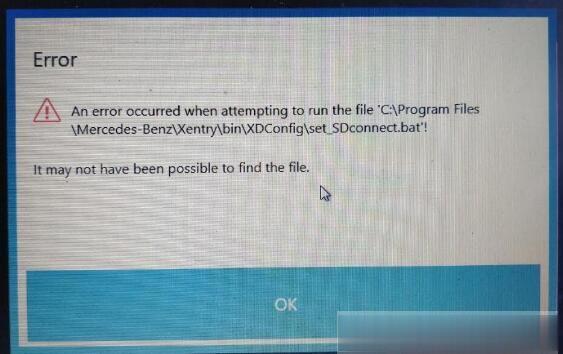
Error 2: When running the file “C:\Program Files\Mercedes-Benz\Xentry\bin\XDConfig\set_SDconnect.bat”, the error message prompts “it may not have been possible to find the file”.

MB-SD-Connect-C4-Software-Problems-and-Solutions-6 (2)

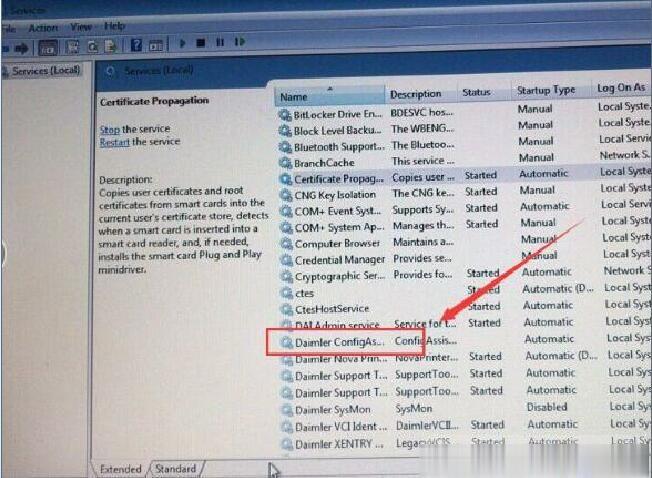
Solution offered by obd2tool engineer:
Please follow the steps below to operate:
1.Press “WIN+R” keyboard shortcuts to open the run window
2. Enter “Services.msc” in the textfield to start the Configassist service

MB-SD-Connect-C4-Software-Problems-and-Solutions-7 (2)

Please kindly notice:
V03.2020 MB SD Connect C4 software cannot support online programming. Please choose software version before 2019.12, such as 2019.09.

To be continued…

Tuesday, March 2, 2021

Star diagnostic clone review

What Is MB Star?

It’s the common name for the set of tools used by Mercedes and Smart to perform all diagnostics and coding.

It consists of a laptop, various pieces of software, several cables and a multiplexer.

Star-diagnostic-clone-review-1

What Can MB Star Do?

You can code keys, activate paddles, activate auto, activate cruise control, turn off all the error lights, read out
all of the error codes, set the clutch, check all systems, actuate everything on the car etc. The list is enormous.

How Much Is MB Star?

Due to the varying prices, I won’t put a figure here as it’ll be wrong next week. Read the rest of the page and
at the base of this page you’ll see a link to who I bought mine from. Click the link and have a look at the prices.

What Software Is Used?

Xentry DAS – Diagnosis Assistance System. This is the main diagnostics software.
WIS – Workshop Information System. This shows you how things are fixed.
EPC – Electronic Parts Catalogue. Lists out all of the part numbers for each car.

They are all handy to have and generally come as 1 package from the seller.

What Is A Multiplexer?

A multiplexer (or mux) is a device that can take several input signals and forward them all down a single line.
Essentially, it takes data received through several pins and transfers it down 1 line
into the laptop for the software to view. There are a few main types of multiplexer

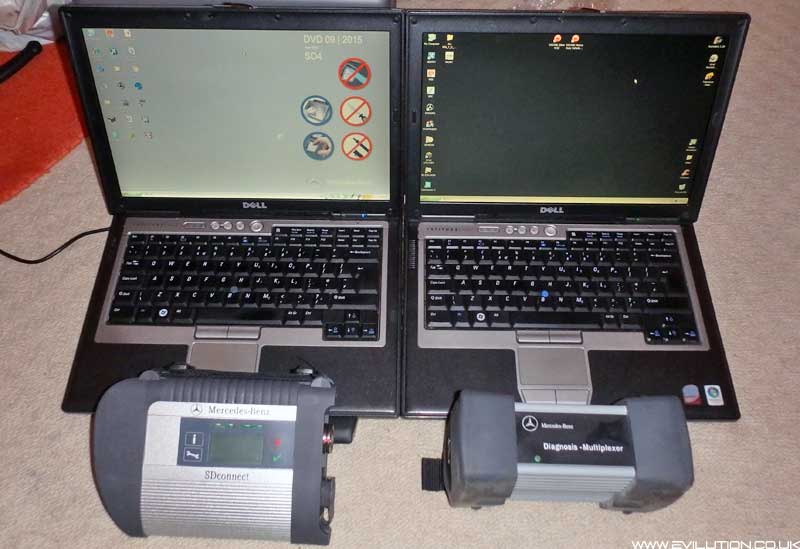
MB Star C3 Multiplexer

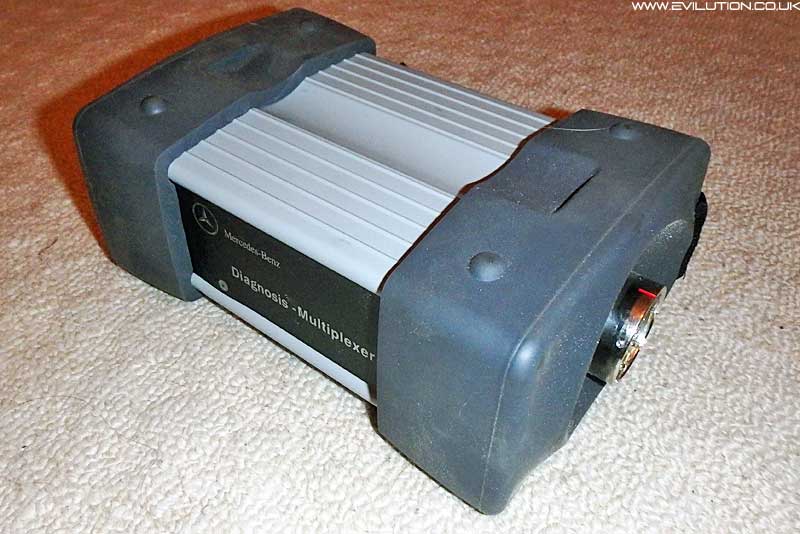
This was the original design from Mercedes. It’s a rubber capped aluminium brick with a connector at each end.
200mm x 130mm x 85mm and weighing in at 1.3 kilograms*. It has 1 LED on the front panel.

Star-diagnostic-clone-review-7

This multiplexer was created to communicate with the CAN bus cars that were being brought out.
It could also communicate with K-line diagnostic cars like the smart 450 fortwo and Roadster.

C4 Multiplexer
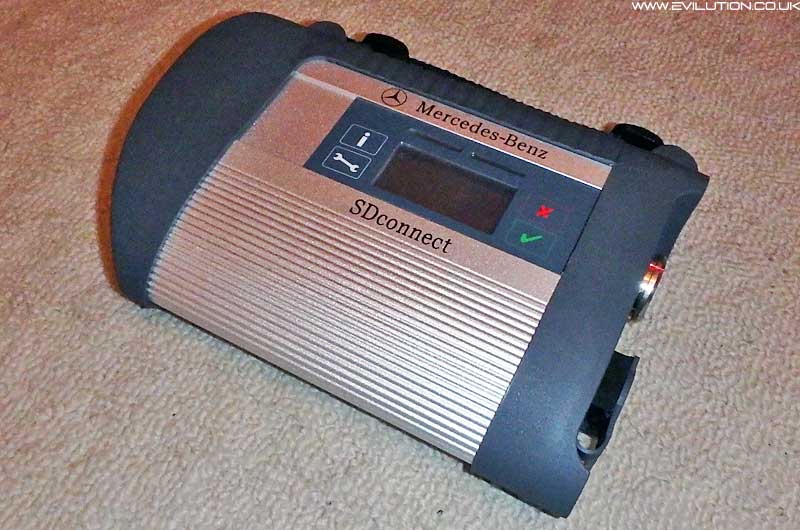
a.k.a. SDconnect

The update was called the C4. An aluminium extrusion with a hard plastic surround and 2 connectors at 1 end.
215mm x 155mm x 50mm and weighing in at 1 kilogram*.

It has 4 LEDs, an LCD and 4 buttons. This multiplexer is wireless between the laptop and the multiplexer.

Star-diagnostic-clone-review-6

This replaced the C3 multiplexer due to an addition of a third diagnostic protocol.
It still covered K-line and CAN bus but now it also covered the new UDS protocol.

UDS is what is used in the smart 453 fortwo and forfour.

*Actual size and weight may vary slightly depending on the manufacturer.

Alternative C4 Multiplexer

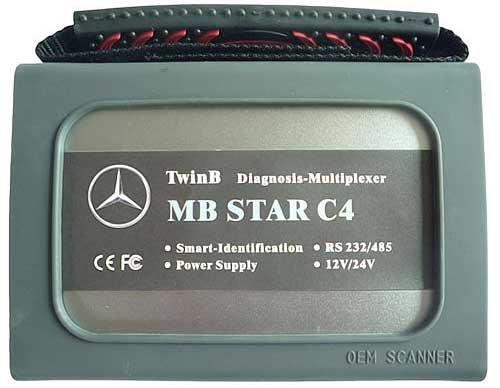
Before Mercedes even came out with the official C4 multiplexer, a Chinese company decided to make their own and attempt to sell it as an update. Steer well clear of this type. They are very unreliable.

Star-diagnostic-clone-review-5

Essentially, it is a C3 multiplexer, made as small as possible using the cheapest parts available.
They were a massive bodge up and they would fail all the time. Don’t buy this type.

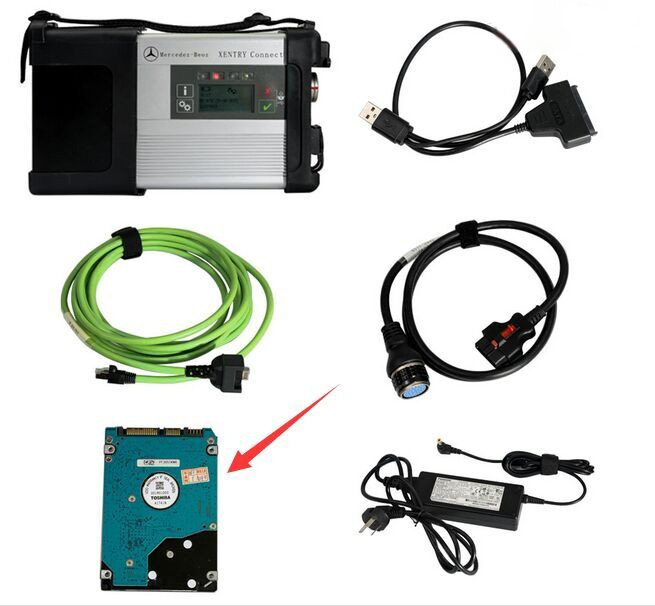
C5 Multiplexer
a.k.a. Xentry Connect

This is the newest multiplexer from Mercedes.

Because it is so new, there doesn’t seem to be any clones of this unit yet.

Star-diagnostic-clone-review-4

I don’t know how this differs from the C4 device but it is required for the new Merc hybrid (W222).

Original Multiplexer Or Chinese Clone?

I hate to be the messenger of bad news but you aren’t buying an official multiplexer for less than about £7,000.
So it’s a no-brainer to get a Chinese clone multiplexer from a reputable company for less than 1/10th of the prce.

Software

The software you get will normally be preinstalled onto a laptop or hard drive for you to install into your own laptop.
Preinstalled is a lot easier than doing it yourself and will save you 2 or 3 hours of installing and messing around.
You will get cracked versions of all of the software that you require. Some companies will also add other software on there too like the TAN code calculator.

Laptop

The original MB Star setup uses an unknown Toshiba touchscreen tablet or the newer Panasonic CF-D1 tablet.
The CF-D1 is very expensive so not worth considering. You could buy 30-40 compatible laptops for the same price.

Can I Use Any Laptop?

You can but you really shouldn’t. I don’t advise it for simplicity sake.

The MB Star software was tweaked to work with 1 specific touchscreen tablet. When loaded onto other laptops, it wouldn’t function properly. Wouldn’t connect to the car, kept crashing and didn’t do what it was supposed to.
This was mainly down to the MB Star drivers controlling the hardware in the computer.

Over time, hundreds of laptops were tested for compatibility but only 2 laptops were found to work correctly.

Dell Latttude D630
IBM Thinkpad T30

The IBM T30 has a smaller screen, slower processor and was launched in 2002.
The Dell D630 has a larger screen, faster processor and was launched in 2007.

As you can imagine, the Dell D630 is the better of the 2 to go for. It’s also easier to find as they aren’t as old.

If you really want to use your own laptop, you can get the MB Star software on an external hard drive and run it all through a virtual machine. This is a terrible way to do it, full of problems and I really suggest you don’t bother.

The Dell D630 can be bought in working condition for around £50. I paid less than £100 for these 2 including postage. The orange top is just vinyl to cover up the scratches on the lid.

Star-diagnostic-clone-review-3

It makes more sense to source your own laptop instead of buying it in a kit from a Chinese seller.
You’ll pay more for the laptop, you’ll pay more postage and you’ll pay more import duty.

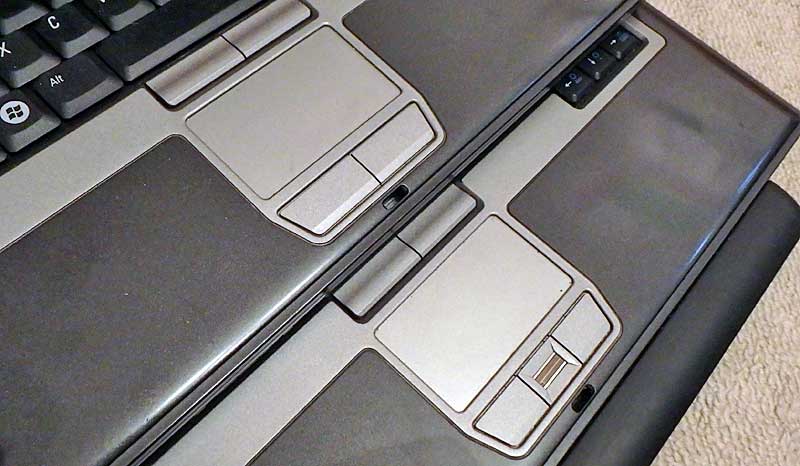
The Dell Latitude D630 came in 2 subtle variations but they both work as an MB Star laptop.
The difference can be seen in the touchpad button layout.

Where Can I Buy These From?

There are countless shops online and 10 times more sellers on Aliexpress who will sell you these items.
However, it’s always nice to have a company recommended that someone has experience with.

Star-diagnostic-clone-review-2