Friday, November 24, 2017

How to recoverreset Xentry SD Connect C5

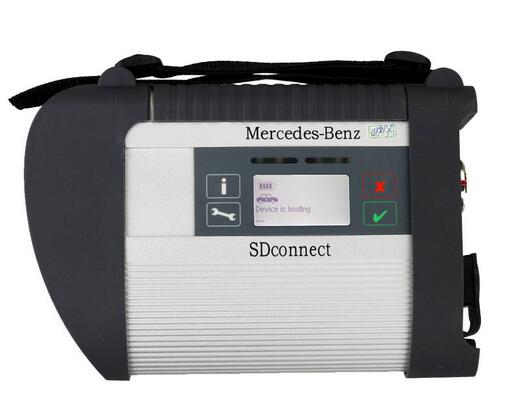
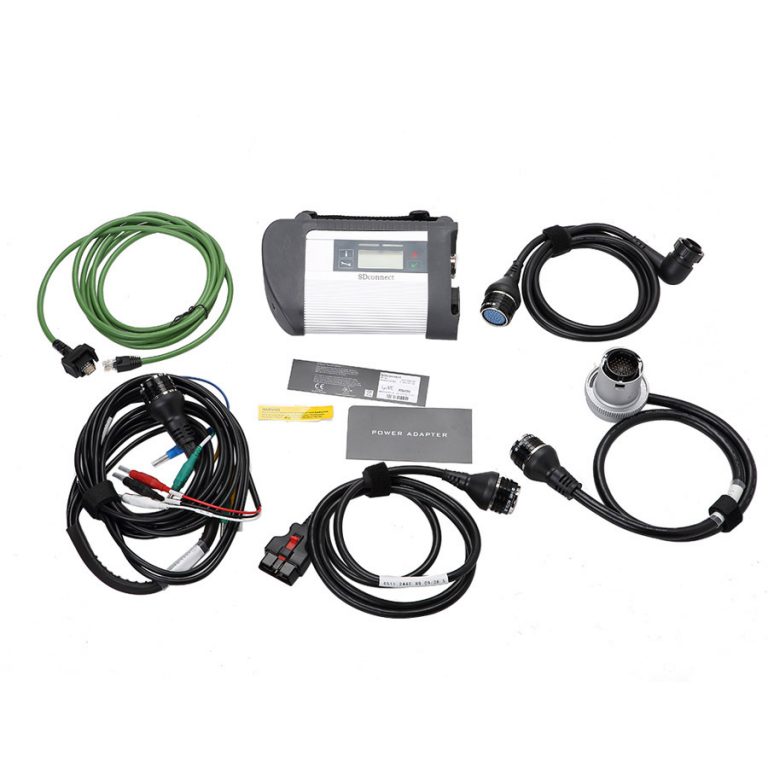
You can recover Benz diagnostic tool XENTRY Connect C5 to factory setting if it not working properly. Here is the step-by-step instruction provided.
XENTRY SDConnect MUX + Panasonic Tablet, check here
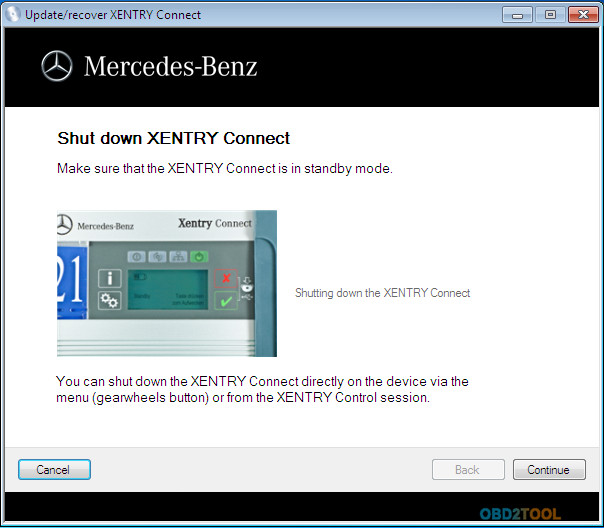
1.Make sure the Mercedes BENZ C5 multiplexer is in Standby Mode. Shutting down the XENTRY Connect.
17-1
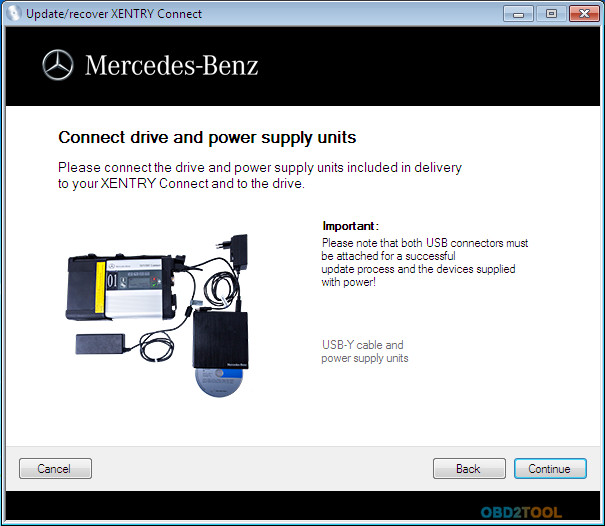
2.Please connect the driver and power supply included in delivery to your Xentry connect and to the drive.
17-2
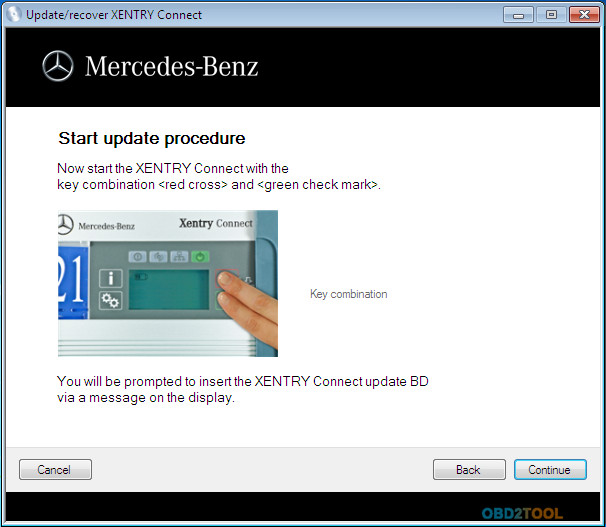
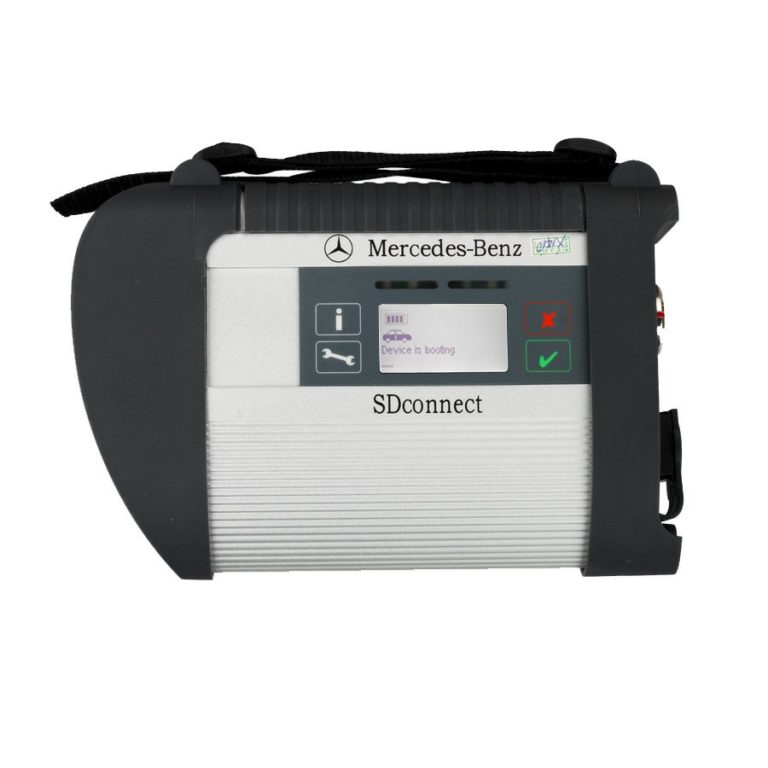
3.Power on the Xentry Connect with the key combination <Red Cross>and <Green Check Mark>. (Follow picture below)
17-3
You will be prompted to insert the XENTRY Connect update BD via a message on the display.
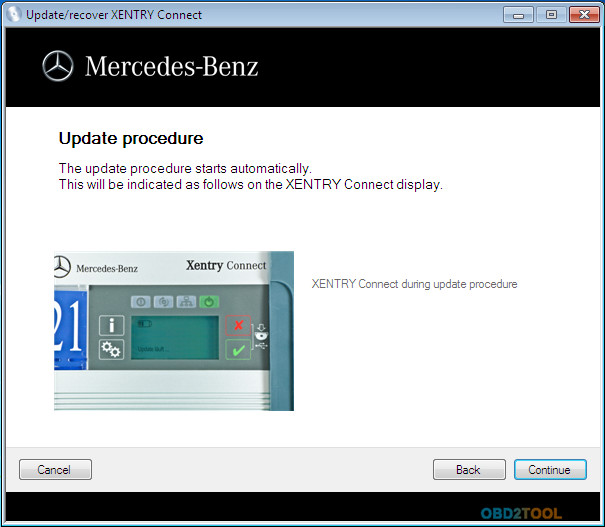
4.The update procedure starts automatically.
This will be indicated as follows on the XENTRY Connect display.
17-4
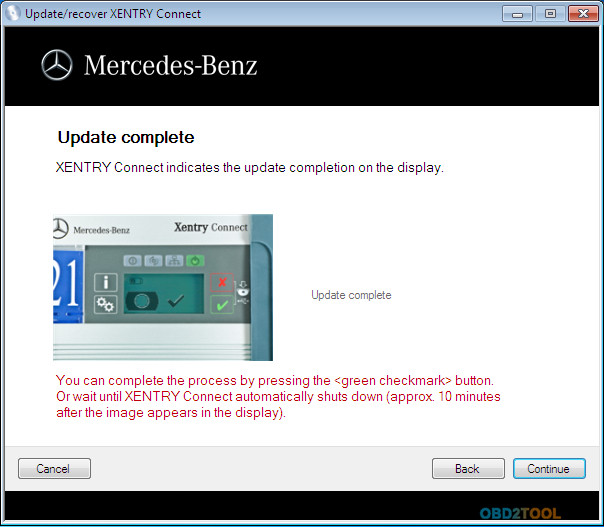
5.XENTRY Connect indicates the update completion on the display.
You can complete the process by pressing the <Green checkmark> button. Or wait until XENTRY Connect diagnostic system automatically shuts down (approx. 10 minutes after the image appears in the display).
17-5
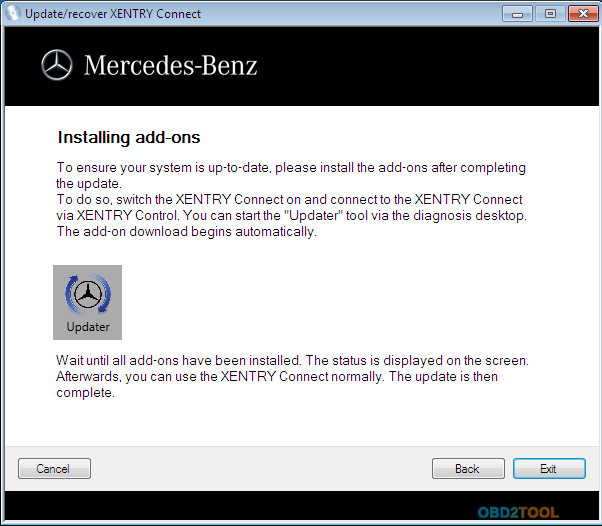
6.To ensure your system is up-to-date, please install the add-ons after completing the update.
To do so, switch the XENTRY Connect on and connect the main unit via XENTRY Control on OBD2TOOL. You can start the “Updater” tool via the diagnosis desktop.
The add-on downloaded begins automatically.
Wait until all add-ons have been installed. The status is displayed on the screen.
Afterwards, you can use the XENTRY Connect normally. The update is then complete.
17-6
loading..

Saturday, November 11, 2017

How to quick fix MB Star C4 Xentry “No more updates” error?

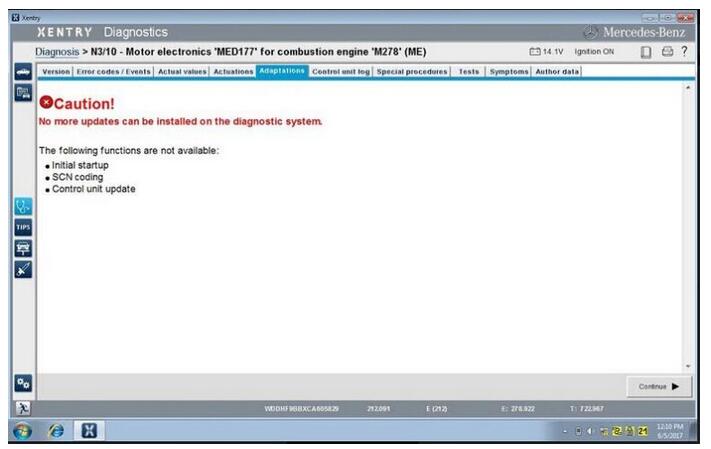
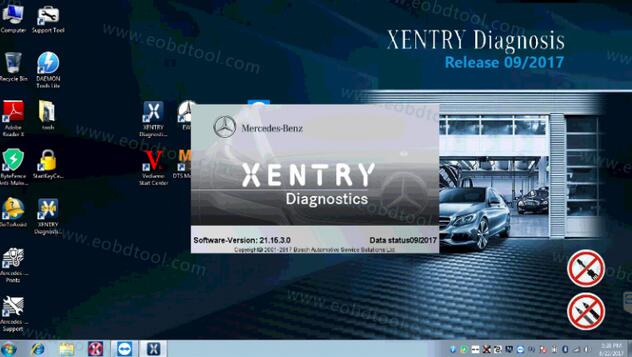
When run 09.2017 MB Star C4 Xentry or other previous versions, the error show “No more updates can be installed on the diagnostic system.”.


What’s the solution? Check below quick fix method!

Mercedes Xentry error when Mercedes MED177 M278 engine for E550 4matic 2012

Xentry error message


The following functions are not available:

Initial setup

SCN coding

Control unit update

12-1

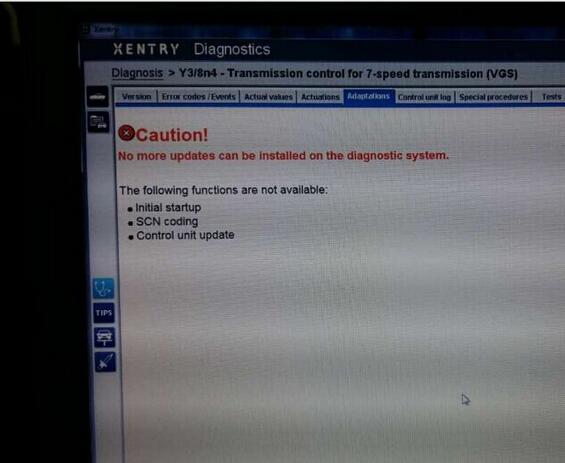
Same error also show when Xentry program Mercedes 7G tronic transmission

12-2

Quick fix method for MB Xentry error “No more updates”

(Tested and given by engineers)

Just download this new Kontexte file and replace the old one

https://mega.nz/#!wh5AxKqJ!VanGy5sXsiaiFG5AXZmJlTLrgXsByBuPDcsdMzIVwR8


The Kontexte file location should be:

C:\Program Files(x86)\ Mercedes-Benz \ Xentry \ Kontexte
And things done!

Now you can run Xenrty software and start again.


Some useful information about MB STAR Diagnostic Tools:

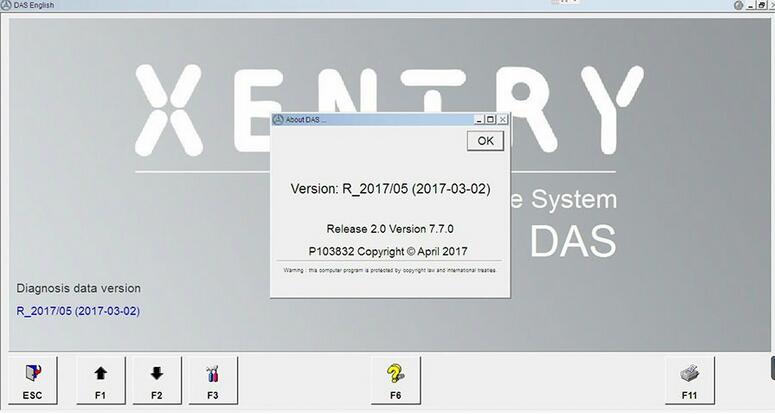
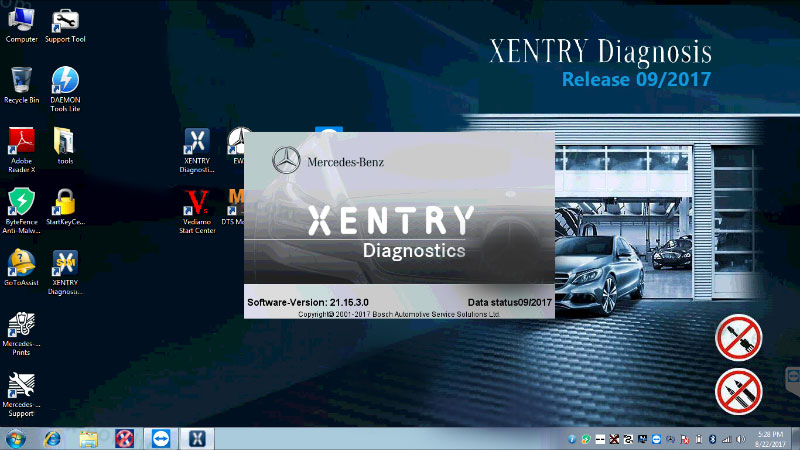
2017.9 MB SD C4 software SSD WIN7

2017.9 MB SD C4 software HDD WIN7

100% tested working stable with SD C4 Connect!

12-3 12-4

Why Choose MB SD C4 from obd2tool.com

MB SD C4 was most popular MB Star Diagnostic Tool, MB SD C4 Multiplexer from Aliexpress is much more cheaper than obd2tool.com. As we all know the MB SD C4 request after-sales service more often than other device. Up to now, there are so many MB SD C4 customer who order from Aliexpress different ask for after-sales service. Such as following case:
MB Star Diagnostic SD Connect Compact C4 MB SD Connect C4 Multiplexer
10-1
Obd2tool.com Kindly note:
1.Obd2tool.com only offer free after-sales service within 1 year warranty for the product order from us.
2.We do not free offer technical support for product from other suppliers, due to the quality different, much MB SD C4 multiplexer can only send back to supplier for repair.
3. If Customer need technical support for your Benz diagnostic tool MB SD C4 Multiplexer from Other suppliers indeed, just pay 39usd for each time, then contact Skype:obd2tool02 for technical support.
Why order the MB SD C4 from obd2tool.com?
1. SD Connect Serial Number 100925(obd2tool.com Kindly note: serial number 101923 or 101044 SD CONNECT may be locked when you update firmware?
2. Star Diagnosis SD Connect C4 firmware update available.
3. DAS/XENTRY Software from obd2tool.com have Blask list path can help sd connect C4 mux avoid locked.
4. Full New Chips layout on PCB board which inlud UDS Chips which support scn online coding via dealer account.
5. All SDConnect will be power on and aging than 12 hours, and it will be tested 3 times with Ecus before shipping
20151029010232 57364 Buy MB SD C4 from Aliexpress or Other Online Shop?
6. Obd2tool.com MB SD C4 Mutiplexer have 1 year free warranty, we offer free after-sales service for device from us under warranty.
More question about MB SD C4 Multiplexer from obd2tool.com just feel free to keep your order number to contact us freely. Thanks.

Mercedes Vediamo Xentry Das Developer Mode User Manual

MB Star Diagnosis Xentry/das developer mode with Mercedes Vediamo for SCN coding no need SCN account. Few Customer inquiry Star Diagnosis Xentry/DAS developer mode Mercedes Vediamo, How to use the Mercedes Vediamo software? obd2tool.com share the Mercedes Vediamo Star diagnosis developer mode user manual as following.
MB Star Diagnosis Xentry Das with Vediamo Xentry/DAS Developer Mode
9-1
XENTRY MERCEDES DIAGNOSTIC SOFTWARE 2017 2 MB Star Diagnosis Xentry/DAS Developer Vediamo Mode User Manual
Here is obd2tool.com Benz diagnostic tool MB Star Diagnosis Xentry/DAS Developer Mode User Manual, incl three part:
What you need for Mercedes Vediamo Xentry/DAS Developer Mode ?
When & why you should use Mercedes Vediamo Xentry Developer Mode?
How to use Mercedes Vediamo Developer Mode step by step?
THE MOST IMPORTANT NOTE: you are trying on your own risk!!!!!!!!
Be very careful when using the Developer functions! Many of them can cause irreversible damage to the components of the vehicle and may cause personal injury! Please be aware that modification to some specific systems (airbags, braking systems) may make the vehicle unsafe for on road use and may violate the local highway laws, rendering the car not roadworthy in the legal aspect.
This is especially true for the SRS modules, where unintentional usage of developer options may cause deployment of airbags/tensioners and other aggressive restraint systems.
IMPORTANT NOTE: what do you need for Xentry/DAS Developer Mode?
– original Mercedes diagnostic tools like Super mb star c3 or HQ clone like SDconnect C4 china clone mux
– DAS/XENTRY with good installation
– a laptop running with Windows XP better
IMPORTANT NOTE: why & when should you use Xentry/DAS Developer Mode?
As a presumed DAS user you have probably learned already that there are number of functions that would logically belong to the software options, but they
are missing from the regular DAS installations. These include recoding (variant coding) the control units without SCNs (Software Calibration Numbers), de/activation of commercially sensitive options (in-motion video of tv/dvd), recoding the configuration of airbag units, seat belt reminders, changing the configuration of instrument clusters, restoring damaged EEPROM contents for Comand/APS and other ECUs and many more. There is also an additional benefit: sometimes control units record a DTCs (error codes) that are filtered out by the production software. Developer kit allows unfiltered view on the module’s error memory, therefore allowing to see all stored trouble codes, including the masked ones.
The reasons for disabling these functions in the DAS setups seen at the dealership are very simple: firstly, risk associated with using them is too high to open these tools to (very often) under trained and rushing technicians; secondly, there are several legal obligations that put restrictions on what the dealer can do and what he can not – for instance, recoding tv-in-motion, airbags and emission-re lated systems fall into this category. Thirdly, electronically damaged components very often result in replacement, therefore repairing (recoding) would have adverse effect on spare parts revenue.
Here is how to : clean ASSYST Plus Memory
Firstly, you need the mentioned Developer key made according to your LAN ID. Before scrapping your old key, take note of the LAN ID (there are some cases when it changes ie. when reconfiguring the hardware) and the current License Key in the DAS. Both information can be found in the licensing menu of Star Utilities. Then replace your current key with Developer key, save and restart DAS. After selection of vehicle class there should be now a new screen (in German, except V-Series and W221 where it comes in English) informing you about dangers associated with using Developer Kit. You are good to go now.
In Mercedes Vediamo Developer mode : (tested version 11-2010)
Steuergerate (Control units) ->F3
Aufbau (Body) ->F3
ZGW (CGW) ->F3
Entwicklungen (Development data) ->F3
Steuergerate – Anpassungen (Control unit adaption) ->F3
Programmieren (Update) von Steuergeraten (Control module programming) ->F3
Steuergerat programmieren (Auswahl) (Program control unit (Selection)) ->F3
Now we have 2 options to flash the ZGW/CGW with, choose the correct one
Don’t panic ! if you choose the wrong file , it terminates process and you can do it over again
Confirm Flash pop-up with Ja (Yes)
After that it says : “Das Steuergerate wurde erfolgreich programmiert”
->”OK” it ask for a reset -> JA (Yes) ->
ECU Reset (FN_ECU_Reset) ->F3 again ->F3
Now you Complete full History wipe
Enable Comand DVD/TV in Motion (W211 W219) and OTHERS
USE THIS TIP WITH CARE AND COMMON SENSE !!! AND OBEY LOCAL LAWS.
In obd2tool.com Vediamo Developer mode :
Audio, Video, Navigation und Telematik ->F3
a screen might pop up with all kind of settings, ignore and press F2
New screen with ESD warning ->F3 COMAND /AUDIO -AUDIO 50 oder COMAND ->F3
Entwicklungsdaten ->F3
Steuergerate-Anpassungen ->F3 Steuergerate-Anpassungen (Variantencoderierung) ->F3
HU Parameter ->F3 scroll down to line: Driving speed is more than 0 kph and
Driving speed is more than 10 kph and BOTH enable them and ->F3 to confirm coding
Now you be able to watch DVD/TV when car is in motion
Uprate the speed limited in a gasoline (ME-series controller) engine control unit
Log on to DAS, connect to the car, select:
Control Units -> Drive -> ME-SFI 28 -> Development Data.
Then select the Control Unit Adaptations -> Explizite Kodierung
This option works quite the same in Diesel engine models, however i found it more difficult to use (quite frequently modules are replying with an error message to the attempt of recoding). I was able to successfully remove the speed limiter on a CDI2 series module from the W210 model and some others as well.
Addrear airbags to the AB control module
Control Units -> Body -> Airbag (AB) -> Development Data -> Control Module Adaptations -> Variant Coding -> Fahrzeugausstatung Kodieren
(the last menu entry can be slightly d ifferent in various module variants)
Select the drop-down list in the field Airbag Hinten Rechts and Airbag Hinten Links – set to YES. Back up to the main Airbag menu, reset the fault codes, cycle ignition, reset fault codes again and cycle the ignition for 2nd time (this step is very important).
Addfog lamps to function as a cornering aid
Select Body, then Driver Side SAM -> Development Data -> Control Unit Adaptations -> Variant Coding -> Abbiegelicht set to ON (“ja”).
Then go to the Passenger SAM (if present, for example in 211/219 model series) and similarly, perform the same coding in the second SAM unit. I have found that quite often cars manufactured prior to year 2003 have the relevant cornering lights option available in the left sam, however right sam is missing it. Not a big problem since these are readily and cheaply available from the second-hand market.
For all the onboard systems to recognize the new function you will also need to recode the CGW or EZS and mark the appropriate factory option in the adaptations.
Hidden error codes
For W211/W219/W230 series with SBC system, go to the Chassis-> Sensotronic Brake Control (SBC) then enter Development Data then call up Fault Codes. Most likely, a car that has been driven for some time will have a code “Event: ABS Bremsung” stored. This Fault/Event is not normally shown in the general menu of DAS – it is being filtered. It actually
does not represent an actual error, just a specific condition (hard braking with ABS activation). You will find many modules that actually filter out some more or less useful fault codes.
This menu is also very useful when evaluating vague fault codes (ie: “Hydraulics fault” in the general version in the developer menu can be drilled down to something more meaningful like “rear left release valve stuck in closed state” – this will come in German though).
Adapting the SRS control unit to a new car (different configuration, different VIN).
First of all erase all present error codes in the unit if possible. If there are current faults the airbag module might not get properly reinitialized.
Then proceed to the menu control unit adaptations -> special functions -> Control Unit is released.
From this point do not turn the ignition off or reset the control module. Proceed to the menu option “initial startup” where the current configuration will be reinitialized and new VIN can be written to the control unit.
Please pay attention to the specified configuration (ie. Does the car have rear side airbags?) otherwise you will end up with a controller that does not recognize airbags installed in the vehicle.
After completing the initial startup, reset the control module (cycle ignition) and erase all fault codes resulting from the startup process.
Extend SBC life
UNDER NO CIRCUMSTANCES USE THIS PROCEDURE MORE THAN ONCE ON ANY CAR AS TRUE SERVICE LIFE OF SBC UNIT IS AROUND 160-180% OF WHAT MB SET THE UNIT AT
Make sure engine is running !!!
In Mercedes Vediamo Developer mode from obd2tool.com you need to go to Entwickelingsdaten – > ansteueringen -> Gesamstliste aller Ansteuerungen
to see how many times brake has been pressed there is a line that says: Bremsenzahler (DJ_GetBrLive)
then 1 line down there you see Bremsenzahler aktualisieren und Lebensdauerzahler F neu berechenen -> click it !
Parameter uINBR = 0
then click F3
1 line down Bremsenzahler auf beliebigen Wert setzen (DJ_SetNBr) -> click it
Parameter uINBR = 0
then click F3
then scroll down untill you see the line’s :
Lebensdauerzahler F neu berechenen (DJ_CalcLiveTime)
Parameter uINBR = 0
then click F3
Lebensdauerzahler F neu berechenen und schreiben (DJ_BuildAndWriteF)
Parameter uINBR = 0
then click F3
Log out of SBC !!
log out of verhicle !!
let engine run at least 10 minutes or drive at least 10 minutes
If no coils are damaged , SBC fault code is not AKTUEL no more
Desactivate seat children and ocuppancy seat in mercedes ml270 cdi
MUST READ !!
Warning !! Warning !!
After completing this procedure
NEVER use a child seat in this seat again
Warning !! Warning !!
EXTREME CAUTION TO BE USED WITH THIS METHOD
In obd2tool.com Mercedes Vediamo Developer mode , you have to Disable AKZE in passenger seat.
When you disable this feature, passenger airbag in Dashboard, will work ALLWAYS when crash signal come’s from the front of the car , even if no passenger is sitting in this chair . So in an accident from the front, you allways have to buy a new Dashboard + dash airbag as well
Important !!
After you disabled AKZE in SRS unit ,you will notice you can’t erase the fault , or another fault came back (fault coding).
To complete procedure , you have to unplug the Yellow AKZE connector under passenger seat, so SRS can’t measure anything connected on this input port.
Now you can erase Fault codes in SRS , and your SRS light in Instrumentcluster will go off
MUST READ !!
Warning !! Warning !!
After completing this procedure
NEVER use a child seat in this seat again
Warning !! Warning !!
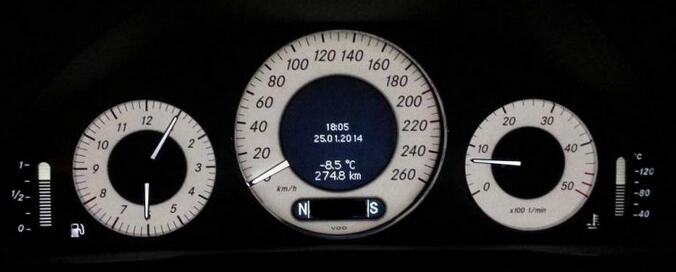
Activate this secret function as litres, datum, bigger pictures/symbols of some check controls on all models
like W211
9-2 9-3 9-4
AGAIN! DISCLAIMER: The author takes no responsibility for any damage caused by use of the Developer Kit of DAS. This option is a very powerful tool but must be used responsibly and with extreme caution. If in doubt, please do not blindly try the menu options – several of them will cause EEPROM or FLASH memory damage, requiring the module to be disassembled and reprogrammed using external tools – this is a troublesome and risky operation. Unintentional actuation of components may cause mechanical failures or even risk of fire – please remember, that in obd2tool.com Mercedes Vediamo Developer Mode DAS will do exactly what you command, all safety checks and interlocks are bypassed!
More question about MB SD Connect C4 software Xentry DAS Diagnostic Mercedes Vediamo software pls feel free to let me know.
How to solved Mercedes Star Diagnostic Xentry Das License Key is Corrupted

MB Star Diagnosis Software update to 2017.09 MB Star C4 SDConnect xentry software. Mercedes Star Diagnosis Software have Das license key is corrupted met by customer who order 2017.07 xentry diagnostic software. Obd2tool.com sharing Mercedes Star diagnosis Xentry Das license key is corrupted solution as following.
2017.09 Mercedes Star Diagnosis Software Xentry DAS Software for MB SD Connect C4/C5
11-1
Hello Obd2tool.com,
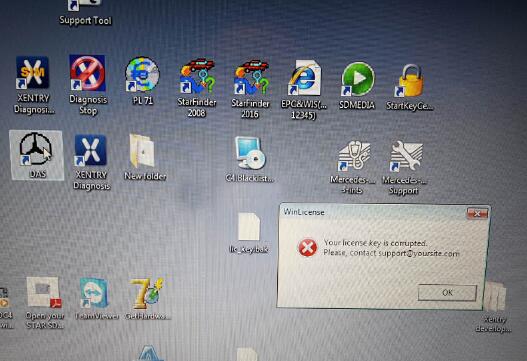
I got 07.2017 Xentry DAS Windows 7 software HDD is giving me the following massage:
winLicense
your license key is corrupted
please contact support@…
How to solved it? Any help can offer?
11-2
Best Regards
Obd2tool.com Technician have been check the error, this is DAS need activation.
Obd2tool.com Mercedes Benz Diagnostic Software Xentry Das license key is corrupted solution:
Xentry/DAS activation:
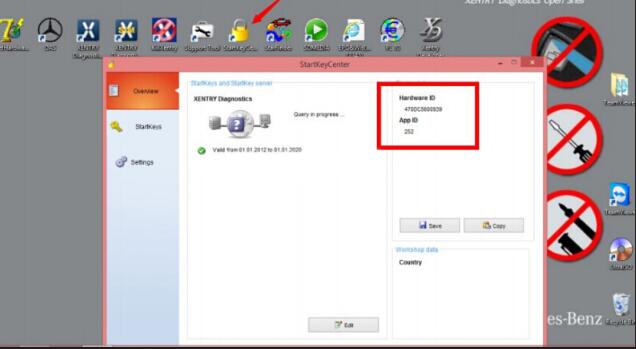
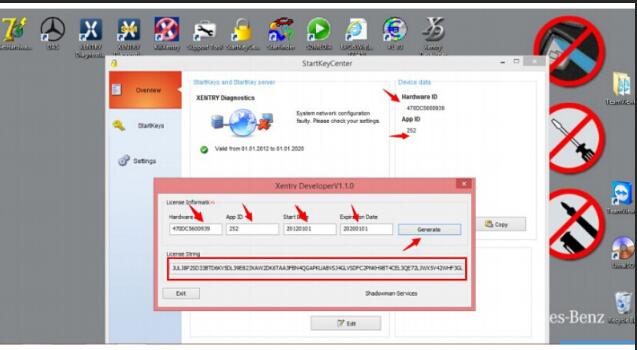
Step 1: Run StartKeyCenter to get ID for activation
Open “StartKeyCenter” on Desktop, to get the Obd2tool.com SD connect c4 Hardware ID and App ID
11-3
Complete Licence information (Hardware ID, App ID, StartDay, ExpirationDay), then click “Generate” to get License String
11-4
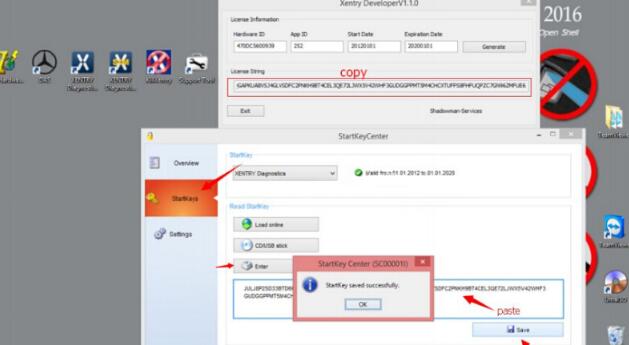
Copy License String, then go to “StartKeys”, click “Enter” to read StartKey, then “Save” data
11-5
Step 2: Reactivate Xentry/DAS
Go to Local Disk C:/ ProgramData/ LicDir, the copy and paste “lic_key_2.dat”, re-name as “lic-key_2.x4711”
Xentry Your License key is corrupted 5 Mercedes Star Diagnostic Xentry Das License Key is Corrupted Solution
Setup Properties of “lic-key_2.x4711”, select Read-only
Then open Obd2tool.com XENTRY Diagnostics Openshell and close it
(NOTE: this avoids the activation code to be lost and reactivate XENTRY)
More question about Mercedes benz star diagnostic tool mb star c4 sd connect Xentry diagnostic software just keep your order number to contact us freely.
Focus On OBD Tool Since 2008

Which mb sdconnect c4 worth the money?

Mention MB SD Connect C4, it seems that there’s a lot of different manufacturers and quality levels of multiplexer clones. Here’s the one I went with, however I didn’t bother with the HDD/software they included or a dell D630 laptop. I have a background in computers, so I set myself up a vmware virtual machine and installed all the software with the (occasionally somewhat difficult to follow) information on mhhauto. I have heard of people having problems using VMware, but I didn’t experience any myself.
7-1
As for the hardware itself, mine is of decent quality. I have no real complaints with it other than it losing it’s WiFi configuration once drained of battery (which happens quickly, but it’s not really an issue since it draws power from OBD when connected), but I prefer using a cable connection anyway.
P.S I will warn you that if you’re not very familiar with computers/configuring software/some basic computer networking (IP address assignments, etc), you might have a hard time getting everything to work. Definitely look into the details of getting everything set up before buying. I wish there were a complete and total guide to setting up everything (go to last part for details). Getting everything working properly took quite a lot of reading and searching, and a couple of days of tinkering. Patience is a plus.. if I had to compare MB Star C4 to something else in terms of difficulty (computer-wise), I’d say it’s similar to setting up a microsoft exchange server without errors.

Friday, October 27, 2017

Why should you buy a Mercedes diagnostic tool with a laptop

Here list reasons why you should buy a Mercedes diagnostic tool ( MB SD Connect C4/C5, Mb Star C3) with a laptop together:
—With the Dell D630's dedicated serial port, there was no issue for me…. it was plug and play… I just loaded the HDD from the Seller into my Dell and all I needed to do was activate WIS/EPC and XENTRY/DAS with “activation keys”… I only use the Dell for mb star sd c4 purposes…
—Bought an older Dell D630 laptop with a serial port and plan on buying MB SD Star C4 directly installed in a Dell D630 hard drive. No Virtual Machine issues.
—Mercedes Benz Star diagnosis C3 / C4 actually specifies the computer or tablet used in the SDS environment… The T30 is rather slow but will get the job done.
—If your ever in the market for a faster SDS laptop, the Dell 630 with at least 2Ghz and the speed improvement especially when using Xentry is like night and day.
—the HDD that is pre-loaded with the software for SDConnect 4 by the Seller, is inserted into the DELL D630… The DELL D630 is the fastest laptop with the RS232 feature.
—Need to connect directly into a RS232 port without using an interface – this is why I went for the complete system with laptop.
—The software Xentry/ DAS is a bit slow on an old IBM so that it is worth paying a bit extra and getting a Dell D630.
—There is a very specific set of COM ports you must use for it to work. For example you need DAS to be looking at COMx within the VM session, then VMware needs to redirect that to COMx which is a ‘physical’ serial port on your machine.
—It’s probably because it has a real com port. Most laptops these days have just a USB port and things don’t always work right if you’re using a USB to RS-232 converter. You wouldn’t want to brick a component during an update if you’re using USB. The other option would be to get a C4 system, but then they cost more. I think there are a couple other systems out there like IBM that also have real com ports.
—The PART D mux(C3) is a serial ported mux—that’s the reason for the Dell and IBM older laptops.
—The PART W mux(MB SD Connect C4) is and Ethernet/wifi connected system and that is the reason for use on other laptops—the issue is the operating system currently DAS Xentry only runs on XP.
—Plug and play!! It is more convenient for users because the software for C3/SD C4 diagnostic tool will be pre-installed before delivery.
Here are MB STAR diagnostic kits (tool+laptop) for sale:
http://www.obd2tool.com/category-163-b0-MB+Star+Diagnostic+Tools.html
Here are advantages of MB Star diagnostic multiplexer:
MB Star C3 Advantages:
MB Star C3 is called the best-quality Star diagnostic multiplexer.
---the most reputable/ well-received in the market;
---has a better performance and usually it will not happen to be poor connected or work stably during operation. Because of that, an increasing number of customers select MB Star C3 be their professional diagnostic equipment for Mercedes Benz cars.
---its technology and quality is developed after lots of experiments and improvement. The new version MB Star C4 need time to perfect its reliability and operation.
MB Star C4 Advantages:
The great performance of MB Star C3 is accepted by the market, while MB Star Compact-4, as a new-born and updated tool of C3, it also own its comparative advantages.
---is much different in the shape from Compact3;
---smaller in size, lighter in weight than Compact3;
---C4 2008 can do all the works what Compact3 does and it is the replacement of Compact3-Star.
SDconnect Compact 4 Advantages:
MB SD C4 overcomes the shortage of C3, C4.
---covers a wide range of vehicles including trucks and some cars that C3 and C4 do not support;
---supports wireless diagnose;
---not only support K line diagnose and CAN BUS, but also UDS diagnose protocol. Because old MB STAR C4 main board do not have UDS chip, so old MB STAR C4 can not support it;
---now use Lan cable to connect, can fit all computers (not only IBM T30);
---adopts Military quick swap technology, and supports 10,000 times pull plug, more stable;
Cloned BENZ SD C5 Connect Advantages:
---covers all new Mercedes Benz models, Mercedes W222, W221, W212, W203, 211,W 204,W207, W212, GL166, B 246, CLS 218, SLK172 and Smart405, 451, 452, 454
---efficient diagnostic program and complete vehicle database;
---advanced upgraded VCI+ communication interface;
---support Wired/ wireless connection.
---Besides the software c3 and c4 own,it added three more software: SD Media, Xentry and Smart TAN Code.
SD Media: Video and PDF lessons;
Xentry: New software released Xentry software for diagnosing W 204,W207 and W212 which C3 and C4 does not support;
Smart TAN Code: Opened special function in DAS program with Smart cars 405/ 451/452/ 454.Besides, it also opened more special functions, such as engineer mode, remove limitations,etc, which MB Star Diagnosis Star C3 and Star C4 do not have.
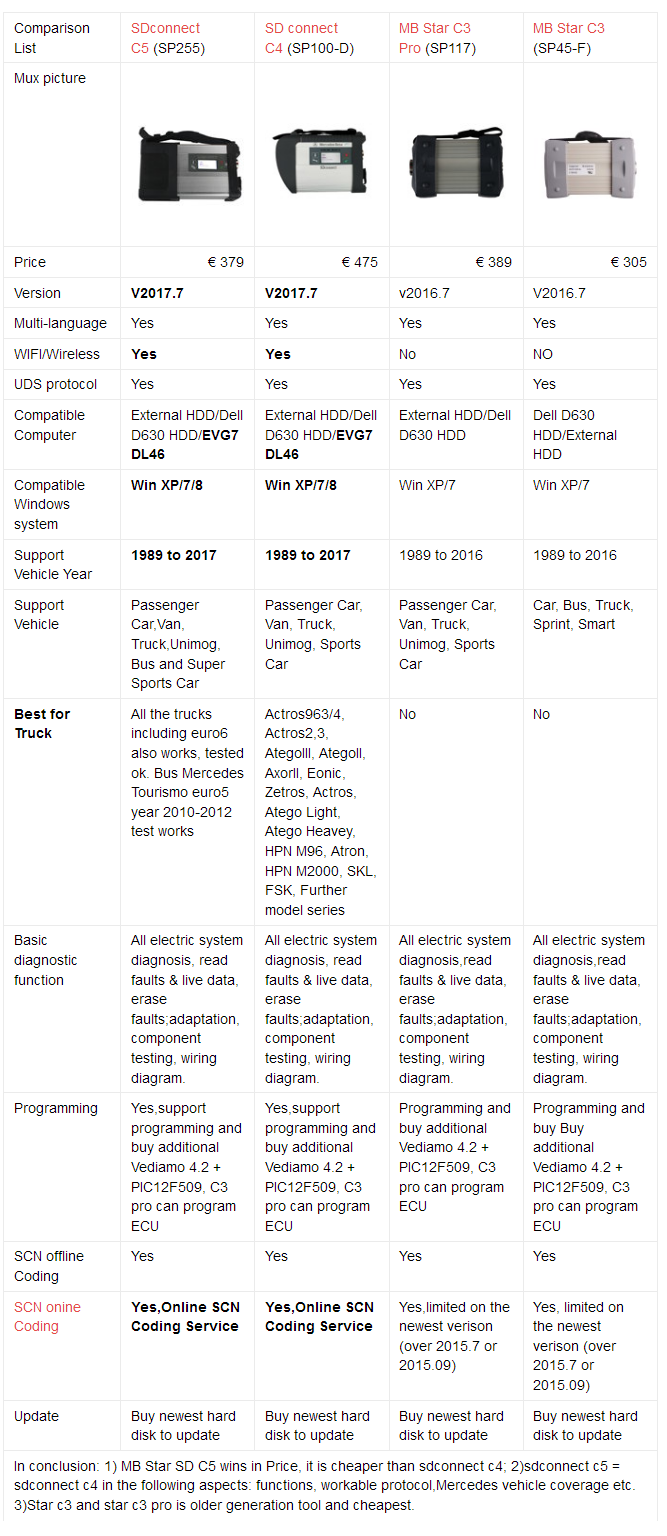
Mercedes diagnostic tool-1